SmartSDR v4.2.20 | SmartSDR v4.2.20 Release Notes
SmartSDR v3.10.15 | SmartSDR v3.10.15 Release Notes
The latest 4O3A Genius Product Software:
The latest 4O3A Genius Product Software and Firmware
If you are needing assistance with FlexRadio products, please refer to the product documentation or check the Help Center for known solutions. Need technical support from FlexRadio? It's as simple as creating a HelpDesk ticket.
setup of FreeDV

Learned of this mode just recently, and having problems.
Physical set up is. 6400 v4.0.1, Win 10 with headset connected to front jacks. FreeDV 2.0.2 installed.
Program setup similar to what Mike va3mw shows on Aug 23 post for receive and transmit (headset and different com port) PTT test on FreeDV shows up on the flex waterfall.
The screen on the FreeDV stays black nothing shows. (Dax turned on or off).
Do not know what to do next. Mode is set to RADEV1, If click on "start Modem" it shuts the program down.
I have deleted the program and reinstalled and no joy. Do not know what to try next.
Lee ve6mkm
Answers
-
Hello Lee,
I think your Windows is 64-bit and
is the Python installation complete in the command prompt window ?
73 Klaus, DF3RP0 -
my config:
at Win11pro and FlexRadio 8600 V4.0.1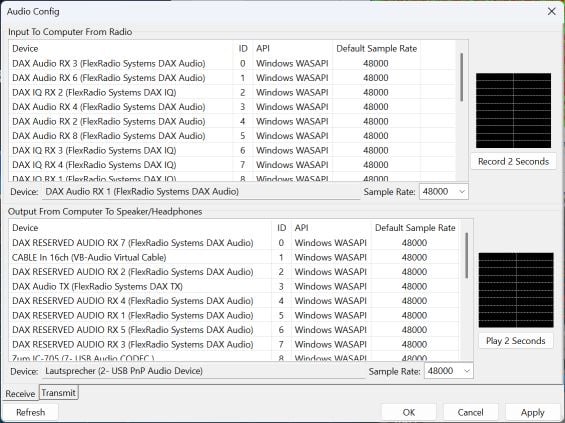
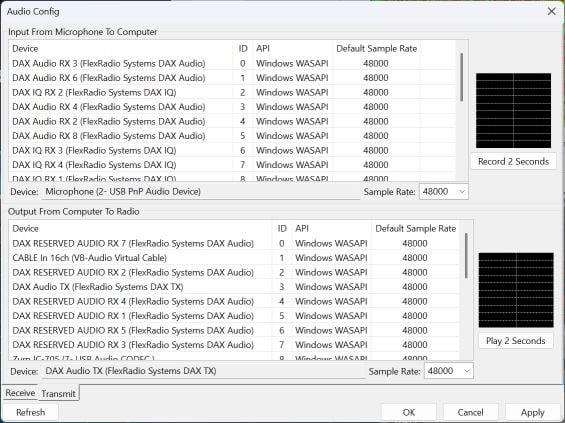
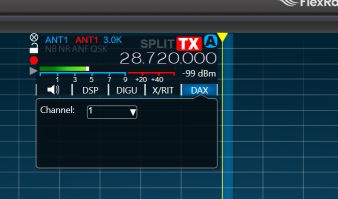
i hope it helps you
0 -
Thanks, I will order a usb headset and see if that works.
Lee
0 -
Hi Lee,
you write "Do not know what to do next. Mode is set to RADEV1, If click on "start Modem" it shuts the program down."
That certainly has nothing to do with the microphone.
The program also works without a microphone as RX only, and then there should at least be a signal in the window, even without a proper digital useful signal.
73!0 -
No signal in window never has been one. Down loaded Python as a standalone, not sure if freedv will pick it up. Did not make a difference anyway.
Gone through everything I can on the program and I am at a total loss. Can not call myself a programing wiz by any stretch of the imagination.
Maybe I should delete the program and start over again.
Thanks for trying.
Lee
0 -
Problem is my desktop. I deleted all FreeDV software, I deleted all Flex software, I did a reset of the 6400.
Wiped everything out and started from scratch. Loaded all software back on and had the same results.
I installed the same software on a laptop operating remote and could get it to finally work.
Do not know what the problem with the desktop is will look into replacing it down the road.
Thanks for all the help, it was informative and helpful.
Lee 73
0 -
Hello Lee,
I'm glad I could help and that you've now found a way to solve the problem.
vy73 55
Klaus0


Leave a Comment
Categories
- All Categories
- 401 Community Topics
- 2.2K New Ideas
- 689 The Flea Market
- 8.6K Software
- 197 SmartSDR+
- 6.6K SmartSDR for Windows
- 200 SmartSDR for Maestro and M models
- 460 SmartSDR for Mac
- 279 SmartSDR for iOS
- 268 SmartSDR CAT
- 220 DAX
- 395 SmartSDR API
- 9.6K Radios and Accessories
- 109 Aurora
- 348 FLEX-8000 Signature Series
- 7.2K FLEX-6000 Signature Series
- 999 Maestro
- 58 FlexControl
- 872 FLEX Series (Legacy) Radios
- 975 Genius Products
- 482 Power Genius XL Amplifier
- 358 Tuner Genius XL
- 135 Antenna Genius
- 322 Shack Infrastructure
- 227 Networking
- 483 Remote Operation (SmartLink)
- 145 Contesting
- 847 Peripherals & Station Integration
- 147 Amateur Radio Interests
- 1.1K Third-Party Software