SmartSDR v4.2.20 | SmartSDR v4.2.20 Release Notes
SmartSDR v3.10.15 | SmartSDR v3.10.15 Release Notes
The latest 4O3A Genius Product Software:
The latest 4O3A Genius Product Software and Firmware
If you are needing assistance with FlexRadio products, please refer to the product documentation or check the Help Center for known solutions. Need technical support from FlexRadio? It's as simple as creating a HelpDesk ticket.
PGXL to Ekekraft

I set the baud rate but I don’t see where the serial port number goes? Anyway they didn’t connect
Peter
Answers
-
Beuller. Beuller??
0 -
what is Beuller?..
Screenshots of PG XL Device Configuration screens would help, along with firmware version of PG XL. Also what Elecraft? K3 and K4 handle the RS232 port differently if using the radio’s USB. Test with Elecraft USB disconnected.For this example, assume the Elecraft is connected to port A of PG XL.
- In PG Device Configuration, make sure Flex is unchecked in Flex tab for port Elecraft is using.
- In CAT/CI-V tab check the port you are using for Elecraft and set choice to Elecraft. Set baud rate to match the Elecraft RS-232c baud. Set parity to 8,n,1
- Connect straight through RS232 female to female DB9 cable from Elecraft to Proper CAT port on PG XL. (CAT A if using port A).
- Connect RF cable from Ant1 on Elecraft to DRIVE A on PG XL
- Connect Output A of PG XL to your antenna or Tuner, or Antenna switch
This is covered is same detail in the PG XL user manual.
73 Dave wo2x0 -
I don’t see any where to set a unique Com port????
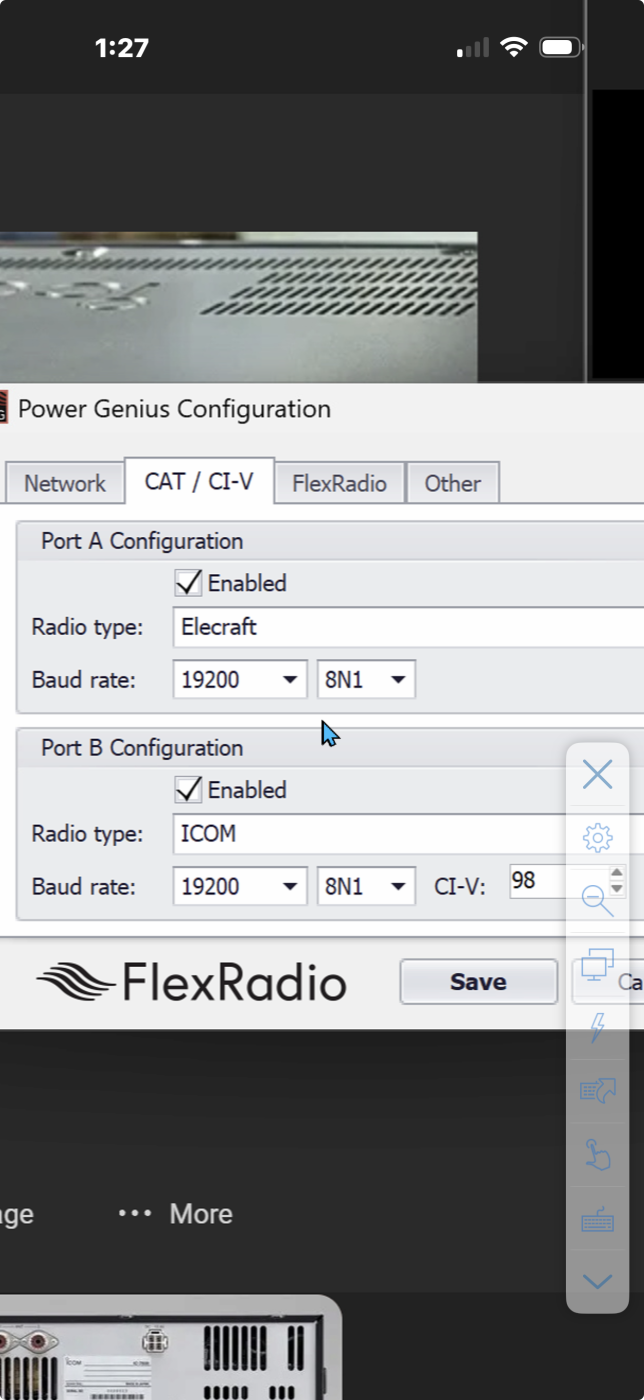 0
0 -
you don’t need to. Just plug the straight through (pin 2 to pinn2, 3 to 3, and 5 to 5,) female to female DB9 cable from RS232 port on Elecraft to CAT port A on Power Genius. This is not like a PC.
0 -
ok the Elekraft I’m using is the K4. I only see one choice of Elekraft. Should I use something else? Kenwood? Also the K4 has a female DB9 not a male. I’m using a straight M to F. No data is available?
Peter
0 -
then try a null modem adapter. I had a K4 a couple of years ago and worked with the firmware engineer to ensure compatibility.
0 -
check Elecraft K4 menu for the RS232 port, make sure RTS and DTR are disabled. Make sure AI (auto information) is enabled. Since it looks like the port is designed for PC control, you will need the null modem adapter.
0 -
I’ll give it a try
0 -
this is frustrating. I tried with null modem regular no good. What now???????
0 -
by the way the PGXL manual is COMPLETELY wrong. The pin out referred to for the K4 on the acc is all wrong and should be corrected.
Anyway the RS232 is simply not working. I’ve tried every possible choice and none works.
Given how incorrect the manual is I think I need to be reconnected with the developer. I’ve worked with him before Can you facilitate that?
Peter0 -
David any thoughts?
0


Leave a Comment
Categories
- All Categories
- 401 Community Topics
- 2.2K New Ideas
- 689 The Flea Market
- 8.6K Software
- 196 SmartSDR+
- 6.6K SmartSDR for Windows
- 200 SmartSDR for Maestro and M models
- 460 SmartSDR for Mac
- 279 SmartSDR for iOS
- 268 SmartSDR CAT
- 220 DAX
- 395 SmartSDR API
- 9.6K Radios and Accessories
- 109 Aurora
- 348 FLEX-8000 Signature Series
- 7.2K FLEX-6000 Signature Series
- 999 Maestro
- 58 FlexControl
- 872 FLEX Series (Legacy) Radios
- 975 Genius Products
- 482 Power Genius XL Amplifier
- 358 Tuner Genius XL
- 135 Antenna Genius
- 322 Shack Infrastructure
- 227 Networking
- 483 Remote Operation (SmartLink)
- 145 Contesting
- 847 Peripherals & Station Integration
- 147 Amateur Radio Interests
- 1.1K Third-Party Software