SmartSDR v4.2.20 | SmartSDR v4.2.20 Release Notes
SmartSDR v3.10.15 | SmartSDR v3.10.15 Release Notes
The latest 4O3A Genius Product Software:
The latest 4O3A Genius Product Software and Firmware
If you are needing assistance with FlexRadio products, please refer to the product documentation or check the Help Center for known solutions. Need technical support from FlexRadio? It's as simple as creating a HelpDesk ticket.
Transmit Equalizer Settings for 8400M

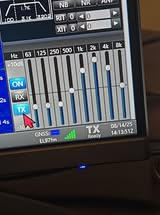
I realize that the transmitter equalizer settings are more or less user specific. I read from a miscellaneous internet posting that good settings for a flex radio are the 3 lowest settings should be full scale and the fourth setting should be about 6 clicks or so upward. The rest of the equalizer settings should be just at Zero. I am currently using a Radiosport with M208 Microphone Element. Does Flexradio have a guidelines on this, or is it mostly try it and see how it sounds to you in the F mode setting?
Mark KB3Z
Answers
-
Hi Mark… as you originally surmised, the TX equalizer settings are best tailored to your specific voice and speech patterns. It really depends on how you want it sound on the air. There are numerous 'how to' videos available on Youtube for setting up the radio in Fulll Duplex mode so you can listen to how you actually sound on the air and adjust the audio bands appropriately.
0 -
Thanks Don. I just tried something and it sounds exactly like my voice with just enough Lows and just enough highs.
0 -
Excellent! I've set mine so that it kind of 'levels out' my voice so that it is pretty equal across the entire spectrum. Not quite 'FM Broadcast Standard', but hey, it's SSB and I'm talking to POTA guys/gals :-)
0 -
Hi Mark…Are you saying that you have the 3 lowest frequencies, 63, 125, and 250Hz, boosted by 10dB? And 500Hz boosted by 6 dB?
And What level is your mic audio peaking on the meter?
Thanks!
0 -
Geoff,
I changed it.I will include the picture that I got from Facebook. My microphone setting that I am using is 63. Using DX for the compression. Here is the picture…
 0
0 -
Mark.. I see. What is your peak audio level on the meter?
0 -
Geoff,
I will have to check that out for you. Shut down due to Thunderstorms tonight. But will take a look tomorrow.
0 -
Geoff,
The audio level on SmartSDR is peaking at about -10 on the sectional screen off to the right. The audio sounds very crisp and clear for me.
Mark KB3Z
0 -
Mark,
That's great. I'm always concerned that using the equalizer to boost a number of bands too much can lead to an overdriven and distorted on-air signal.
I need to play around a bit to see what the limits of the EQ really are with regard to mic gain.
0 -
I even adjusted the Microphone Level down to 61 and the numbers looked even better.
Mark KB3Z
0 -
Work your way through this document, and check out the links at the end for more information:
Adjusting your Microphone Settings for Best TX Audio – FlexRadio
0 -
Well, just be aware the level meter is before the Eq adjustment, so any boost of Eq is creating more than the meter shows.
0





Leave a Comment
Categories
- All Categories
- 401 Community Topics
- 2.2K New Ideas
- 689 The Flea Market
- 8.6K Software
- 196 SmartSDR+
- 6.6K SmartSDR for Windows
- 200 SmartSDR for Maestro and M models
- 460 SmartSDR for Mac
- 279 SmartSDR for iOS
- 268 SmartSDR CAT
- 220 DAX
- 395 SmartSDR API
- 9.6K Radios and Accessories
- 109 Aurora
- 348 FLEX-8000 Signature Series
- 7.2K FLEX-6000 Signature Series
- 999 Maestro
- 58 FlexControl
- 872 FLEX Series (Legacy) Radios
- 975 Genius Products
- 482 Power Genius XL Amplifier
- 358 Tuner Genius XL
- 135 Antenna Genius
- 321 Shack Infrastructure
- 226 Networking
- 483 Remote Operation (SmartLink)
- 145 Contesting
- 847 Peripherals & Station Integration
- 147 Amateur Radio Interests
- 1.1K Third-Party Software