SmartSDR v4.2.20 | SmartSDR v4.2.20 Release Notes
SmartSDR v3.10.15 | SmartSDR v3.10.15 Release Notes
The latest 4O3A Genius Product Software:
The latest 4O3A Genius Product Software and Firmware
If you are needing assistance with FlexRadio products, please refer to the product documentation or check the Help Center for known solutions. Need technical support from FlexRadio? It's as simple as creating a HelpDesk ticket.
Flex Repeater Spots Utility
Comments
-
Here is a good reason to use the FlexRepeaterSpots utility in a contest.
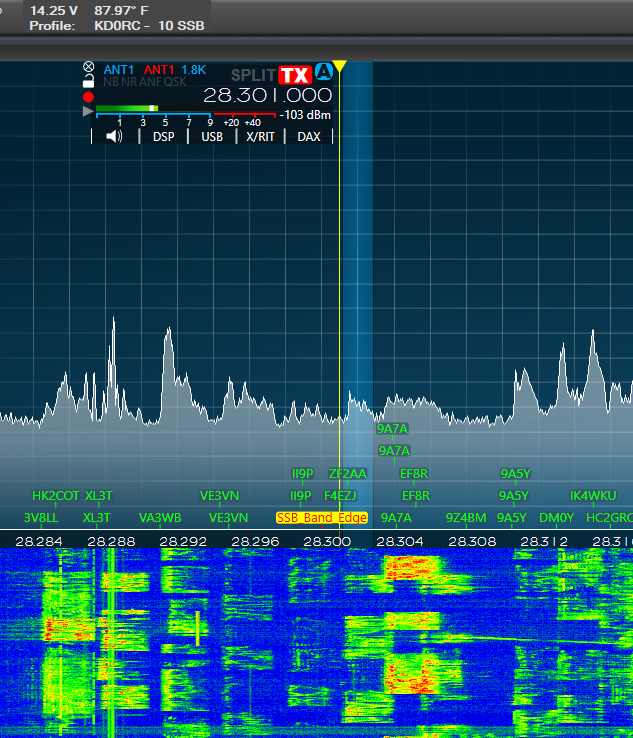
With all those stations just south of 28.300, it is very easy for a US ham to go down there without thinking about it. I put a band edge marker in FlexRepeaterSpots to help remind me not to go there in the heat of battle. Here is the Config.ini entry that I used:
Spot: freq=28.300 name=SSB_Band_Edge mode=LSB SpotColor=RED SpotBackColor=YELLOW
0 -
FlexRepeaterSpots V1.11 is now available on GitHub:
    // ***********************************************************************

    // V1.11

    // Added ability to use as many slices as the radio will support.

    // ***********************************************************************
I didn't realize just how much I rely on FLexRepeaterSpots in everyday operation. I had four slices open on 2 meters so that I could compare coverage and latency of a set of linked repeaters. Slices C and D did not get their options set when I clicked the repeater spots. I really had to think about what was wrong when it dawned on me that I hard-coded two slices for my 6400. Now that I have an 8600, I have a way to test for more slices.
This update should work with however many slices a radio has, so it should be good to go for 6700 users.
If you upgrade to this version, you will need to uninstall the previous version first. Use the Windows Settings, Apps screen to do the uninstall. Do not delete anything manually.
0 -
FlexRepeaterSpots V1.13 is now available on GitHub:
    // ***********************************************************************

    // V1.13

    // Upgraded so it will compile under Visual Studio 2022.

    // Upgraded FlexLib to V 4.x.

    // ***********************************************************************

    // V1.12 (not released separately)

    // Fixed bug where slice index got lost causing app to crash.

    // Added ability to select which radio to connect to.

    // ***********************************************************************
New this time is the ability to select the radio that you want, or just specify ANY and it will connect to the first radio it finds. If you have multiple radios on the same LAN, this new feature is indispensable. If not, you can leave it at the default of "ANY".
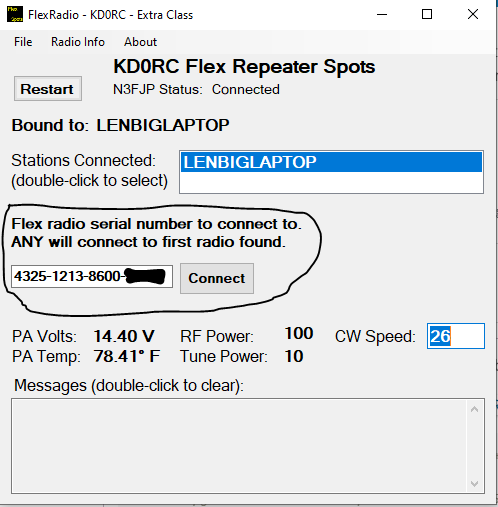
If you upgrade to this version, you will need to uninstall the previous version first. Use the Windows Settings, Apps screen to do the uninstall. Do not delete anything manually.
0 -
WORKS Super, I love the ALL connection when I have two radio and only one online at a time, SLICK.
Thanks for the Update
Bret WX7Y
0 -
Thanks Bret, I appreciate it!
0 -
FlexRepeaterSpots V1.14 is now available on GitHub:
    // ***********************************************************************

    // V1.14

    // Fixed MultiFlex issue where the correct active slice was not being set.

    // ***********************************************************************
My new 8600 is showing me bugs in my code that I never saw before… The problem is that a rig with more than two slices can have different slice indices on each GUI client in a MultiFlex situation. I found the problem when slices 0, 1 and 3 were on one GUI client (SmartSDR) and slice 2 was on the other GUI client.
Slices 0 and 2 were set as the active slice (one active slice on each client). As long as I used slice 0 or 1, I got the desired results. As soon as I switched slice 3 to active, it actually changed slice 2 on the other client, as it was the first active slice that it found.
In any event, it is all sorted out and working for me. Please let me know if you have any issues with the new version.
If you upgrade to this version, you will need to uninstall the previous version first. Use the Windows Settings, Apps screen to do the uninstall. Do not delete anything manually.
0 -
I'm using v1.14 but I can only display the memories of my Flex 6600.
All the lines that I add to config file are not displayed
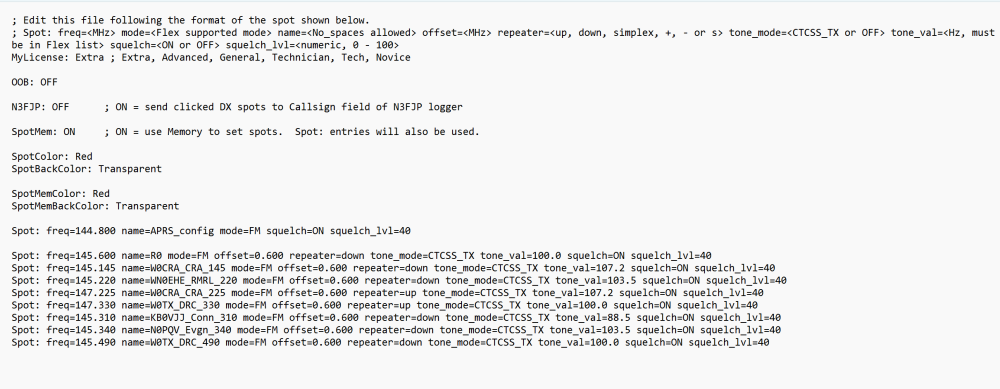
Where is config.ini saved, because looking at the folder, there is a different config file to the one I open from the File Menu
Thanks and 73
0 -
I can't seem to recreate that situation. Do you have the same frequency and spot name in both memory and in the Config.ini file? If so, you will only get one or the other. If the name or frequency are different, you will get both.
Can you post a picture of your SmartSDR screen on 2 meters when the above file is in FlexRepeaterSpots?
0 -
hi Len no I took those out of the Flex Memory list
Maybe it’s only doing it because I Run FreeDV-Flex on my Raspberry pi
Which actually gives me the FDVU and FDVL mode from a waveform
0 -
I only have these spots in config.ini (different to the ones in the memories list) but none of them are displayed in Smartsdr.
I can only see the memories when is configured ON in config.ini file, but Spots included in config.ini are never displayed
0 -
I can't recreate that behavior.
Do you have a transverter for 2 meters set up on the XVTR tab of Radio Setup? Without this, no 2 meter spots will show. Do you have spots defined at other frequencies?
0 -
Yes, I have a xvtr configured and working correctly.
I have also other bands spots but none of them are displayed. Only the memory Channels from smartsdr are displayed if I set it as ON in the config.ini file
0 -
Very strange behavior… Can you post your Config.ini file here? I wonder if there is something in there that I did not accommodate in the code. Also, do you have Config spelled with a capital "C"?
0 -
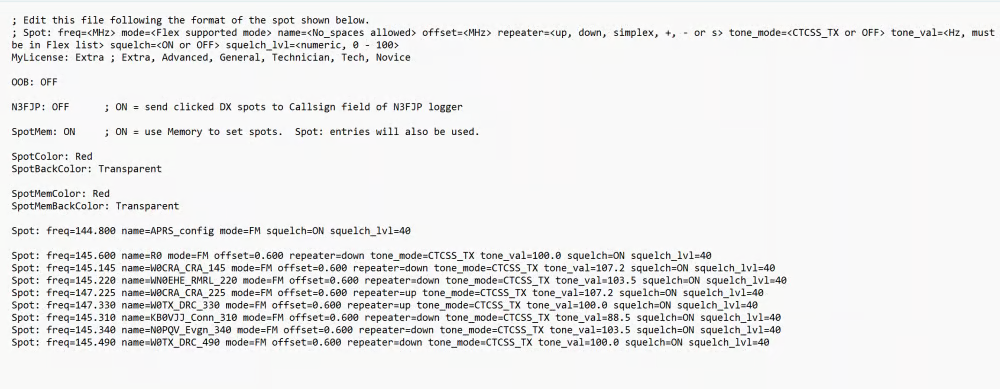
I put a picture of my config.ini file
 0
0 -
I can't use the picture to re-create the issue, can you post the file here or send it to me in an email? You might need to zip it to post it here.
The name of the file must be Config.ini, not config.ini. Can you verify that it is Config?
0 -
; Edit this file following the format of the spot shown below.
; Spot: freq=<MHz> mode=<Flex supported mode> name=<No_spaces allowed> offset=<MHz> repeater=<up
MyLicense: Extra ; Extra
OOB: OFF
N3FJP: OFF ; ON = send clicked DX spots to Callsign field of N3FJP logger
SpotMem: ON ; ON = use Memory to set spots. Spot: entries will also be used.
SpotColor: Red
SpotBackColor: Transparent
SpotMemColor: Red
SpotMemBackColor: Transparent
Spot: freq=10.100 name=RTTY_config mode=USB squelch=OFF
Spot: freq=10.130 name=FT8 mode=USB squelch=OFF
Spot: freq=144.800 name=APRS_config mode=FM squelch=ON squelch_lvl=40
Spot: freq=145.600 name=R0 mode=FM offset=0.600 repeater=down tone_mode=CTCSS_TX tone_val=100.0 squelch=ON squelch_lvl=40
Spot: freq=145.145 name=W0CRA_CRA_145 mode=FM offset=0.600 repeater=down tone_mode=CTCSS_TX tone_val=107.2 squelch=ON squelch_lvl=40
Spot: freq=145.220 name=WN0EHE_RMRL_220 mode=FM offset=0.600 repeater=down tone_mode=CTCSS_TX tone_val=103.5 squelch=ON squelch_lvl=40
Spot: freq=147.225 name=W0CRA_CRA_225 mode=FM offset=0.600 repeater=up tone_mode=CTCSS_TX tone_val=107.2 squelch=ON squelch_lvl=40
Spot: freq=147.330 name=W0TX_DRC_330 mode=FM offset=0.600 repeater=up tone_mode=CTCSS_TX tone_val=100.0 squelch=ON squelch_lvl=40
Spot: freq=145.310 name=KB0VJJ_Conn_310 mode=FM offset=0.600 repeater=down tone_mode=CTCSS_TX tone_val=88.5 squelch=ON squelch_lvl=40
Spot: freq=145.340 name=N0PQV_Evgn_340 mode=FM offset=0.600 repeater=down tone_mode=CTCSS_TX tone_val=103.5 squelch=ON squelch_lvl=40
Spot: freq=145.490 name=W0TX_DRC_490 mode=FM offset=0.600 repeater=down tone_mode=CTCSS_TX tone_val=100.0 squelch=ON squelch_lvl=40
File name is Config.ini
0 -
Another Issue: after SmartSDR upgrade to v4, now when clicking on the repeater spots, Offset and subtone are not taked. Moving from one repeater to another, data in OPT doesn't change
73 de EA5WA Juan Carlos
0 -
Hi Juan Carlos, I tried your file with the very latest version (not yet released) and it works fine. Can you load Version 1.15 and let me know if you get different results?
    // ***********************************************************************

    // V1.15

    // Added a workaround so that the FM offset direction works properly.

    // I believe this to be either a SmartSDR or FlexLib error.

    // ***********************************************************************
You will need to uninstall V 1.14 first. If this works for you, I will publish it to GitHub.
0 -
Hi Len:
Thanks for your support
I have done it, but still the same…. Only Memories are displayed as spots.
Even if I put SpotMem: OFF in the Config.ini, memories are displayed on Smartsdr but never the lines created in this Config.ini file.
Strange….
73 de EA5WA Juan Carlos
0 -
HI Juan Carlos, are you running SmartSDR for windows or for Mac? Are you operating locally to the radio or remotely? Is the utility running on the same computer as SmartSDR?
I am looking for something that would cause this strange behavior. I just can't recreate it here.
0 -
Hi Len:
I'm using SmartSDR under windows 11 operating remotely through VPN Softether.
Your utility is running on the same laptop with SmartSDR
Thanks
73 de EA5WA Juan Carlos
0



Leave a Comment
Categories
- All Categories
- 401 Community Topics
- 2.2K New Ideas
- 689 The Flea Market
- 8.6K Software
- 196 SmartSDR+
- 6.6K SmartSDR for Windows
- 200 SmartSDR for Maestro and M models
- 460 SmartSDR for Mac
- 279 SmartSDR for iOS
- 268 SmartSDR CAT
- 220 DAX
- 395 SmartSDR API
- 9.6K Radios and Accessories
- 109 Aurora
- 348 FLEX-8000 Signature Series
- 7.2K FLEX-6000 Signature Series
- 999 Maestro
- 58 FlexControl
- 872 FLEX Series (Legacy) Radios
- 975 Genius Products
- 482 Power Genius XL Amplifier
- 358 Tuner Genius XL
- 135 Antenna Genius
- 321 Shack Infrastructure
- 226 Networking
- 483 Remote Operation (SmartLink)
- 145 Contesting
- 847 Peripherals & Station Integration
- 147 Amateur Radio Interests
- 1.1K Third-Party Software