Welcome to the FlexRadio Community! Please review the new Community Rules and other important new Community information on the Message Board.
The latest SmartSDR Software:
SmartSDR v4.2.20 | SmartSDR v4.2.20 Release Notes
SmartSDR v3.10.15 | SmartSDR v3.10.15 Release Notes
The latest 4O3A Genius Product Software:
The latest 4O3A Genius Product Software and Firmware
SmartSDR v4.2.20 | SmartSDR v4.2.20 Release Notes
SmartSDR v3.10.15 | SmartSDR v3.10.15 Release Notes
The latest 4O3A Genius Product Software:
The latest 4O3A Genius Product Software and Firmware
How to Receive Technical Support::
If you are needing assistance with FlexRadio products, please refer to the product documentation or check the Help Center for known solutions. Need technical support from FlexRadio? It's as simple as creating a HelpDesk ticket.
If you are needing assistance with FlexRadio products, please refer to the product documentation or check the Help Center for known solutions. Need technical support from FlexRadio? It's as simple as creating a HelpDesk ticket.
Lost record in SmartSDR 1.6.17.156
Options

R2AGG
Member
Hello FlexRadio!
When recording a signal from the air, I can not play a recording. From the sound I hear the hiss and nothing more. I see this in the panorama SmartSDR and remote WEBSDR.

My signal in Remote webSDR
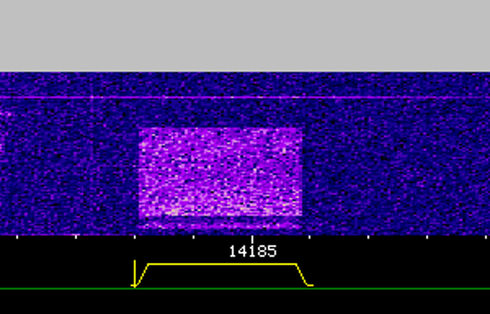
How to resolve this issue?
Best 73!
--
Michael R2AGG
When recording a signal from the air, I can not play a recording. From the sound I hear the hiss and nothing more. I see this in the panorama SmartSDR and remote WEBSDR.
My signal in Remote webSDR
How to resolve this issue?
Best 73!
--
Michael R2AGG
0
Comments
-
Sorry, update screen the panorama playpack

0 -
Can we see an entire view of the SmartSDR console in order to see the audio setup panels?0
-
Just have tested - https://www.dropbox.com/s/r124ayh3arbyal7/PlaybackTest.mp4?dl=0
however within pause (no recorded signal memory) we can see high the level of the gain. I think Mikhail talking abt noise ilimination in pauses0 -
Sorry forgot press remote :-) new movie here https://www.dropbox.com/s/1ilgtnlhqy5by1i/TestPlayback.mp4?dl=00
-
Hi Tim, never did the next test, but i see some issues with audio mixing exist - https://www.dropbox.com/s/jn03sqo4cwzk3zt/TestAudio.mp4?dl=0
during the test radio stay on air(TX) and manipulation with Audio source and DAX button
pls advise0 -
Hello Tim!
see attachment. It's correct?
0 -
My guess would be to try unmuting the speaker and unselecting DAX.
Barry N1EU0 -
Interesting, however Benny you are right "Slice Speaker Mute" make sense with playback also https://www.dropbox.com/s/4qblzqz7yhrgqz3/ScreenCaptureProject12.mp4?dl=00
-
Yes. If you are operating digital modes, you should be using DIGU or DIGL so that audio processing is turned off. And why would you want to record a digital mode signal and re-transmit it?0



Leave a Comment
Categories
- All Categories
- 401 Community Topics
- 2.2K New Ideas
- 689 The Flea Market
- 8.6K Software
- 197 SmartSDR+
- 6.6K SmartSDR for Windows
- 200 SmartSDR for Maestro and M models
- 460 SmartSDR for Mac
- 279 SmartSDR for iOS
- 268 SmartSDR CAT
- 220 DAX
- 395 SmartSDR API
- 9.6K Radios and Accessories
- 109 Aurora
- 348 FLEX-8000 Signature Series
- 7.2K FLEX-6000 Signature Series
- 999 Maestro
- 58 FlexControl
- 872 FLEX Series (Legacy) Radios
- 975 Genius Products
- 482 Power Genius XL Amplifier
- 358 Tuner Genius XL
- 135 Antenna Genius
- 322 Shack Infrastructure
- 227 Networking
- 483 Remote Operation (SmartLink)
- 145 Contesting
- 847 Peripherals & Station Integration
- 147 Amateur Radio Interests
- 1.1K Third-Party Software