Welcome to the FlexRadio Community! Please review the new Community Rules and other important new Community information on the Message Board.
The latest SmartSDR Software:
SmartSDR v4.2.20 | SmartSDR v4.2.20 Release Notes
SmartSDR v3.10.15 | SmartSDR v3.10.15 Release Notes
The latest 4O3A Genius Product Software:
The latest 4O3A Genius Product Software and Firmware
SmartSDR v4.2.20 | SmartSDR v4.2.20 Release Notes
SmartSDR v3.10.15 | SmartSDR v3.10.15 Release Notes
The latest 4O3A Genius Product Software:
The latest 4O3A Genius Product Software and Firmware
How to Receive Technical Support::
If you are needing assistance with FlexRadio products, please refer to the product documentation or check the Help Center for known solutions. Need technical support from FlexRadio? It's as simple as creating a HelpDesk ticket.
If you are needing assistance with FlexRadio products, please refer to the product documentation or check the Help Center for known solutions. Need technical support from FlexRadio? It's as simple as creating a HelpDesk ticket.
PGXL Windows Utility Quick Reference Graphic
Options

Dan Quigley, N7HQ
Member
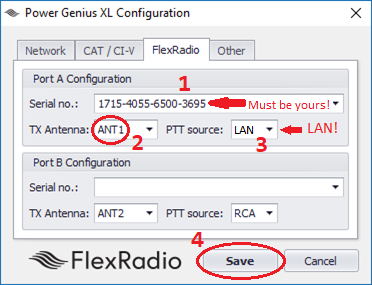
This is a quick reference graphic and text to use when you first configure a PGXL and assumes a single FRS radio connected to Port A of a PGXL.
1) Please make sure the serial number in the Port A matches that displayed/stamped on your FRS radio. If you have just received the PGXL from Austin, it will very likely have an incorrect serial number in this box. If your network is functioning and FRS radio is turned on, when you click on the drop-down list box, you will see the serial number of your FRS radio. If you don't see it there, then you need to troubleshoot the network. If you have more than one FRS radio present on your LAN, then you will need to select the correct serial number.
2) Most initial configurations will set this value to ANT1 - it reflects which antenna the FRS radio will emit RF to the amplifier though. If this is set incorrectly, or the FRS slice has indicated a different output, then there will be no RF amplification.
3) Unless you intend to use an RCA (wired) connection for PTT in your station, set this value to LAN.
4) You *must* click save to complete the configuration on any change. If you don't the changes you make will not be used.
1) Please make sure the serial number in the Port A matches that displayed/stamped on your FRS radio. If you have just received the PGXL from Austin, it will very likely have an incorrect serial number in this box. If your network is functioning and FRS radio is turned on, when you click on the drop-down list box, you will see the serial number of your FRS radio. If you don't see it there, then you need to troubleshoot the network. If you have more than one FRS radio present on your LAN, then you will need to select the correct serial number.
2) Most initial configurations will set this value to ANT1 - it reflects which antenna the FRS radio will emit RF to the amplifier though. If this is set incorrectly, or the FRS slice has indicated a different output, then there will be no RF amplification.
3) Unless you intend to use an RCA (wired) connection for PTT in your station, set this value to LAN.
4) You *must* click save to complete the configuration on any change. If you don't the changes you make will not be used.
2
Comments
-
Dan, I understand this is written based on another post that user assumed that SN was his radio and went to open a support ticket. As a suggestion ,above steps should be printed and included wish shipment Sergey, kn7k1
-
Thank you, sir, and of course, that will be done. We are working on a more complete quick start guide and an updated release of the PGXL windows utility.
73,
Dan0

Leave a Comment
Categories
- All Categories
- 401 Community Topics
- 2.2K New Ideas
- 689 The Flea Market
- 8.6K Software
- 196 SmartSDR+
- 6.6K SmartSDR for Windows
- 200 SmartSDR for Maestro and M models
- 460 SmartSDR for Mac
- 279 SmartSDR for iOS
- 268 SmartSDR CAT
- 220 DAX
- 395 SmartSDR API
- 9.6K Radios and Accessories
- 109 Aurora
- 348 FLEX-8000 Signature Series
- 7.2K FLEX-6000 Signature Series
- 999 Maestro
- 58 FlexControl
- 872 FLEX Series (Legacy) Radios
- 975 Genius Products
- 482 Power Genius XL Amplifier
- 358 Tuner Genius XL
- 135 Antenna Genius
- 322 Shack Infrastructure
- 227 Networking
- 483 Remote Operation (SmartLink)
- 145 Contesting
- 847 Peripherals & Station Integration
- 147 Amateur Radio Interests
- 1.1K Third-Party Software