SmartSDR v4.2.20 | SmartSDR v4.2.20 Release Notes
SmartSDR v3.10.15 | SmartSDR v3.10.15 Release Notes
The latest 4O3A Genius Product Software:
The latest 4O3A Genius Product Software and Firmware
If you are needing assistance with FlexRadio products, please refer to the product documentation or check the Help Center for known solutions. Need technical support from FlexRadio? It's as simple as creating a HelpDesk ticket.
Mac SDR not connecting to radio

Just like the title says. Mac SDR is not even showing the radio as available to connect with.
I am new to the Apple MAC so a lot of hand holding may be necessary.
Comments
-
Depends on how you are connected. At the very least, I believe you need to have the Mac computer connected to the radio with a hard-wire LAN connection so that it can "see" the radio. Just relying on wifi I am sure will not work, as the Flex radios do not have wifi built in….? I also assume you have got the paid app downloaded from the Mac app store? The forum will definately be able to help, but we need to know your present connections, like what radio, what computer are you running etc etc. The app originator also has a very helpful and detailed manual that you can download and check out.
Good luck, and you will certainly not be disappointed once up and running!
73 Mike.
0 -
I have no problem finding and connecting to the radio on my local LAN, it seems to work fine. But I have been unable to get it to work from any other network. I have no problem finding the radio and connecting to it. But it does not fully paint the screen, no waterfall and no receive audio. It tries to paint the screen, but it typically paints with a single horizontal line and then stops. I still have control over the transmitter, ATU and tune buttons work, just no receive. I have tried to use a 5G cellular hotspot, but I have also tried public WiFi with decent performance.
My preferred method of access is to run WireGuard to get to my home LAN then by IP (the radio is always at the same IP on my home LAN). If I am out, the chances are good I have the VPN up anyway, I use it to access my NAS and always wear my home public IP address. Plus WireGuard removes the requirement for port forwarding.
At Marcus' suggestion, I also set up Smartlink, which worked but produced the same symptoms. Finally I messed around with the SmartUnlink proxy, which also worked, but the same symptoms.
So three different access methods, all producing no joy. Exact same symptoms on my MacBook Pro, iPad and iPhone. I even broke out a Windows 11 laptop (which I hate), installed SmartSDR with the same results. Does anyone have remote access to an Aurora working. Version 4.2.20 on the radio, Mac SmartSDR ver 2.9.130. I even tried AetherSDR, it provides a complete interface, but no waterfall nor audio.
Does anyone actually have this working?0 -
Something is blocking the VITA49 UDP packets. Check permissions for SmartSDR.
I am not a MAC person but was using SmartSDR for MAC today doing testing. Hopefully someone else can chime in with the answer.0 -
David, I ran into this when I transferred SmartSDR for Mac to my new Apple Mini. During the new computer installation I inadvertently answered 'NO' when asked about allowing Networks (sadly, I cannot remember the exact wording). In Settings, there is an option that must be answered 'YES' referencing allowing or sharing Network resources. I just can't remember it exactly but Marcus (the developer) will know.
W7NGA
0 -
System Settings/Privacy&Security/Local Network.
All Smart SDR access to the Local Network:
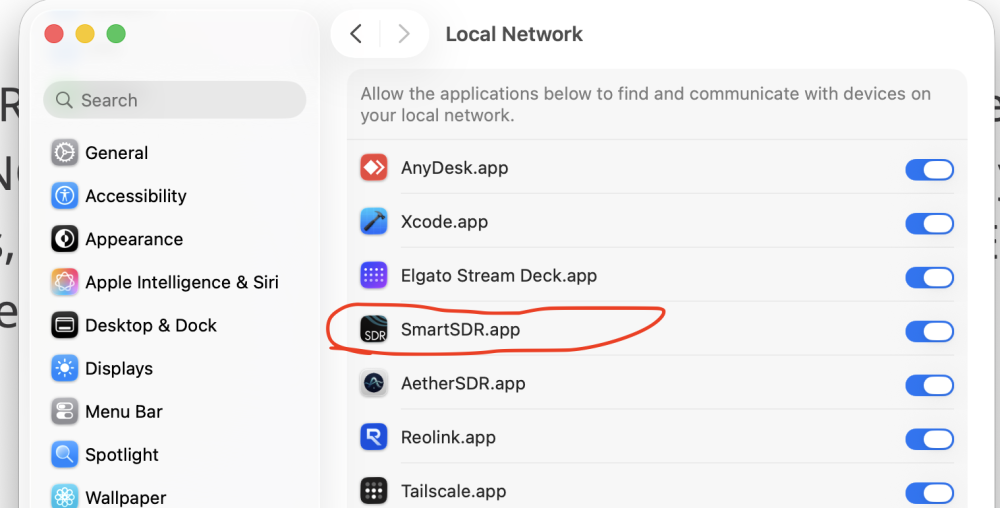
Alan WA9WUD
0 -
I do not disagree. I just do not understand what it might be. I have the local firewall on the Mac disabled. That is not possible on iOS devices. Could you elaborate on permissions for Mac SmartSDR? It works perfectly on my local LAN, I don't know how anything permissions related would cause it to choke on remote connections.
My hot spot is a GL-iNet generic rig. The tunnel running on MacOS works fine for all other apps.
I am just hoping to find someone that actually got a remote connection to work. Then I can engage, probably outside the forum, and figure out what I missed.0 -
>System Settings/Privacy&Security/Local Network.
>All Smart SDR access to the Local Network:
Yes, all set up that way. In fact, it fails if I turn that setting off. But I can use it on the local network 100%. I can even find the radio when logging in remotely, it just doesn't work right.0 -
if the panadapter, waterfall, and audio are failing, your internet provider may be blocking UDP traffic. T-Mobile does this in some markets.
there have been reports some markets are now unblocking the VITA49 UDP packets.
73 Dave wo2x0 -
Nope, I know that is not true, I have other apps that rely on UDP. Besides, if that was the case, then WireGuard would jump over it . Now that I mention it, WireGuard itself uses UDP based tunnels, WireGuard works flawlessly, even after SmartSDR locks up.
I just want to find someone that is using it successfully, then maybe I can compare notes.0





Categories
- All Categories
- 401 Community Topics
- 2.2K New Ideas
- 691 The Flea Market
- 8.6K Software
- 197 SmartSDR+
- 6.6K SmartSDR for Windows
- 200 SmartSDR for Maestro and M models
- 462 SmartSDR for Mac
- 280 SmartSDR for iOS
- 268 SmartSDR CAT
- 220 DAX
- 395 SmartSDR API
- 9.6K Radios and Accessories
- 113 Aurora
- 352 FLEX-8000 Signature Series
- 7.2K FLEX-6000 Signature Series
- 999 Maestro
- 58 FlexControl
- 872 FLEX Series (Legacy) Radios
- 978 Genius Products
- 484 Power Genius XL Amplifier
- 358 Tuner Genius XL
- 136 Antenna Genius
- 323 Shack Infrastructure
- 228 Networking
- 485 Remote Operation (SmartLink)
- 147 Contesting
- 847 Peripherals & Station Integration
- 148 Amateur Radio Interests
- 1.1K Third-Party Software