SmartSDR v4.2.20 | SmartSDR v4.2.20 Release Notes
SmartSDR v3.10.15 | SmartSDR v3.10.15 Release Notes
The latest 4O3A Genius Product Software:
The latest 4O3A Genius Product Software and Firmware
If you are needing assistance with FlexRadio products, please refer to the product documentation or check the Help Center for known solutions. Need technical support from FlexRadio? It's as simple as creating a HelpDesk ticket.
FreeDV Docker container for 8000/Aurora series

Hi all,
I'm one of the developers on the FreeDV project. I mentioned this on a FlexRadio related mailing list but for those who haven't seen this yet, I wanted to make you aware that there is now a Docker container available that you can install onto your Flex 8000 or Aurora series running the most recent version of SmartSDR. To set this up:
- Download the Docker container from https://github.com/drowe67/freedv-gui/releases/download/v2.3.1/freedv-waveform-2.3.1.tar.gz (Current version: 2.3.1, released today.).
Note: do not decompress the .tar.gz file. SmartSDR needs the file as-is in order for the FreeDV waveform to properly function. - Go to File→Waveforms in SmartSDR. You'll see something like the following:
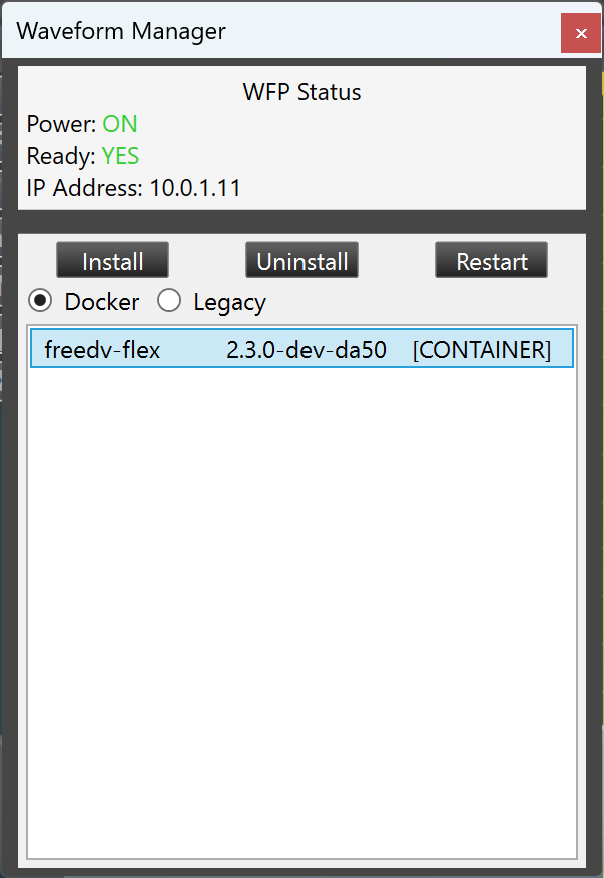
- Click on the "Docker" radio button and then click Install. When prompted, choose the .tar.gz file you downloaded above.
- The Install button will change to "…". Once it finishes installing the Docker container, the label will become "Install" again and there will be a new "freedv-flex" entry in the list. "FDVU" for FreeDV on Upper Sideband and "FDVL" for FreeDV on Lower Sideband modes will then become available for use in SmartSDR.

Operation in SmartSDR is similar to operating in regular voice modes with a few differences:
- DAX should NOT be enabled for the slice using FreeDV. Otherwise, no TX audio will go out.
- The FreeDV waveform can only be used on one slice at a time. Attempting to use it on more than one slice will cause the waveform to switch other slices back to regular USB or LSB modes. (Note: it is possible to use the FreeDV application on a second slice without interfering with the waveform.)
The waveform/Docker container also supports FreeDV Reporter and will connect to that server when you set the active slice to FDVU/FDVL. This is particularly useful for seeing who's currently on FreeDV and how propagation is doing (for instance, rows will immediately light up in blue when they're decoding a signal).
Anyway, hope you guys enjoy! Feel free to comment with questions or feedback :)
Thanks,
-Mooneer K6AQ
Comments
-
Ive downloaded the file following your directions. it doesn’t show up in the waveform manager. where should that file go so it will?
0 -
It should appear as soon as you select the downloaded file in the window that comes up when you push the Install button. Does it come up if you restart the radio?
0 -
Very nice, Mooneer! This will make FDV much more accessible.
73,
Dan0 -
Mooneer, is there a step I'm missing when installing the container in SmartSDR v4.2.18? I went to File → Waveforms like you indicated:
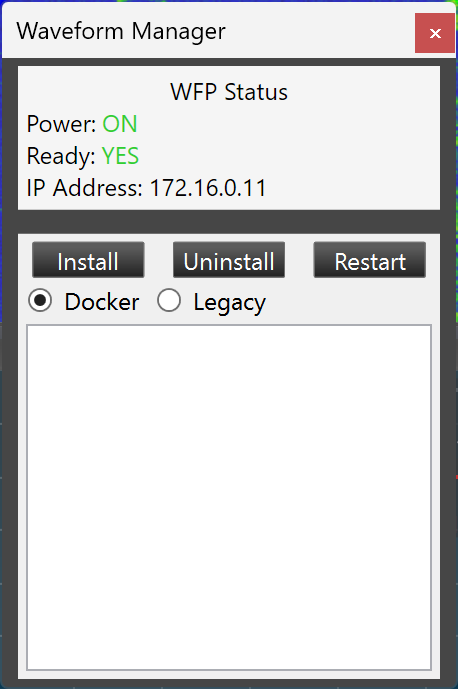
I clicked Install and pointed it at the freedv-waveform-2.3.1.tar.gz I downloaded from the Github repository. The Install button changed to a grey button with progress dots like this:
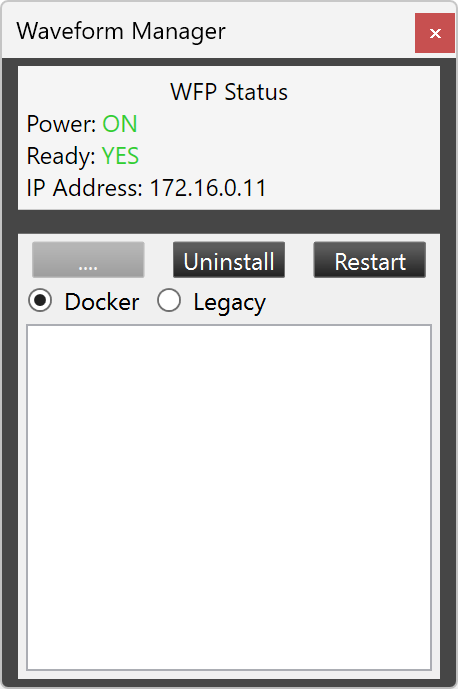
After about 30 seconds, the button changes back to a normal Install button, but nothing is added to the list below. No error message was generated. I tried with the 2.3.0 release and got the same results. I also tried restarting SmartSDR and my 8600 multiple times, but always with the same result.
Is there an installation log created somewhere?
Thanks and 73,
Don, K4PEZ
0 -
Don, I heard of a similar problem from someone else and Flex support ultimately had them reinstall the OS on the radio (factory reset wasn't enough). You may need to contact support to see if you need to do that as well.
-Mooneer K6AQ
0 -
I downloaded and installed the FreeDV 2.3.1 Docker in my 8600 this morning. No issues with the install and I monitored 14.236 for a couple of hours and was impressed with the audio quality of FreeDV.
Could someone who has mastered TX setup post some hints. I assume mic processing should be off. How do you set Mic Gain? Should voice peaks be close to "0" on the Level meter? Any other settings to consider?
Thanks/73,
Pat, W5VY
0 -
Pat: Basically, I just make sure that the peaks are a bit under the "0" on the Level meter. FreeDV is particularly sensitive to overdriving your microphone, so you definitely want to avoid that where possible.
-Mooneer K6AQ
1 -
Installed FreeDV and actually had a nice conversation with several people on a net here in Texas on 40 meters. Audio clarity was really surprising. Several out of state hams joined in as well. I was using SmartSDR on my pc. But, I later noticed that people's callsigns were showing up on the front panel of my AU-520M! I existed SmartSDR on my pc and found that FreeDV was selectable in the Mode Selection menu on the radio. I never knew it was there.
A fun new mode to play with. Thanks to the develops that made it possible
James
WD5GWY
0 -
It looks like the processor should be off and as reported above, definitely keep the audio level below 0 dB. I have had several QSOs on 20 and 40 meters now, and it is working really well. One thing to note - you cannot have more than one slice on FreeDV at a time. This includes during a multiFLEX session. If you are on FreeDV and your multiFLEX buddy opens a slice on FreeDV, your slice will move to USB or LSB depending on band.
1 -
I noticed that! I was using FreeDV on my pc with SmartSDR and after seeing the callsigns show up on the radio's front panel, I wondered if FreeDV was selectable on the radio. I found it listed under "Other " in the Mode selection menu. But, I got a error message saying only one instance of FreeDV can be running.
What I don't know, was FreeDV installed with the latest version of SmartSDR? Or did it somehow get installed on the radio when I downloaded it and installed it from the Waveform menu in SmartSDR on my pc? Either way, it's a really nice Mode. Much better than some others I have tried.
James
WD5GWY
0 -
Trucker,
To get the FDVU and FDVL modes to show up on the Radio itself you need to have A Raspberry Pi or Computer on the same network as the Radio running FREEDV-FLEX Waveform for ALL 6000 and 8000 Radios or on the 8000 series you can run the FREEDV-FLEX DOCKER waveform right on the Radio itself.
The Problem with the Docker Waveform so far is the lack of the ability to add your Grid Square, Name, QTH and other information for the FREEDV-Reporter
For the Pi FreeFV-FLEX version you can add the information line to the same command line that you use to start the FreeDV-FLEX program on the Pi.
These work with what ever software or console you are running, Maestro, AetherSDR, SmartSDR, RimuSDR, MAC, Not sure about the IOS as I haven't tried that yet but it should.
If you run AetherSDR you can also use the RADE MODE that is built in.
0 -
I do believe you are incorrect as far as the 8000 and Aurora radios go. I operated the radio standalone using FreeDV without any external Raspberry Pi. This was after using it with SmartSDR on my pc. It worked just as well as it did in SmartSDR.
James
WD5GWY
0 -
Listening on 14.236 no computer connected. Working fine.
James
WD5GWY
0 -
Bret, my apologies. I think that I misunderstood your comments. As I understand it, FreeDV is in the latest release of SmartSDR for the 8000 and Aurora radios. At least on my AU-520M it was there without me having to do anything. At first I thought it was installed to the radio when I downloaded the gz file to my computer and then selected it from the Waveform menu selection in SmartSDR. I had thought that it not only got installed on my computer, but also to my radio. I read a post from Mike on groups.io mailing list that leads me to believe that it was already installed in my AU-520M.
James
WD5GWY
0 -
Answering my own questions. The latest release of FreeDV does have the ability to upload FreeDV to the 8000 and Aurora radios. Here's a quote from the developer.
FreeDV 2.3.0 has just been released, and with this comes the ability to upload FreeDV to your Flex 8000 or Aurora series radio using the Docker container feature that is new with SmartSDR 4.2.18! This allows you to use FreeDV with your Flex radio in a manner similar to what you would do with regular USB or LSB modes; no need to set up DAX or CAT with the FreeDV application (though you still can do so if you'd like).0 -
BTW I received some reports that TX with the waveform on the Aurora series doesn't work properly unless you set TX low/high cut to 0 and 8000, respectively. This change isn't needed on the 8000 series (or 6000 if using the AppImage on a Raspberry Pi).
0





Leave a Comment
Categories
- All Categories
- 396 Community Topics
- 2.2K New Ideas
- 677 The Flea Market
- 8.5K Software
- 188 SmartSDR+
- 6.6K SmartSDR for Windows
- 193 SmartSDR for Maestro and M models
- 454 SmartSDR for Mac
- 278 SmartSDR for iOS
- 267 SmartSDR CAT
- 216 DAX
- 390 SmartSDR API
- 9.5K Radios and Accessories
- 87 Aurora
- 328 FLEX-8000 Signature Series
- 7.2K FLEX-6000 Signature Series
- 986 Maestro
- 58 FlexControl
- 870 FLEX Series (Legacy) Radios
- 959 Genius Products
- 477 Power Genius XL Amplifier
- 351 Tuner Genius XL
- 131 Antenna Genius
- 314 Shack Infrastructure
- 219 Networking
- 477 Remote Operation (SmartLink)
- 143 Contesting
- 840 Peripherals & Station Integration
- 146 Amateur Radio Interests
- 1.1K Third-Party Software