SmartSDR v4.2.20 | SmartSDR v4.2.20 Release Notes
SmartSDR v3.10.15 | SmartSDR v3.10.15 Release Notes
The latest 4O3A Genius Product Software:
The latest 4O3A Genius Product Software and Firmware
If you are needing assistance with FlexRadio products, please refer to the product documentation or check the Help Center for known solutions. Need technical support from FlexRadio? It's as simple as creating a HelpDesk ticket.
Help w FLDIGI plz

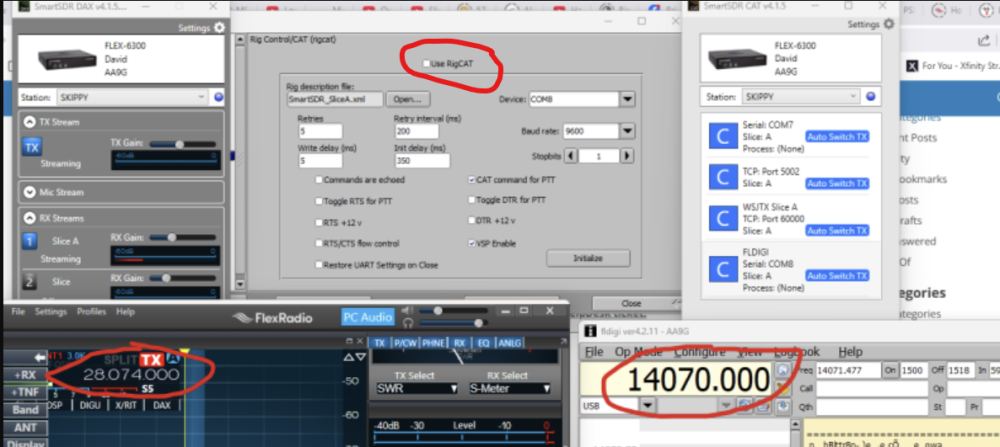
I am at my wits end with FLDIGI. All my other stuff, wsjtx, gridtracker, jtalert, log4om, it runs fine. I can see there is communication with the radio as the signal strength (lower right) bounces in time with a CW signal. But the program will not assume CAT control. I have followed Ken Wells recent article (And Mikes video) on setup multiple times. It SHOULD work. It does not. Someone PLEASE tell me what I am missing here.

Comments
-
Any reason you have not enabled this?
 1
1 -
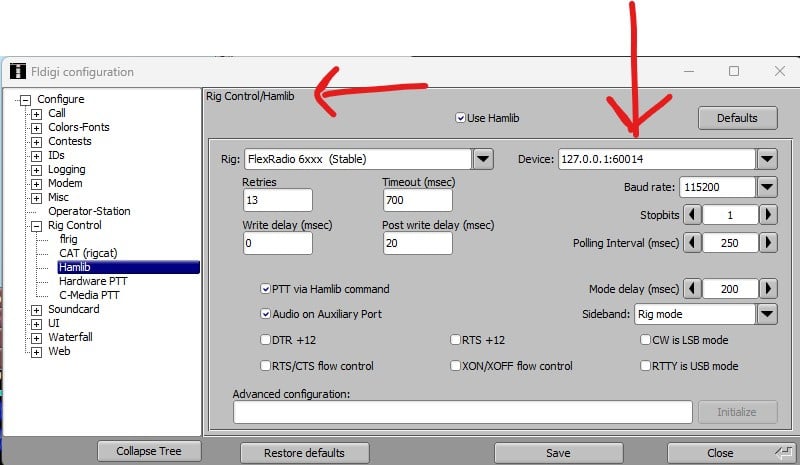
Personally I use HamLib and TCP/IP CAT control.
 0
0 -
Dang it. I KNEW I would feel stoopid. Yeah the reason is I never saw that little button sitting there in plain sight. Thank you very much, Gary. Tell me, why do you use the one over the other?
0 -
Having similar issue - using v4.2.18 - receiving fine but when Fldigi goes to TX - getting no power out . So tried the Hamlib setup in above screen shot - 2x checked - all settings the same. But still no power out of radio
Ideas??
73 Paul w2eck
0 -
Make sure you have the DAX button on , this enables the DAX TX ..
0 -
Dudley
Good morning. Yes I have checked that and it's on. This morning it's working. But the last several days it's been intermittent. It will work in the morning and I try several hours later and - No Power out - frustrating.
73 Paul w2eck
0



Leave a Comment
Categories
- All Categories
- 401 Community Topics
- 2.2K New Ideas
- 689 The Flea Market
- 8.6K Software
- 196 SmartSDR+
- 6.6K SmartSDR for Windows
- 200 SmartSDR for Maestro and M models
- 460 SmartSDR for Mac
- 279 SmartSDR for iOS
- 268 SmartSDR CAT
- 220 DAX
- 395 SmartSDR API
- 9.6K Radios and Accessories
- 109 Aurora
- 348 FLEX-8000 Signature Series
- 7.2K FLEX-6000 Signature Series
- 999 Maestro
- 58 FlexControl
- 872 FLEX Series (Legacy) Radios
- 975 Genius Products
- 482 Power Genius XL Amplifier
- 358 Tuner Genius XL
- 135 Antenna Genius
- 321 Shack Infrastructure
- 226 Networking
- 483 Remote Operation (SmartLink)
- 145 Contesting
- 847 Peripherals & Station Integration
- 147 Amateur Radio Interests
- 1.1K Third-Party Software