SmartSDR v4.2.20 | SmartSDR v4.2.20 Release Notes
SmartSDR v3.10.15 | SmartSDR v3.10.15 Release Notes
The latest 4O3A Genius Product Software:
The latest 4O3A Genius Product Software and Firmware
If you are needing assistance with FlexRadio products, please refer to the product documentation or check the Help Center for known solutions. Need technical support from FlexRadio? It's as simple as creating a HelpDesk ticket.
I received my Aurora today and getting nowhere.

Best Answers
-
I am no expert but I did see this section from the SmartSDR User Guide. When I received my Aurora, I spent the evening looking through the Guide and it was immensely helpful.
23.5 HOW TO CONNECT AN EXTERNAL KEYER USING THE FSK/KEY INPUT ON
THE ACCESSORY CONNECTOR
In CW mode, the FSK/Key input on the rear panel accessory connector (pin 4) can be used as a straight
key input. This is useful if you wish to attach an external keyer, such as a K1EL WinKeyer, microHAM
microKEYER, or another contest-oriented interface. This input is always active and is not affected by
the FLEX-6000 internal keyer settings. It’s therefore possible to use both the external keyer, and the
internal keyer at the same time.0 -
Al,
In SmartSDR click on settings then the phone/cw tab. I 'believe' you need to disable Iambic then a straight key or external keyer will work using the key jack on the back of the rig.
Rich - N5ZC
0 -
@K2BLA , Rich is correct, if you plug a set of paddles into the KEY jack on the back of the rig, you will want Iambic enabled (blue). If you plug a keyer or a straight key into the KEY jack, then you want Iambic disabled (grey).
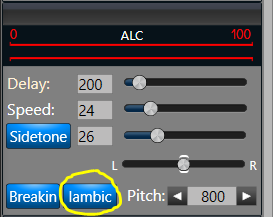
As K4WAX mentioned, you can also wire a jack to pins 4 and 5 of the ACC connector for a keyer and/or straight key connection. A great way to do it is to plug a set of paddles into the KEY jack and a straight key into the ACC jack. That way you get the best of both worlds without having to change any settings to go from one to the other. Note that the ACC jack does not do anything with the Iambic setting, that is only for the KEY jack.
1




Answers
-
Thanks guys. I figured it out shortly after I posted. But I do appreciate the help. At least it confirmed what I figured out was correct.
Now a new and strange situation: If I turn on my computer that "runs" the Aurora and the "RF deck", at the same time and start the SDR, it receives just fine and can also xmt OK on CW. If I start WSJT-X, the CAT control doesn't find the Aurora and crashes. If I close the SDR and restart the computer, without turning off AC power or shutting down the Aurora and then bring the SDR back up everything works fine.
I can simply make this my regular power-up routine, which I have been doing but it is annoying.
I have been working a lot of CW and FT8 on HF and 6m with great results.
Al, K2BLA
0
Leave a Comment
Categories
- All Categories
- 401 Community Topics
- 2.2K New Ideas
- 689 The Flea Market
- 8.6K Software
- 196 SmartSDR+
- 6.6K SmartSDR for Windows
- 200 SmartSDR for Maestro and M models
- 460 SmartSDR for Mac
- 279 SmartSDR for iOS
- 268 SmartSDR CAT
- 220 DAX
- 395 SmartSDR API
- 9.6K Radios and Accessories
- 109 Aurora
- 348 FLEX-8000 Signature Series
- 7.2K FLEX-6000 Signature Series
- 999 Maestro
- 58 FlexControl
- 872 FLEX Series (Legacy) Radios
- 975 Genius Products
- 482 Power Genius XL Amplifier
- 358 Tuner Genius XL
- 135 Antenna Genius
- 321 Shack Infrastructure
- 226 Networking
- 483 Remote Operation (SmartLink)
- 145 Contesting
- 847 Peripherals & Station Integration
- 147 Amateur Radio Interests
- 1.1K Third-Party Software