SmartSDR v4.1.5 | SmartSDR v4.1.5 Release Notes
SmartSDR v3.10.15 | SmartSDR v3.10.15 Release Notes
The latest 4O3A Genius Product Software:
The latest 4O3A Genius Product Software and Firmware
If you are needing assistance with FlexRadio products, please refer to the product documentation or check the Help Center for known solutions. Need technical support from FlexRadio? It's as simple as creating a HelpDesk ticket.
How to configure software to display spots on my SMARTSDR panoramic display from a cw skimmer?
Hello,
I am trying to configure things to use a cw skimmer and populate the spots on my display.
I did some research and it looks like I can use SDR-BRIDGE and CW SKIMMER server.
I tried these and it didnt work.
The sdr-bridge had the appearance of working, everything looked good to me. I'm unsure about the cw skimmer server. Does cw skimmer server do the whole job or do I need the regular cw skimmer too?
Some of the details of the configuration are unclear to me, so maybe someone can clarify things for me.
- does SMARTSDR emulate a TELNET client?
- Does the skimmer server emulate a TELNET server?
- or is it the other way around?
The only configuration items for spots I see in SMARTSDR is enabled or disabled. This makes me ask what is being enabled or disabled? Whats listening on which ports in this kind of configuration.
Thanks
Phil NC3S
Comments
-
Well I have it working with CW SKIMMER not the server version. I think to get it working with skimmer server I need to dedicate a daxiq stream to a dedicated slice (A, B, C ETC) to a band. That allows 4 bands to be populated with spots so when I switch bands, it has already been populated with its spots.
I think thats the way it's supposed to work.
Phil, NC3S
0 -
Phil
So can give us details on how you got it to work- I would like to be able to use also
73 Paul w2eck
0 -
OK I'll try to condense down what I did, in the end it wasn't difficult to do.
- In SMARTSDR, go to the DAX on the left hand side for DAXIQ not the DAX in the slice. I chose to use channel 1 for all the bands. In the DAX task look for the IQ streams at the bottom, I set sample rate of stream 1 to 96000. You should be able to get it to say Streaming. Keep SMARTSDR up and running.
- Install SDR BRIDGE V3, first thing before cw skimmer (not the server)
- Install cw skimmer.
- start sdr bridge v3. on the BRIDGE tab check SKIM for IQ1, under the RADIO tab you should see the slice frequency. On the SPOTS tab check the CW SKIMMER AS THE SOURCE
- START CW SKIMMER V2.1
- IN CW SKIMMER under VIEW go to SETTINGS
- under radio select SOFTROCK, SELECT 96KHZ sampling rate, to match the streaming rate in DAX
- under AUDIO tab, select WDM, signal i/o source DAX IQ RX 1 , under audio i/o device select DAX AUDIO RX 1 , don't change the other stuff
- under the network tab set enable telnet server to port 7310. I selected send spectrum via udp
- Once you get it going you can try some of the settings.
- One more thing, in SMARTSDR go into settings and select SPOTS, I enabled everything and enabled AUTO.
- SPOTS begin showing up soon.
- currently with space weather being so bad there isnt a giant amout of activity to stress it with but It did work well during the last CWT earlier this week
I think I am now going to try the SDC software that performs a similar function and see how they compare.
PS: after getting things going I noticed that sdr bridge will start cw skimmer automatically after it starts.
Phil NC3S
0 -
Phil
Followed all your steps- with CWSkimmer started is showing the radio freq but nothing in the waterfall - see attached
In Network with UDP checked - what do you have in ip & port number
Paul w2eck
0 -
source name is CW Skimmer
destination address is localhost 127.0.0.1
destination port is 13064
I can uncheck send spectrum via udp and it still works, so I dont know how important it is.
also in skimmer on top of the waterfall display directly below File is a button for start/stop check that.
Phil NC3s
0 -
Phil
Yes I had started CWSkimmer with that button was getting nothing
I turned everything off - had dinner and j ust came back in the shack and decided to try it again and it's WORKING
With all the same settings - so go figure!
Another question or two: In Skimmer> View Settings>>Network, what does port 7310 match up to ?
And under UDP what does port 13064 correspond to ?
I have been using SDC Skimmer for awhile now and it's quite good. SDC is a great contest program for CW & RTTY. One small nit and why and why I wanted to try CWSkimmer again, is SDCSkimmer only sends calls to the Spectrum Display that are calling CQ.
Anyway thanks for the assist in getting my CWSkiimer working again, much appreciated.
&3 Paul w2eck
0 -
You are mistaken, Paul. Settings in SDC allow it to send to the Panorama all Spots or as you designate.
Here are my settings where all Skimmer Spots go to the spectrum display regardless of whether the call is sending CQ or not.
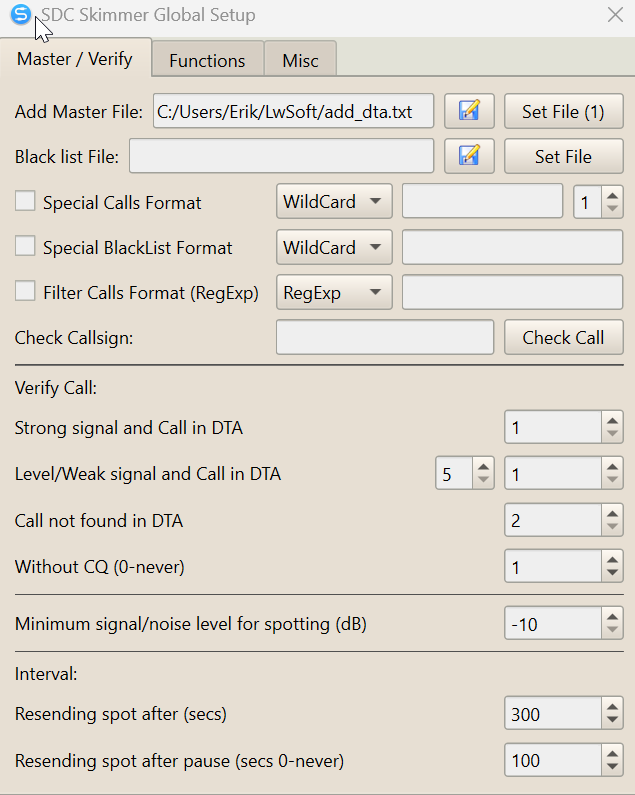
The pertinent section so far as this topic is 'Without CW (0-never)'. Set to '1' as I have it means that CQ is not required and any call will be displayed per the criteria above relating to the DTA master file.
0 -
Paul,
I think but not sure it represents the port that cw skimmer uses for telnet protocol communications with SDR-BRIDGE. If you go to SDR-BRIDGE Edit settings, it matches up with its port for dax IQ1.
That is what it looks like to me. from what I have read, the skimmer does all its i/o with SMARTSDR using SDR-BRIDGE in-between to translate things.
as far as destination port 13064 goes, its sending data to 127.0.0.1 (localhost, meaning your tcpip stack on your PC, to port 13064. As far as I can determine, "send spectrum via udp" doesnt do anything, which makes me think there is nothing listening on that port.
Phil NC3S
0 -
I have installed SDC too.
- I learned that what is downloaded and installed is worthless unless you make a donation and get the product key, hence $20 just to see if it works…
- The main benefit I see of the SDC product is it's all from one source (and knows how to talk directly to a flex-radio) and he must test things as a single unified product, as compared to get 2 programs from 2 different developers to work together. In a sense he can't point his finger at someone else when there is a problem ( but in real life he can point at SMARTSDR, but I doubt it)
- So far it works well and I also have it send the spots to LOG4OM, for their cluster display.
- Lots of things to tinker with here.
Phil NC3S
0 -
Phil
I think you’ll find it $ well spent. It has tremendous capabilities. Steep learning curve. Manual is 350+ pages. Program author is very supportive via the Forum you can reach via link in upper right of prgm window.
0 -
Phil
Thanks for feedback on CWSkulimmer ports.
73Paulw2eck
0




Leave a Comment
Categories
- All Categories
- 390 Community Topics
- 2.2K New Ideas
- 662 The Flea Market
- 8.4K Software
- 157 SmartSDR+
- 6.5K SmartSDR for Windows
- 186 SmartSDR for Maestro and M models
- 440 SmartSDR for Mac
- 275 SmartSDR for iOS
- 265 SmartSDR CAT
- 204 DAX
- 386 SmartSDR API
- 9.4K Radios and Accessories
- 55 Aurora
- 297 FLEX-8000 Signature Series
- 7.2K FLEX-6000 Signature Series
- 971 Maestro
- 58 FlexControl
- 867 FLEX Series (Legacy) Radios
- 946 Genius Products
- 473 Power Genius XL Amplifier
- 347 Tuner Genius XL
- 126 Antenna Genius
- 308 Shack Infrastructure
- 216 Networking
- 468 Remote Operation (SmartLink)
- 142 Contesting
- 814 Peripherals & Station Integration
- 144 Amateur Radio Interests
- 1.1K Third-Party Software