SmartSDR v4.1.5 | SmartSDR v4.1.5 Release Notes
SmartSDR v3.10.15 | SmartSDR v3.10.15 Release Notes
The latest 4O3A Genius Product Software and Firmware
Need technical support from FlexRadio? It's as simple as Creating a HelpDesk ticket.
SliderMaster - DSP Sliders - utility to adjust DSP levels
Comments
-
I had a couple people report issues so I had to address those issue before continuing development and releases. Those who are testers I plan do upload a v1.18 likely on Saturday.
Those who want to be testers or just want to download an use SliderMaster, just a couple more days and I'll do a general release if this weekend's release has no surprises.
0 -
Mike,
Great news! I´ll wait the 1.18 to do new tests.
Thanks,
Eduardo PY2VR0 -
v1.17.7 is available for download, once a few testers have confirmed all is ok, hopefully later today, I will do a release open up the website for all to download.
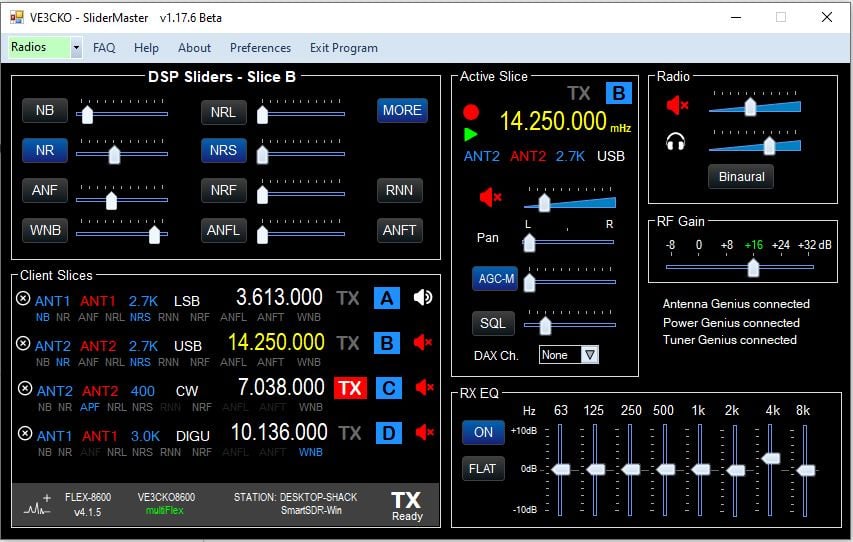
*********************** V1.17.7 Beta ************************ released Sunday Mar.8th
NOTE: To those who have donated and with version 1.17 comes a new validation server, so you will need to re-validate. To do that first email me ve3cko@interpc .ca request a validation reset, be sure to include your callsign in the email. You will then be notified it's been reset. You then go to Preferences, make sure your callsign is saved. Click the Get Key button, it should turn green and cahange to VALIDATED.
- Added RXant, TXant, Filter and Mode for Active slice under frequency.
- Added change RXant, TXant, Filter and Mode in Active Slice, select by click on
- Added Frequency color of xmit slice changes to red during transmission.
- Fixed, when client disconnected features in Active Slice area disabled, prior if they were clicked would cause an Exception error.
- Fixed closing program, can now be either "X" top-right or "Exit Program"
- Added when program is closed, the screen position of app as well as if MORE panel is remembered so next time app is opened those screen positions are recalled.
- Fixed RX EQ levels adjusting, ON/OFF, FLAT
- Fixed MORE closing with band changes, slice added or removed.
- Fixed Client Slices window height for 2, 4 and 8 slice radios.
- Fixed volume slider color recall in Preferences.
- Issue, RX EQ levels adjusting, ON/OFF, FLAT not functional
- Issue, RFgain just adjust for one pan, to be fixed.
0 -
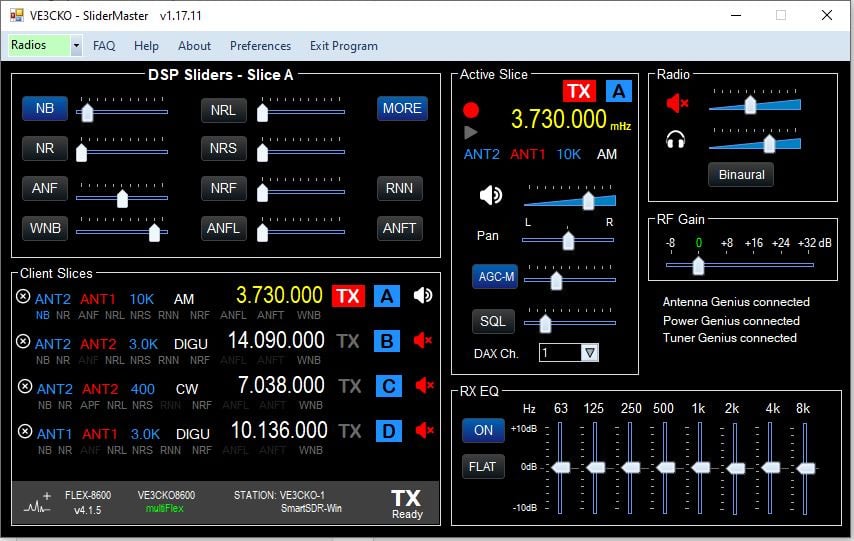
I am pleased to announce, SliderMaster is now available for all, https://ve3cko.itch.io/slidermaster
Current version is v1.17.11
To all the beta testers who provided so much good information, thank you. I will continue to need your input as the app progresses along.
Going forward if you have a previous version installed, when you execute the setup.exe it should ask you to remove the old version. Do that then do setup.exe to install the new version.
Be sure to read the Change Log to see what new features, fixes, and known issues. Enjoy!
 0
0 -
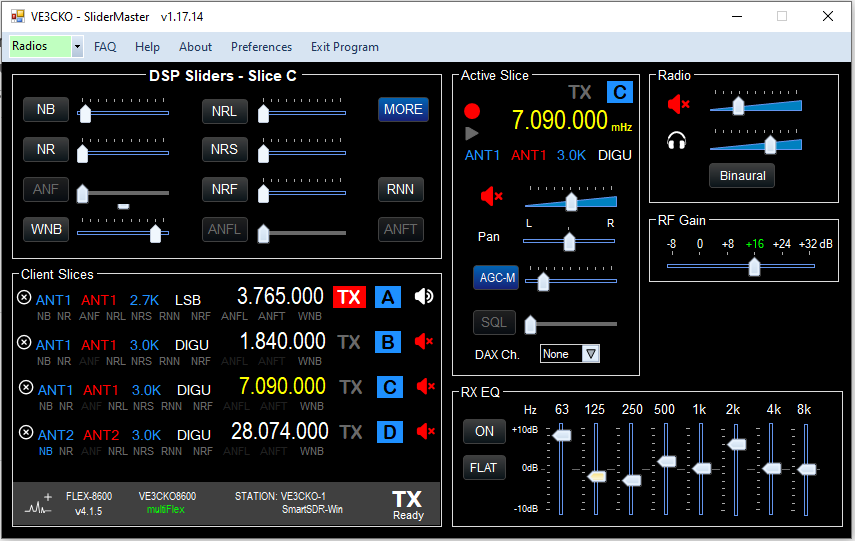
There is a new verison v1.17.14 that may take care of your 6600 problems. I do not have a 6600 to test on, so please anyone who has a 6600 model please download and install this new version and report back to me if it working for you. If you tried the app before and had problem, try this version and let me know your experience.
Those of you with more than one radio, use the Radio pulldown at the top left of the menu bar and select the radio you wish to connect to. I plan to make changes to how the app connects in the coming days. Make it more inline with selecting from a list of radios on the LAN and then client.
Also a future version will ask if you want to control/monitor or client, or actually be a client, this being part of the broader CKO project. In the meantime . . . .
SliderMaster website is: https://ve3cko.itch.io/slidermaster
0 -
Mike, I don't know if you saw my reply on groups.io. The latest release fixed the problem with Slider Master not connecting to my 6600. It also worked fine with my AU-520M. Because of severe thunderstorms in the area last night, I only tested it for a short time. I will test it again today to make sure it still works and doesn't have the same problem like the first test where it initially worked with both radios and then after shutdown and restart, it failed on both radios.
James
WD5GWY
0 -
Thanks James, good that we got th 6600 and Aurora's reporting good results.
To get the latest download of SliderMaster is: https://ve3cko.itch.io/slidermaster
 1
1 -
Tested again this afternoon. Everything still working like expected. It connects to either radio and shutting down and restarting doesn't present any problems.
James
WD5GWY
0 -
I will never have a paypal account and do not see a guest checkout. Can you turn on guest checkout?
Thx
0 -
Let me look into that Doug.
0 -
It says:
Customers can check out without a PayPal account
When the "account optional" feature is turned on, customers don't need a PayPal account. They use an alternate checkout and have the option to sign up for a PayPal account afterward. Customers with PayPal accounts still log in to their PayPal accounts to check out.
This feature is available for Buy Now buttons, Donations, and shopping carts.
Please note that if both the "auto return" and "account optional" features are turned on, customers who don't log in to PayPal can choose to go back to your website after checkout, but aren’t returned automatically.
Then it also says:
If you have already made this change and guests still cannot check out, it may be due to PayPal's fraud prevention systems that occasionally require account login.
Note that this feature is generally designed for Business or Premier accounts.
Even when enabled, PayPal may still require a login based on risk factors like the buyer’s location, purchase history, or cookies.
So if you can't pay as a guest, this must be the reason.
0 -
I downloaded and installed SkiderMaster v1.17.14 from on my Windows 11 machine. When I click on the shortcut it spins for a second and then exits. In the folder C:\Program Files (x86)\VE3CKO\SliderMaster there is no SliderMaster.exe.
Am I missing something? I tried v1.17.11 and had the same result.
Michael Wheatley
0 -
Michael if you could let me know what model of FlexRadio you have. Can you got to the windows Settings, then APPS and see if SliderMaster is one of the apps installed, if so click it to see Uninstall, then uninstall it.
Then proceed to install v1.17.14 again.
0 -
I uninstalled SlierMaster using the Revo Uninstaller which completely removed all traces of it. Then I reinstalled v1.17.14. Again the install appears to have worked, but there is no .exe file in the folder C:\Program Files (x86)\VE3CKO\SliderMaster.
I am running Smart SDR 4.1.15 with a 6400 radio.
Michael KM6LHD
0 -
I have installed Slicemaster v 1.17.11, unfortunately does not connect to my 8600.
Here is an error message.
how to rectify this problem?
Tom
»»»»»»»»»»»»»»»»»»>
See the end of this message for details on invoking
just-in-time (JIT) debugging instead of this dialog box.************** Exception Text **************
System.NullReferenceException: Object reference not set to an instance of an object.
at SliderMaster.frmMain.LeftModel_MouseHover(Object sender, EventArgs e)
at System.Windows.Forms.Control.OnMouseHover(EventArgs e)
at System.Windows.Forms.Control.WmMouseHover(Message& m)
at System.Windows.Forms.Control.WndProc(Message& m)
at System.Windows.Forms.Label.WndProc(Message& m)
at System.Windows.Forms.Control.ControlNativeWindow.OnMessage(Message& m)
at System.Windows.Forms.Control.ControlNativeWindow.WndProc(Message& m)
at System.Windows.Forms.NativeWindow.Callback(IntPtr hWnd0 -
Mr. Radio first v1.17.11 has an issue please use v1.17.14. What radio are you using?
Michael Wheatley Is there a SliderMaster in the desktop or windows apps under SliderMaster, click that. Your windows view may not be setup to view .exe files.
Another user also used Revo to uninstall, and it removes everything including the AppData directory. The result being next time Slidermaster is run it can't access the settings from AppData as it is gone. So if you can get into SliderMaster you will need to do is quickly close down the program, this action should create a new file in AppData.
I understand you can setup Revo not to delete 'residual files' if you continue to use Revo uninstaller.
Does this help ?
0 -
I tried installing SliderMaster on another computer and it worked fine. So I uninstalled it on my main computer, turned off Malwarebyte virus protection, and downloaded it with Firefox rather than Chrome. This time the install worked correctly and the SliderMaster.exe file is visible in the Program Files (x86) folder.
I don't know whether the problem I was having was due to Chrome or Malwarebytes. I had noticed that when I attempted to download the .zip file using Chrome the download would sit and spin quite a while saying it was scanning the file (even with Malwarebytes turned off) before completing the download.
In any case, I'm up and running, and if anyone else encounters this problem, I've got a workaround.
Thank you for all you hard work on this wonderful tool!
Michael Wheatley KM6LHD
0 -
I investigated further and the problem was with MalwareBytes. It was flagging and quarantining SliderMaster.exe as a virus. Adding Program Files (x86)\VE3CKO to the Malwarebytes allow list fixed the problem.
Michael Wheatley - KM6LHD
1 -
Glad you found the problem and that it wasn't an issue with the app. That's good to know, I'm going to add the issue and fix you found to a list for others to see.
0 -
absolute silenceI downloaded the Slider Master version, but it doesn't work. I'd like to know: do I have to donate first to activate a key? Do I need the paid version of SSDR?
Thanks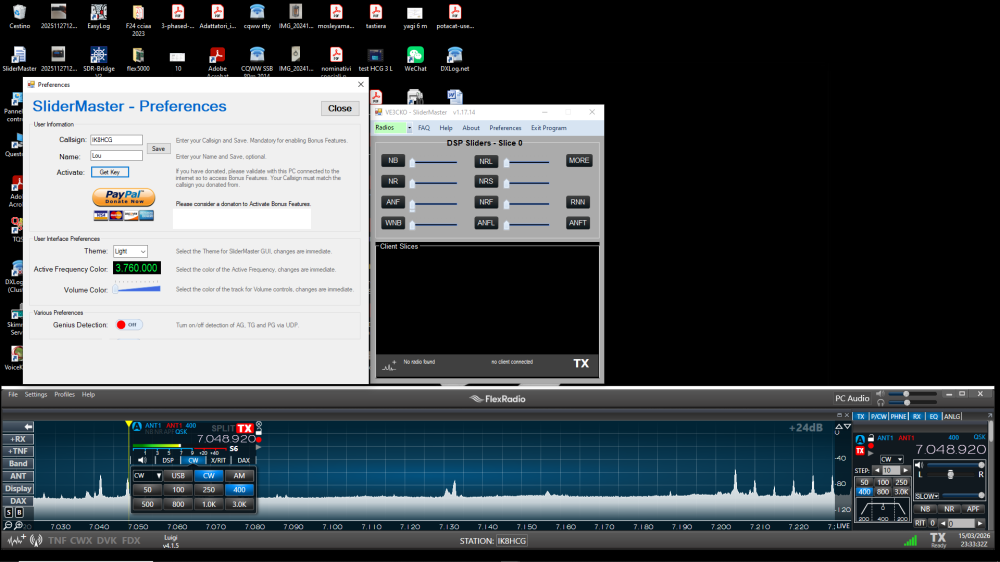 0
0 -
I don't know what you mean by absolute silence!
I see you have v1.17.14 installed, and it is not connected to a radio so I can't tell what radio you have. Have to tried to use the radio drop down menu at the top left, select your radio. I have been unable to do extensive tests with the 6600, as there is still a bug to be worked out.
Click the MORE button, you will see more features. A donation will give you access so the MORE window doesn't close after 10 minutes.
The sliders will work according to the version of SSDR and radio you have, also the mode of your active slice. The paid version of SSDR 4 opens up DSP features depending on the radio. This software will not cheat around that, the intention of the software if to give you added ability to adjust the DSP levels available to you as well as other handy things.
0 -
Absolute silence referring to the program that does not read my flex 6400. I obviously went to the radios window but it's empty
0 -
Maybe your firewall is blocking the program. Turn it off and see if it connects with your radio. If it does then you will need to edit the Windows Firewall to allow an exception for Slider Master.
James
WD5GWY
0 -
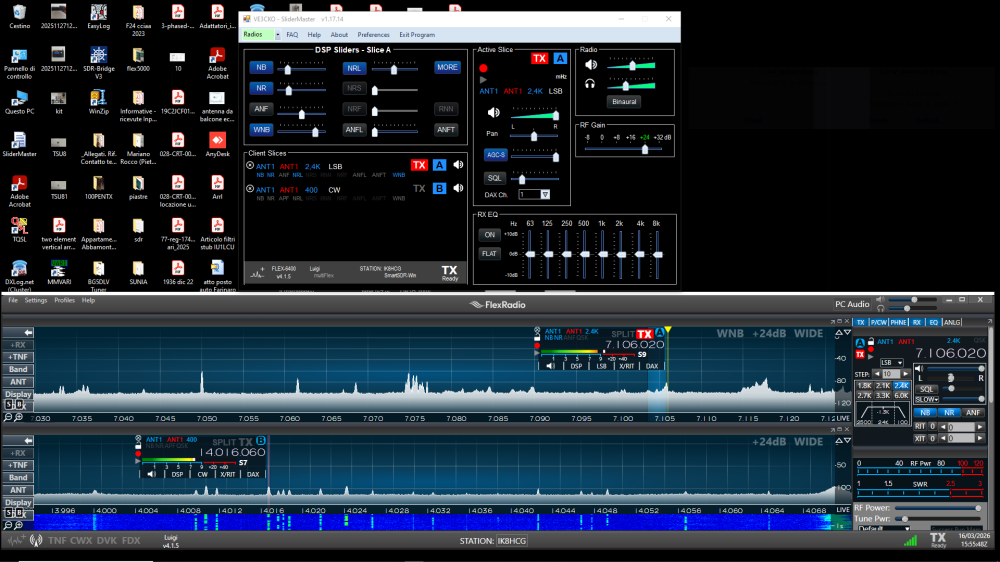
tnx the problem was the firewall, now everything works, excellent NR and NRL adjustment.
only the frequency is not displayed on a single slice
 0
0








Leave a Comment
Categories
- All Categories
- 386 Community Topics
- 2.2K New Ideas
- 656 The Flea Market
- 8.4K Software
- 155 SmartSDR+
- 6.5K SmartSDR for Windows
- 185 SmartSDR for Maestro and M models
- 438 SmartSDR for Mac
- 275 SmartSDR for iOS
- 264 SmartSDR CAT
- 202 DAX
- 385 SmartSDR API
- 9.4K Radios and Accessories
- 52 Aurora
- 294 FLEX-8000 Signature Series
- 7.2K FLEX-6000 Signature Series
- 969 Maestro
- 58 FlexControl
- 866 FLEX Series (Legacy) Radios
- 942 Genius Products
- 470 Power Genius XL Amplifier
- 346 Tuner Genius XL
- 126 Antenna Genius
- 306 Shack Infrastructure
- 215 Networking
- 466 Remote Operation (SmartLink)
- 142 Contesting
- 808 Peripherals & Station Integration
- 144 Amateur Radio Interests
- 1.1K Third-Party Software