SmartSDR v4.1.5 | SmartSDR v4.1.5 Release Notes
SmartSDR v3.10.15 | SmartSDR v3.10.15 Release Notes
The latest 4O3A Genius Product Software and Firmware
Need technical support from FlexRadio? It's as simple as Creating a HelpDesk ticket.
SliderMaster - DSP Sliders - utility to adjust DSP levels
Comments
-
I had a couple people report issues so I had to address those issue before continuing development and releases. Those who are testers I plan do upload a v1.18 likely on Saturday.
Those who want to be testers or just want to download an use SliderMaster, just a couple more days and I'll do a general release if this weekend's release has no surprises.
0 -
Mike,
Great news! I´ll wait the 1.18 to do new tests.
Thanks,
Eduardo PY2VR0 -
v1.17.7 is available for download, once a few testers have confirmed all is ok, hopefully later today, I will do a release open up the website for all to download.
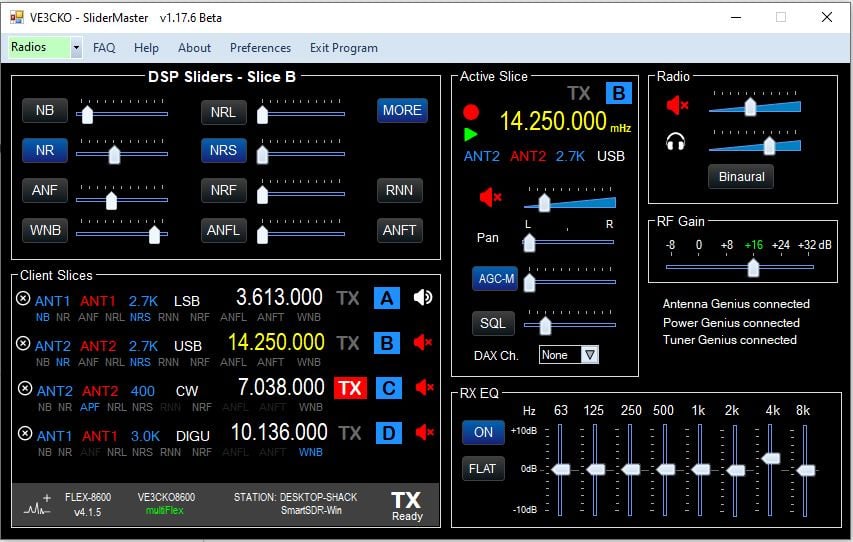
*********************** V1.17.7 Beta ************************ released Sunday Mar.8th
NOTE: To those who have donated and with version 1.17 comes a new validation server, so you will need to re-validate. To do that first email me ve3cko@interpc .ca request a validation reset, be sure to include your callsign in the email. You will then be notified it's been reset. You then go to Preferences, make sure your callsign is saved. Click the Get Key button, it should turn green and cahange to VALIDATED.
- Added RXant, TXant, Filter and Mode for Active slice under frequency.
- Added change RXant, TXant, Filter and Mode in Active Slice, select by click on
- Added Frequency color of xmit slice changes to red during transmission.
- Fixed, when client disconnected features in Active Slice area disabled, prior if they were clicked would cause an Exception error.
- Fixed closing program, can now be either "X" top-right or "Exit Program"
- Added when program is closed, the screen position of app as well as if MORE panel is remembered so next time app is opened those screen positions are recalled.
- Fixed RX EQ levels adjusting, ON/OFF, FLAT
- Fixed MORE closing with band changes, slice added or removed.
- Fixed Client Slices window height for 2, 4 and 8 slice radios.
- Fixed volume slider color recall in Preferences.
- Issue, RX EQ levels adjusting, ON/OFF, FLAT not functional
- Issue, RFgain just adjust for one pan, to be fixed.
0 -
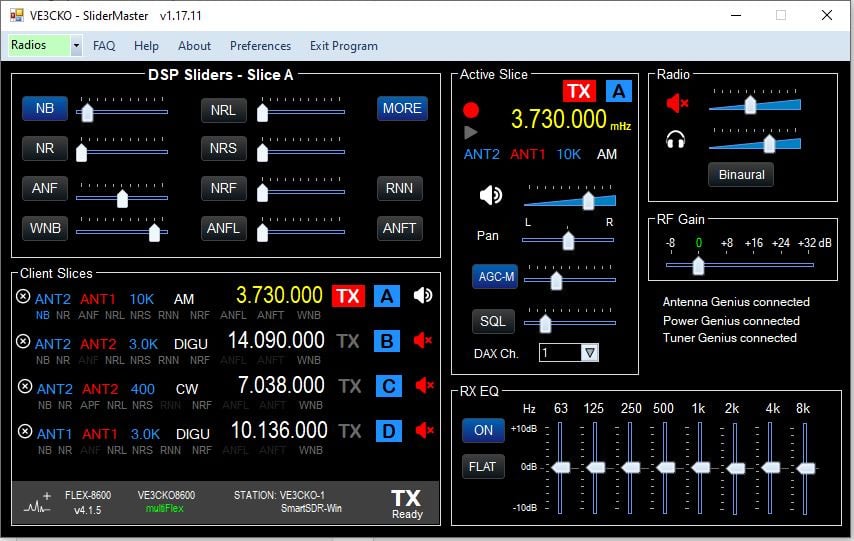
I am pleased to announce, SliderMaster is now available for all, https://ve3cko.itch.io/slidermaster
Current version is v1.17.11
To all the beta testers who provided so much good information, thank you. I will continue to need your input as the app progresses along.
Going forward if you have a previous version installed, when you execute the setup.exe it should ask you to remove the old version. Do that then do setup.exe to install the new version.
Be sure to read the Change Log to see what new features, fixes, and known issues. Enjoy!
 0
0




Leave a Comment
Categories
- All Categories
- 386 Community Topics
- 2.2K New Ideas
- 653 The Flea Market
- 8.4K Software
- 155 SmartSDR+
- 6.5K SmartSDR for Windows
- 189 SmartSDR for Maestro and M models
- 437 SmartSDR for Mac
- 274 SmartSDR for iOS
- 264 SmartSDR CAT
- 202 DAX
- 384 SmartSDR API
- 9.4K Radios and Accessories
- 50 Aurora
- 291 FLEX-8000 Signature Series
- 7.2K FLEX-6000 Signature Series
- 967 Maestro
- 58 FlexControl
- 866 FLEX Series (Legacy) Radios
- 938 Genius Products
- 468 Power Genius XL Amplifier
- 344 Tuner Genius XL
- 126 Antenna Genius
- 306 Shack Infrastructure
- 215 Networking
- 466 Remote Operation (SmartLink)
- 144 Contesting
- 806 Peripherals & Station Integration
- 143 Amateur Radio Interests
- 1K Third-Party Software