SmartSDR v4.1.5 | SmartSDR v4.1.5 Release Notes
SmartSDR v3.10.15 | SmartSDR v3.10.15 Release Notes
The latest 4O3A Genius Product Software:
The latest 4O3A Genius Product Software and Firmware
If you are needing assistance with FlexRadio products, please refer to the product documentation or check the Help Center for known solutions. Need technical support from FlexRadio? It's as simple as creating a HelpDesk ticket.
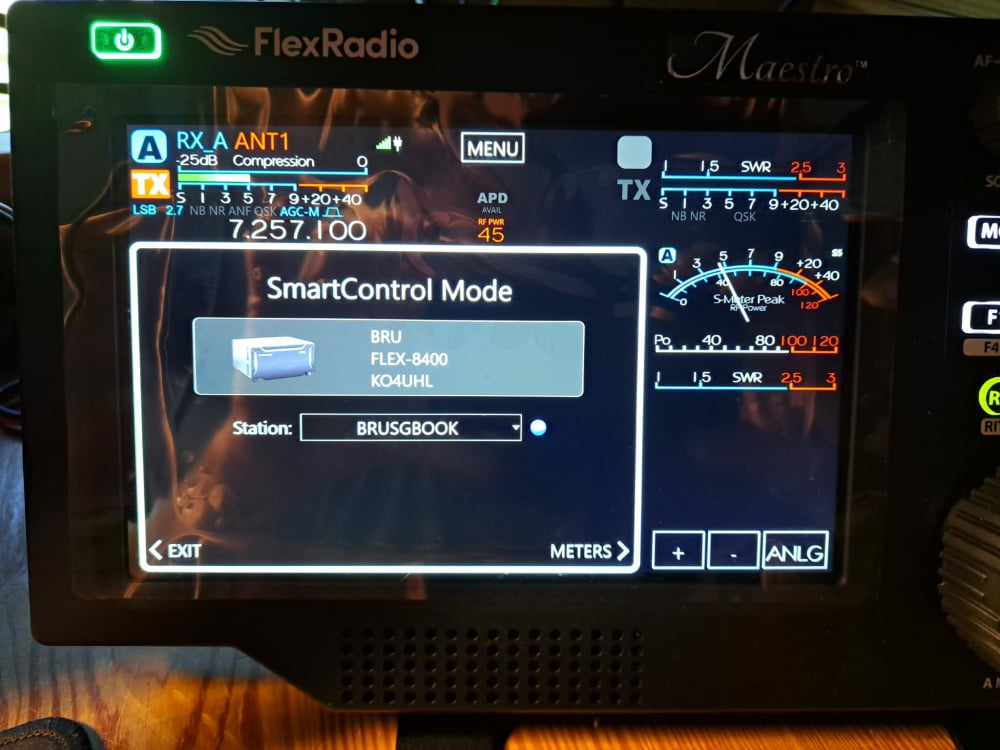
cannot close smart control window on maestro

Thanks,
Bruce KO4UHL
73
Best Answers
-
Panadapters waterfall will only show in SSDR on Mac or PC. Where it says station on the Smart Control Mode window I assume you have the name of your PC or Mac there that is running SSDR.
0 -
SmartControl operation is covered on pages 45 and following of the Maestro User Guide:
Maestro User Guide v3.x – FlexRadio
In "SmartControl" Mode the Maestro only behaves as a control panel. The panadapter display, waterfall, and audio circuits are disabled.
2


Answers
-
Hi Bruce, when in SmartControl, you do not get the option to have the panadapter/waterfall showing.
1 -
Bruce, you cannot close the Smart Control window while using the Maestro to control SmartSDR on your computer. You have to exit Smart Control to get back to using the Maestro to do everything with your radio.
James
WD5GWY
0 -
 0
0 -
Perhaps I should re phrase that question. Just got a new Maestro for my 8400 and installed it according to the instructions, leaving the SDR off at the time. I do not intend to run this radio remotely from another location. All I want to do is be able to use both the SDR windows 11 controls via Mouse and the VFO's on the Maestro to control the radio. I have changed setting on both quite a few times and I can get them to run separately, where the Maestro has no control on the SDR. But when I get them to work together, I am getting this screen on the Maestro…..SMARTCONTROL MODE. I remains blocking most of the screen and yet I can control the SDR with the Maestro VFO and vis versa. I cannot close this window. If I hit the exit at bottom left it just puts me in a loop that eventually brings me back to this same screen. What am I doing wrong here and how do I close this window? When I googled the question it came up with an exact duplicate problem that some people were having with an earlier version of the software and the fix was to go back to an earlier version. That was many versions and years ago on a 6400 and not today on an 8400, but the problem and photo was identical. Perhaps I should add that My computer, the 8400 radio and the Maestro are all hard wired in my network. I realize that there is something that does not jive between the Maestro and the radio, but I cannot find it. Does Multiflex have top be enabled to do this? Does FlexControl need to be on or off to do this?
Thanks AGAIN Guys
Bruce KO4UHL 73
0 -
Hi Bruce, when in SmartControl mode, you do not get a panadapter on the Maestro or front panel. You only get the display that you show in your picture. This gives you mouse and keyboard control using SmartSDR on your computer while simultaneously being able to use the knobs and buttons of the front panel or Maestro to control the same slices.
The way you have it is the way it works.
1 -
Touch "Exit" in the lower left hand corner.
0 -
Reply to all…..I cannot close the window in the picture. If I hit exit I just have to connect again and get the same screen. Its like a loop that never ends:-(
Len, KD0RC
I cannot use the Maestro controls if I can't close that window blocking everything. The VFO on the Maestro works and I can change frequency on both the Maestro and the SDR. How I close this window?
0 -
Apparently you don't understand how the Maestro works with your computer when it's running SmartSDR. If you are wanting to use the manual controls on the Maestro to change VFO frequency etc, you have to use Smart Control. What you see on the Maestro at this point is a reflection of what some of the controls are doing in SmartSDR on your pc. The Maestro physical controls cannot control both SmartSDR for Windows and SmartSDR in the Maestro at the same time and allow for different changes between the two. What you can do is connect to the radio with the Maestro and control only what is displayed on the Maestro. And connect to the radio from your computer with SmartSDR and control a different panadapter using your mouse and keyboard with SmartSDR on your computer. In other words, the Maestro cannot control both at the same time. It is either or.
James
WD5GWY
1 -
My apologies to everyone who tried to help, I guess it is what it is and I will make the best of it
Thank You All
73 Bruce KO4UHL
1 -
Bruce, no problem. If you are wanting a physical control for the VFO in SmartSDR on your pc, you might think about getting a Flex control. A lot of people like them. While they don't control as many things as using Smart Control, you will have a VFO knob and a few,programmable buttons that you can use. They aren't cheap. But, some people really like them.
James
WD5GWY
2 -
Thanks Trucker:-) I will take a look
Bruce
KO4UHL
73
2 -
Bruce: You have your choice of "A" or "B".
"A"= you choose RUN from the startup of your Maestro with SSDR closed on your PC and fully control your Flex with the Maestro. This gives you the panadapters you're looking for. "B"= Smart control, which you're seeing, that works with SSDR open.
There's no combination of the two.
1




Leave a Comment
Categories
- All Categories
- 390 Community Topics
- 2.2K New Ideas
- 662 The Flea Market
- 8.4K Software
- 157 SmartSDR+
- 6.5K SmartSDR for Windows
- 186 SmartSDR for Maestro and M models
- 440 SmartSDR for Mac
- 275 SmartSDR for iOS
- 265 SmartSDR CAT
- 204 DAX
- 386 SmartSDR API
- 9.4K Radios and Accessories
- 55 Aurora
- 297 FLEX-8000 Signature Series
- 7.2K FLEX-6000 Signature Series
- 971 Maestro
- 58 FlexControl
- 867 FLEX Series (Legacy) Radios
- 945 Genius Products
- 472 Power Genius XL Amplifier
- 347 Tuner Genius XL
- 126 Antenna Genius
- 308 Shack Infrastructure
- 216 Networking
- 468 Remote Operation (SmartLink)
- 142 Contesting
- 814 Peripherals & Station Integration
- 144 Amateur Radio Interests
- 1.1K Third-Party Software