SmartSDR v4.1.5 | SmartSDR v4.1.5 Release Notes
SmartSDR v3.10.15 | SmartSDR v3.10.15 Release Notes
The latest 4O3A Genius Product Software:
The latest 4O3A Genius Product Software and Firmware
If you are needing assistance with FlexRadio products, please refer to the product documentation or check the Help Center for known solutions. Need technical support from FlexRadio? It's as simple as creating a HelpDesk ticket.
LOG4OM2 not showing correct RX value only the transmitter frequency value

Hello,
I asked the forum for LOG4OM2 if they had an answer but they didn't.
I have my Flex8600/SMARTSDR(v4.1.5) connected to LOG4OM2 using Omni-rig(v1.20). It works reliably well except that in split mode it doesn't recognize the two frequencies.
As a comparison I also have a FTDX101MP connected too, using Omni-Rig, and both frequencies are displayed here when in split mode.
So is my experience to be expected? or do i have a configuration issue?
Thanks
Phil, NC3S
Best Answers
-
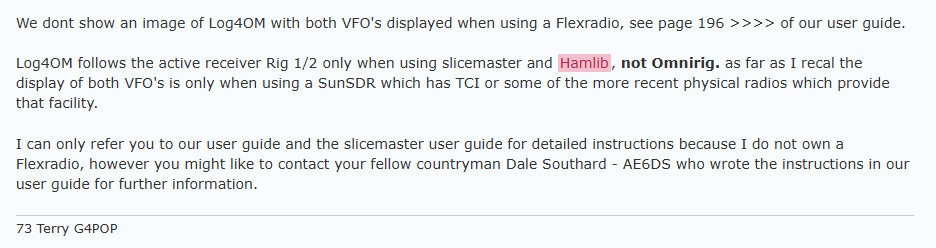
I found the above on the log4om forum and it worked for me a while back when I was DXing a lot (this was prior to the introduction of SSDR version 4) It seems much has changed since Since SSDR 4.x was introduced, L4OM will no longer talk to SSDR by using the "Flexradio 6xxx Stable" rig model. Instead, you now have to choose which slice you want L4OM to communicate with, i.e. "FlexRadio SmartSDR Slice A Stable" when using hamlib.
In addition, the latest L4OM user manual now says it requires Omnirig to show both displays despite the earlier guidance posted above.
Part of the fun of free software is that it constantly evolves, I guess. If it indeed now requires Omnirig I led you down a dead end rabbit hole, but there was a time when both frequencies were displayed using hamlib. My best suggestion now would be to download the latest L4OM manual, follow the split setup process to the letter, and post any questions you have to the L4OM forum.
73, Rick
0 -
Hello Rick!
Thank you very much for the detailed information.I think that answers Phil's question as fully as possible.
Let's see how LOG4OM and Omnirig develop and what can be done with them.
For me, the big advantage of Omnirig is that I can select both FlexRadio and my IC 705 as RIG 1 and RIG 2 respectively.Have a good time.
73, Klaus0



Answers
-
Hi Phil,
I just tried that and Log4OM only takes over VFO A, regardless of whether in split mode or as VFO B...
At least with the “Smartsdr.ini” file for Omnirig from W4TME.
What configuration are you using?73 Klaus
0 -
I just remembered that the configuration in Omni-Rig is not decisive.
This will unfortunately not work, as only one VFO can be set in the CAT for transmission via COM port to OmniRig.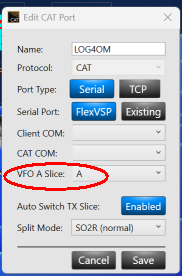 0
0 -
I was looking at that split mode settings, it has a SO2V setting. I tried that but nothing changed.
0 -
Yes, that doesn't change the situation that only one slice is transmitted via the interface.
We can only hope that Flexradio finds a solution so that two slices can be transmitted via one port. 😉0 -
Try switching to the hamlib version that's posted in the log4om forums instead of omnirig.
0 -
There is also a TCI option, but that looks like its specific for another brand of sdr. I will look at hamlib closer than i did before.
0 -
4.6 works fine here.
https://sourceforge.net/projects/hamlib/files/hamlib/
0 -
Hi Rick!
Are you using the COM or the network port?
It would be great if you could show us the SmartCAT and Log4om settings.
730 -
0
-
Hi Rick, Thanks!
They say a picture is worth a thousand words. But sometimes a word would still be nice.. 😉Where does the IP address mentioned come from?
Probably not from Smart SDR, but from third-party software that is not apparent from the image.0 -
Use the IP address of your radio. Settings/radio setup/network.
0 -
ok Thanks!
I tried that but without success.😥
!!!
After reinstalling Log4OM2, it works. However, only with Slice-A, as with Omnirig.0


Leave a Comment
Categories
- All Categories
- 389 Community Topics
- 2.2K New Ideas
- 658 The Flea Market
- 8.4K Software
- 157 SmartSDR+
- 6.5K SmartSDR for Windows
- 186 SmartSDR for Maestro and M models
- 439 SmartSDR for Mac
- 275 SmartSDR for iOS
- 265 SmartSDR CAT
- 204 DAX
- 386 SmartSDR API
- 9.4K Radios and Accessories
- 53 Aurora
- 297 FLEX-8000 Signature Series
- 7.2K FLEX-6000 Signature Series
- 970 Maestro
- 58 FlexControl
- 866 FLEX Series (Legacy) Radios
- 944 Genius Products
- 471 Power Genius XL Amplifier
- 347 Tuner Genius XL
- 126 Antenna Genius
- 307 Shack Infrastructure
- 215 Networking
- 468 Remote Operation (SmartLink)
- 142 Contesting
- 811 Peripherals & Station Integration
- 144 Amateur Radio Interests
- 1.1K Third-Party Software