SmartSDR v4.2.20 | SmartSDR v4.2.20 Release Notes
SmartSDR v3.10.15 | SmartSDR v3.10.15 Release Notes
The latest 4O3A Genius Product Software:
The latest 4O3A Genius Product Software and Firmware
If you are needing assistance with FlexRadio products, please refer to the product documentation or check the Help Center for known solutions. Need technical support from FlexRadio? It's as simple as creating a HelpDesk ticket.
Where is RF Gain slider in v.4.1.5?
The radio is a 8400M running v.4.1.5.
The computer is a Mac with an M4 processor running the latest version of SmartSDR by Marcus Roskosch.
* My question is; How to adjust RF Gain when controlling the radio from my Apple Mac computer"?
Note that on the radio itself I can adjust the preamplifier (RF Gain) by taping ANT1 and adjusting RF Gain in the drop-down menu - (see photo of radio).
https://i.postimg.cc/J405gWsx/8400M_view_Arrow.jpg
However, On the Mac I can find no way of adjusting the RF Gain!
I have included photos of what I see on the radio, and how the same selection looks on the Mac.
As you can see, clicking on ANT in the slice box on the Mac brings down no RF Gain selection.
https://i.postimg.cc/HLcKCyj2Smart_SDR_on_Mac_circ.jpg
Also note that ironically on the Mac in the upper right you can see "-8dB" which is the current setting of the RF Gain that I can NOT adjust!
Thanks in advance for any clarification!
Jake
Best Answers
-
Got it this time. You're clicking on the Ant1 on the slice flag. But I'm talking about the left side slide-out menu, you need to click on this arrow:
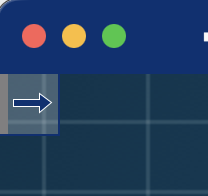
Then about half way down there's an ANT button to click on with the main antenna menu.
1 -
Jake,
Click on the right-pointing arrow at the top left of your screen. Additional selections will appear where you can make the necessary adjustments.
Bill1



Answers
-
Hello Jake, Its in the left side ANT pop-out menu:
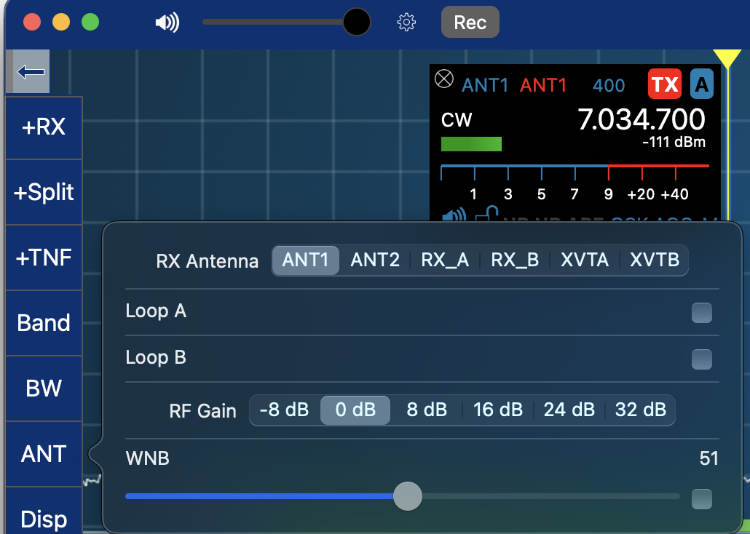
73, Jonathan
0 -
1.) Thanks for your input but I have a different pop-out menu when I click on left side ANT. My pop-out menu does NOT have an RF Gain selection.
2.) How do I post an image or .jpg file in my post? Using regular BB code didnt work for me.
3.) See this link below for a photo of what "I" see when I click on the left ANT on my screen.
https://imgur.com/a/YCi7EgS
Thanks again!0 -
Hi Jake,
Unfortunately I get a "content not available in your region" trying to open your image. You should be able to post here using the picture icon at the bottom of the text input box, but I believe you have to make a few posts in the forum before that works.
What version of SmartSDR for MacOS are you running? Mine is the latest "Version 2.9.105 (20260601)" and my radio is also on 4.1.5.
Jonathan
0 -
I have same: Version 2.9.105 (20260601)
And it would seem that I do not yet have permission to post anything other than text.
Here is another image link that may work. Maybe...
https://postimg.cc/8FGwRsRJ0 -
Finally! That was the key!
I had to use the side pop-out menu rather than simply clicking on ANT1 in the Slice box.
That is completely different then how it works on the actual 8400M radio screen!
* Thank you Bill and Jonathan "times 10" for showing me how to adjust the RF Gain on the Mac.
(AD2iH)1 -
Glad you found it Jake!
Yes there are some differences I guess due to the screen size on the radio/Maestro. The Mac version of SmartSDR had been styled to look similar to the Windows version, so perhaps some things are a little different to normal Mac UI layouts. It did take me a little while to get used to where to find stuff, but it sort of makes sense now.
73, Jonathan
1

Categories
- All Categories
- 401 Community Topics
- 2.2K New Ideas
- 685 The Flea Market
- 8.6K Software
- 194 SmartSDR+
- 6.6K SmartSDR for Windows
- 200 SmartSDR for Maestro and M models
- 456 SmartSDR for Mac
- 278 SmartSDR for iOS
- 268 SmartSDR CAT
- 220 DAX
- 395 SmartSDR API
- 9.6K Radios and Accessories
- 102 Aurora
- 347 FLEX-8000 Signature Series
- 7.2K FLEX-6000 Signature Series
- 994 Maestro
- 58 FlexControl
- 872 FLEX Series (Legacy) Radios
- 970 Genius Products
- 481 Power Genius XL Amplifier
- 357 Tuner Genius XL
- 132 Antenna Genius
- 321 Shack Infrastructure
- 226 Networking
- 482 Remote Operation (SmartLink)
- 144 Contesting
- 845 Peripherals & Station Integration
- 147 Amateur Radio Interests
- 1.1K Third-Party Software