SmartSDR v4.1.5 | SmartSDR v4.1.5 Release Notes
SmartSDR v3.10.15 | SmartSDR v3.10.15 Release Notes
The latest 4O3A Genius Product Software:
The latest 4O3A Genius Product Software and Firmware
If you are needing assistance with FlexRadio products, please refer to the product documentation or check the Help Center for known solutions. Need technical support from FlexRadio? It's as simple as creating a HelpDesk ticket.
SliderMaster - DSP Sliders - utility to adjust DSP levels
Comments
-
Good evening.
Is there any chance I could join the testers? Thank you. EA1DR Oscar0 -
Heads up beta testers, going to do another beta release in the morning. Need some sleep and do some testing before I upload the v1.13
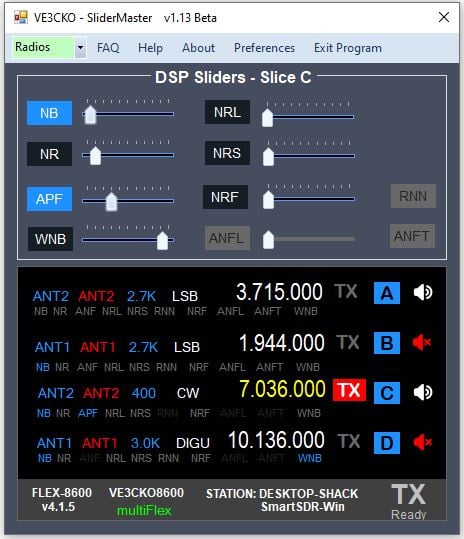
*********************** V1.13 Beta *********************** pending release
- MORE feature, Bonus Features, Xtra Feature, whatever the name will be is being worked on.
- Added Record/Play - Bonus Feature
- Added DAX- Bonus Feature
- Fixed when slice selected only the DSP features for the current mode are available as should be.
- Changed method to show active slice in the slice Window, the frequency color now indicates the active, and is user defined in Preferences.
- Added mute speaker beside slice to make it easier to mute/unmute slices.
- DSP level value beside slider removed as redundant since the tooltip bubble show the same when mouse is hovered over the slider
 0
0 -
This should be one of the last, if not the last release for beta testers. If I don't get any major issues brought to my attention by testers, I plan to do release for all Wednesday the 18th. Development continues for MORE - Bonus Features.
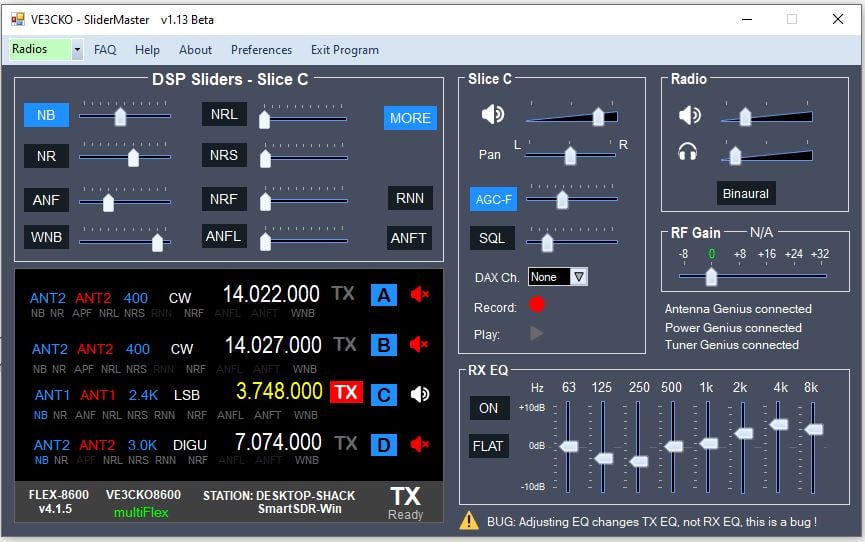
*********************** V1.13 Beta **************************** released Feb.14th
- Fixed issue with TX slice on client being turned off when SliderMaster starts.
- Fixed when slice selected only the DSP features for the current mode are available as should be.
- Changed method to show active slice in the slice Window, the frequency color now indicates the active, and is user defined in Preferences.
- Added slice mute speaker beside each slice letter & slice box.
- DSP levels now show in bubble when mouse is hovered over the slider
- DSP description shown when hovering over DSP button.
- Minimize window feature put back .
- Added screen position persistence, for About, Help, FAQ and Preferences.
- Added Record/Play - Bonus Feature
- Added DAX- Bonus Feature
- Added RX EQ, loads current RX EQ per selected profile. - Bonus Feature
- Bonus Feature free preview for set time of 10 min. then have to OK, and open MORE again.
- MORE, the Bonus Features without timer, is available to those who donate!.
- Donation, validation process added.
- PGXL, TGXL and AG detection for future use.
- Not Fixed, adjusting EQ levels changes TX EQ, it should change RX EQ!!!
- Not Fixed, adjusting RFgain does not actually change RFgain, yet.
 0
0 -
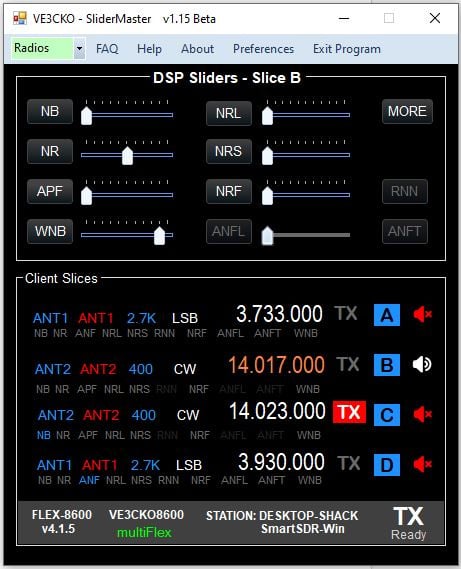
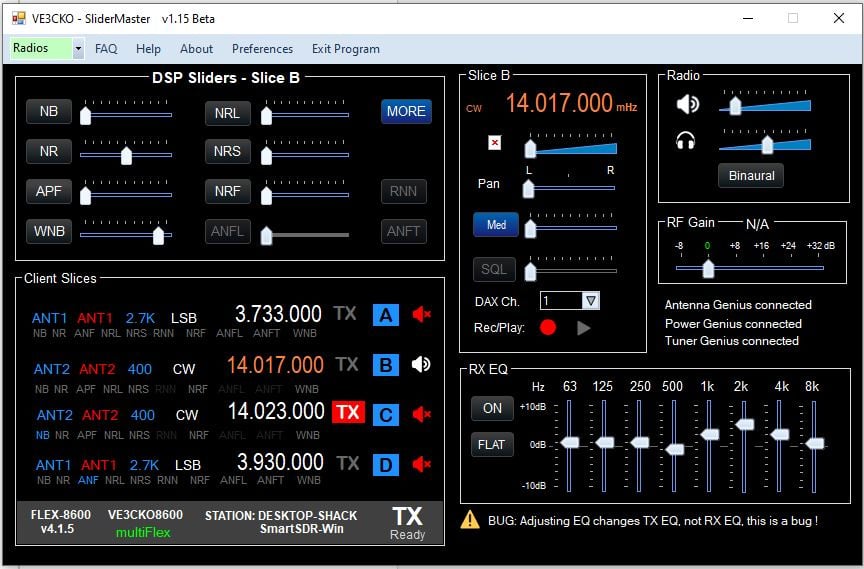
*********************** V1.15 Beta **************************** released Feb.16th
- Fixed client TX slice being removed when SliderMaster starts.
- Added TX select by clicking on the desired TX slice.
- Added Frequency and mode to top of Active Slice area.
- Added, feature to change 1hz, 10hz, 100hz and 1000hz using MouseWheel, (similar to PowerSDR), by moving mouse underneath the digit, then use MouseWheel up/down.
- Fixed "Change slice Frequency, MouseWheel up/down" when hover over NR.
- Fixed slice vol, pan and agc mousehover showing when not suppose to.
- Fixed Name in Preferences not showing after being saved.
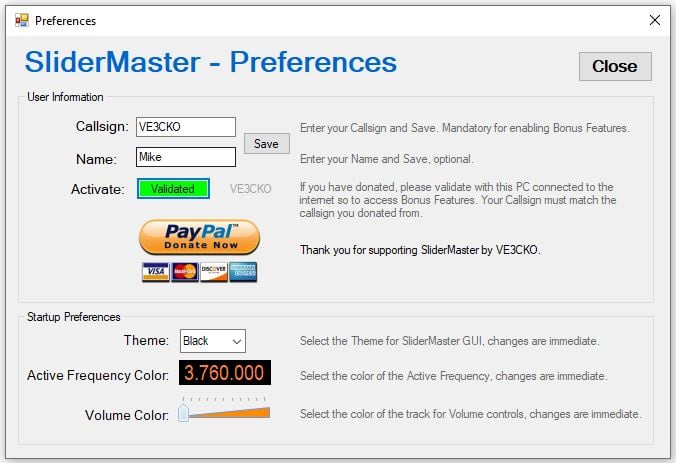
- Added new buttons and new Black, DimGray themes.
- Added to Preferences, ability to select Volume Color.
- Added see changes immediately when changing: Theme, Volume Color, and Active Frequency Color.
- Added toottip detailed caption for each DSP from Ken Wells that suggests the best scenarios to use each DSP. See FAQ for Ken's full technical reference.
 0
0 -
Hi Mike,
For some reason, when I click MORE to show the additional features, everything goes away accept for the title bar of the program.

Rich - N5ZC
0 -
Rich, what version are you using, I'm releasing v1.17 very shortly, later this afteroon is the plan.
0 -
Mike,
I've been staying on top of the upgrades. I 'believe' the problem started when I went from 1.14 to 1.15.
Rich - N5ZC
0 -
Make sure you uninstall the previous version, though v1.17 is coming out later today, install v1.16 and let me know. I do not have anyone else reporting something like this.
0 -
I'd like to do some testing as well!
TNX
0 -
R,R Mike,
FYI, I do an uninstall of the previous version first, then install the latest version.
Has anyone else noticed this issue, or is it unique to my setup.
In the mean time I'll qrz until 1.17 is released and we'll see if that solves the problem.
This would be a neat app to have sitting on a separate touch screen monitor next to the keyboard.
Rich- N5ZC
0 -
Rich, I've been able to duplicate the problem you reported on my 6700. Does not do this with 8600, so I should have asked you what radio are you using?
I was finalizing a few things for a release but then this, so I'll have to delay v1.17 for a day or two.
0 -
Mike,
I'm currently running an 8600. I do have a 6600 as well. (Both non-M) If you need me to test it I can get it hooked up in the next day or two. Too much going on today.
Rich - N5ZC
0 -
This v1.17 is the final beta release for testing. Those who are testing, let me know of any issues, please read the known issues on the website so you don't report something already identified. After this, the website will be available publicly and I'll continue to release improvements with beta releases and then have backup stable release. Thank you to all those who participated in the beta testing stage.
*********************** V1.17 Beta *************************** Release Friday Feb. 27th
CHANGE LOG:
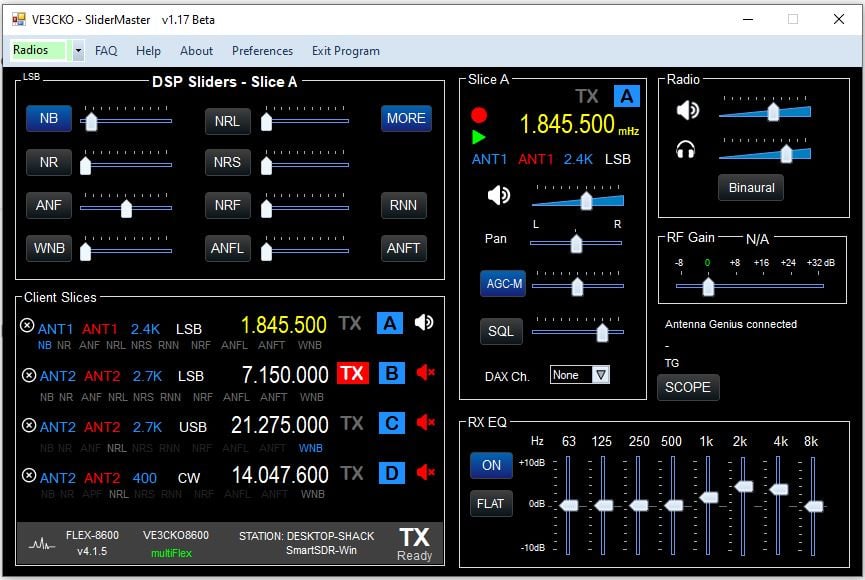
- Fixed closing program, can now be either "X" top-right or "Exit Program"
- Fixed RX EQ levels adjusting, ON/OFF, FLAT
- Added RFgain selection
- Fixed MORE closing with band changes, slice added or removed.
- Fixed Client Slices window height for 2, 4 and 8 slice radios.
- Fixed volume slider color recall in Preferences.
- Issue, RFgain just adjust for one pan, to be fixed.
- Added RXant, TXant, Filter and Mode for Active slice under frequency. Can't change rx filters yet.
- Added RXant selection for Active slice.
- Added X icon to close a slice.
- Added when program is closed, remembers the screen postion of app as well as if MORE panel was opened or closed.
 0
0 -
Mike,
I just loaded 1.17beta. I get the following error message when i click on anything.
0 -
Mike, I just downloaded and installed version 1.17. But I tried using versions 1.14, 1.15, and even 1.17; they install normally and open normally when I start them, but a few seconds later they shut down and the screens close automatically.
My PC is a Dell Optiplex i5 8GB with Windows 10, running SmartSDR 4.1.5 normally.
73 de PY2VR - Ed
0 -
now that's weird, I've installed in on a laptop and desktop both running win 10, not seeing that error. Rich, can you give me details on your computer and operating system.
Do you have a client open first then run the program or the other way around?
What slices and modes are open in the client?
0 -
Mike,
I'm running Windows 11pro.
I start SmartSDR with slice A open first, then SlideMaster. I've also tried SlideMaster first followed by startting SmartSDR. Same result.
Rich - N5ZC
0 -
Same here . . . V1.17 runs for like 30 seconds then shuts itself down. It will also show in the gray at the bottom on left side "no radio found" but show my radio next to it.
0 -
Mike, in addition to my email I have no saved data for callsign, name and validation. I get 'cannot be run on multiple computers'. But this is and always has been the same computer. Erik EI4KF.
0 -
Since I haven't been able to duplicate, and 3 reported this, best to roll back v1.17 til I can find the problem. So to be clear this was not happening with v1.16?
In v1.17 I started using a timer so it would refresh the data from the active slice after so many seconds. This maybe cause issues. Also when in CW , I had found some errors and thought I got them all. Can you confirm one of the slices were on CW. Try changing so no slices are in CW, see if results are different.
Eric are you getting an exception error, if so please open up details and let me know.
0 -
Hi Mike, no exception error. My issues are
Per my email, component crashes and takes down program
No save of call, name and those boxes are blank to start
No validation, tells me I'm on a different computer (I had this in an earlier version and you had to reset validation for me).
Please note: I uninstalled 1.17 and reverted to 1.16 (which was working perfectly) but now I get
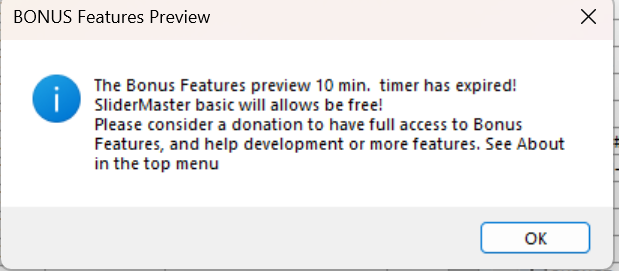
Can you reset it again for me please?
Erik
0 -
I've reset for you Erik, thanks for letting me know v1.16 works fine. Now to narrow down what I added that is doing this.
0 -
Erik, I may have reset you again, if so you re-validate.
0 -
Hi Mike, yes done that.
Actually Mike, although I got the 'validated message' it still expired after 10 minutes. It was perfectly fine before installing 1.17 and I completely uninstalled between versions. But now something is wrong.
In fact after closing with exit program and restarting it I get not validated and then the message about being on a different computer and it will not allow validation.
0 -
Can i ask where to download it and how much you have to pay? I have 6400 version
0 -
I have taken down the link for v1.17 as I got 3 reports of similar issues and though there were more downloads of v1.17 I got no positive reports with v1.17. I have not been able to duplicate the no radio found and more importantly, the app closing after 20 seconds.
Anyone download and use v1.17 without the closing after 20 second issue ?
0 -
All versions fail for me now in that I cannot (re)validate. Something about installing 1.17 **** things up massive. So I have removed SM and await 1.18
0 -
You did a great job, I would be very grateful if I could install it on my FLEX.
73!! SV1JCZ / DL1JCZ e-mail: sv1jcz@gmail.com0 -
Hi,
I am interested in testing. Invite me, please..
sp2ewq@wp.pl
Best regards,
Alec SP2EWQ
0 -
absolute silence
0










Leave a Comment
Categories
- All Categories
- 388 Community Topics
- 2.2K New Ideas
- 658 The Flea Market
- 8.4K Software
- 156 SmartSDR+
- 6.5K SmartSDR for Windows
- 186 SmartSDR for Maestro and M models
- 439 SmartSDR for Mac
- 275 SmartSDR for iOS
- 265 SmartSDR CAT
- 204 DAX
- 386 SmartSDR API
- 9.4K Radios and Accessories
- 52 Aurora
- 297 FLEX-8000 Signature Series
- 7.2K FLEX-6000 Signature Series
- 970 Maestro
- 58 FlexControl
- 866 FLEX Series (Legacy) Radios
- 944 Genius Products
- 471 Power Genius XL Amplifier
- 347 Tuner Genius XL
- 126 Antenna Genius
- 306 Shack Infrastructure
- 215 Networking
- 468 Remote Operation (SmartLink)
- 142 Contesting
- 811 Peripherals & Station Integration
- 144 Amateur Radio Interests
- 1.1K Third-Party Software