SmartSDR v4.1.5 | SmartSDR v4.1.5 Release Notes
SmartSDR v3.10.15 | SmartSDR v3.10.15 Release Notes
The latest 4O3A Genius Product Software and Firmware
Need technical support from FlexRadio? It's as simple as Creating a HelpDesk ticket.
SliderMaster - DSP Sliders - utility to adjust DSP levels

You miss adjusting NB, NR and ANF levels ? You wish you can adjust the levels of some of the new DSP features with SSDR v4 ?
I'd like to introduce what I call Flex DSP Sliders, an app that allows adjustment of DSP levels for NB, NR, ANF and WNB. For those who have an 8000 or Aurora series radio, you can also play around and adjust NRL, NRS and ANFL levels.
How it works is, when first starting the program, it connects automatically to the first radio it sees on the LAN. The tray at the bottom conveniently show some information in similar fashion to SmartSDR. This includes the radio model, SSDR version, the connecting station and it's IP address as well as the TX and multiFLEX flags. If you have more than one FlexRadio on your LAN you'll be able to select which radio you wish to use, in a later release.
If no client is connected to the radio, the slice window will remains black, waiting. When a client is connected to the radio, the slice window will populate with all slices in use by that client, showing basic information and DSP status of each slice and an Active slice indicator. In order to toggle or adjust DSP, you must first select the slice letter of the targeted slice you want to change.
In order to toggle or adjust DSP, you must first select the slice letter of the targeted slice you want to change.
Here is what 6700 looks like with 8 slices, below that is an 8600 with all 4 slices:


Before I do a general release I'd like to get some feedback from a few testers. I have not setup GitHub yet and may just throw a website together instead. In the meantime, if you are interested please email me, ve3cko@interpc.ca this will be a short list. When ready, I'll send a current Beta version in a zip format.
I have some some testing but not nearly as much as is needed. Be looking for some feedback and any bugs. Depending how fast of a response I get, I'd like to get a general release out there shortly.
Donations are certainly welcome and will just encourage more development as I've got a few things up my sleeve. If your comfortable sending an etransfer that would be great. Please etransfer to ve3cko@interpc.ca. If you are not comfortable doing that let me know and see what I can setup until I get the website running.
Comments
-
nice work Mike. I’ll email you.
73 Dave wo2x0 -
new Beta v1.0.4 - Be sure to use Exit Program to close down app properly.
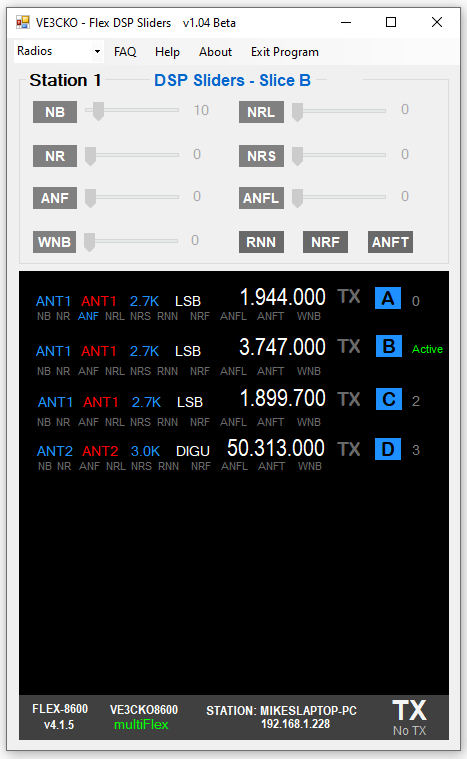
Changes - - -
- Added Radio drop-down in top menu for radio selection
- Fixed slice display window when client removes a slice(s) then adds a slice(s)
- Fixed client window when client is closed down
1 -
Mike, SlideMaster has been downloaded and installed. I'll start testing this evening and over the weekend. We're expecting the big weather event here in Amarillo starting this evening. Barring any antenna issues it will be a good weekend to play radio.
Rich - N5ZC
1 -
During development I named the project Flex DSP Sliders, and I'd like to finalize the name for general release. What name do you like ? Give me your feedback.
- Flex DSP Sliders
- SliderMaster
- DSPmaster
For Beta testers - new Beta v1.0.5 - Be sure to use Exit Program to close down app properly.
Known Issues:
- Having inconsistency with 6700 as the only radio on the LAN as well as using it as a 2nd radio on the LAN. A beta test is also having an issue with his 6700 v4 Basic.
- Using Marcus's iPad as a client, even though the DSP sliders are shown and can be adjust on Marcus's app, it doesn't seem to update it's sliders or when DSP is toggled. For example turning on NR from Flex DSP sliders or adjust it's level, does change the NB in the panadapter but does not update the NB status in the DSP popup on the iPad , NB levels are not updated. However if you adjust NBon the iPad, Flex DSP Sliders do see the changed. I don't think the iPad is looking for change DSP levels coming from the radio.
- Right now this is for one client connection. I have work to do for when a second client is connect to the same radio,
0 -
I have to change the name from Flex DSP Sliders at this time so I can finalize the name for general release. Which name do you like ? Give me your feedback.
- SliderMaster
- DSPmaster
- DSPsliderMaster
0 -
SliderMaster
1 -
I went with SliderMaster as DSP Master is an existing digital signal processing software product.
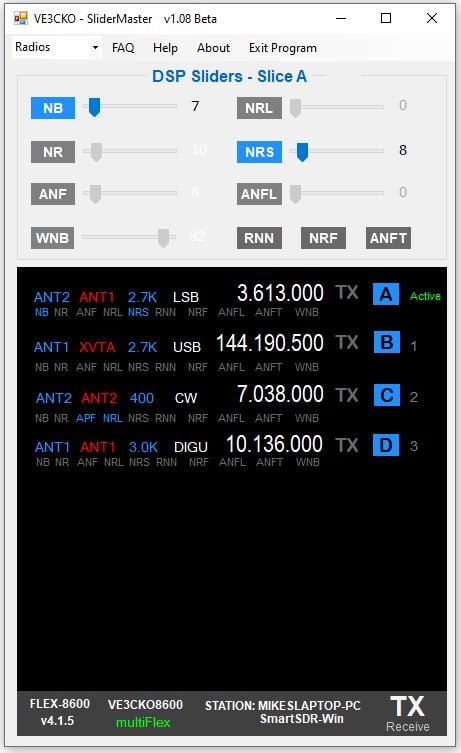
A new Beta v1.08 available for download. Not getting much feedback good or bad at this time. I don't want to assume everyone testing it is happy with it so if you do have any comments that I haven't addressed let me know. Here is the latest changelog.
*********************** V1.08 ***********************
- Added APF when in CW mode
- Fixed Filter display mode dependency
- Added Radio Info tooltip - hover on Model
- Fixed issue introduced in v1.06 regarding 6700
*********************** V1.07 ***********************
- Renamed application "SliderMaster"
- Please uninstall previous FlexDSPsliders before installing SliderMaster
- Fixed CLOSE btn in Help
*********************** V1.06 ***********************
- Fixed client station & client program in bottom tray
- Added Desktop shortcut - Dave wo2x
- Manually must uninstall previous version
- preparing for renaming App
*********************** V1.05 ***********************
- Fixed slices 5, 6, 7 in slice display
- Fixed polling DSP levels when client initally connects and when slice gets added
*********************** V1.04 ***********************
- Added Radio selection in menu **** for radio selection
- Fixed slice display when client removes a slice(s) then adds a slice(s)
- Fixed if client is closed down by client, to black out slice display
 2
2 -
Mike, once the weather clears up I plan to test your application. Right now we are having freezing rain and sleet. So I have put off doing anything radio related until it clears up a bit. It certainly looks good.
Might I ask one question? With the new noise reduction features what are the sliders actually adjusting?
James
WD5GWY
0 -
I've been in front of computer screen all day and wasn't paying much attention to the weather outside, my son went winter camping in a tent up north from, Toronto for the weekend, he said it's -31 F just crazy. I heard on the news yesterday some areas in the states were forecast between 0.5 to 0.75" of freezing rain. YIKES!
Congrats on your Aurora James.
1 -
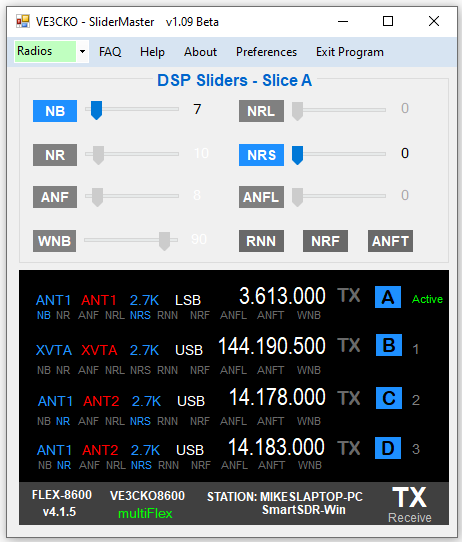
new Beta v1.09 uploaded 18:45 UTC Sunday
ChangeLog:
*********************** V1.09 ***********************
- Added automatic resizing of slice window and app based on radio model & # of slices in use
- Simplified connect/disconnect to radio(s) from Radio drop-down
- Fixed Station at bottom to correctly show status of Station connection
- Fixed so Active slice on startup defaults to slice 0
- Added paypal.me/VE3CKO for donation in the About tab
- Change some coloring in title bar
- Preparing Preferences - eg if more than one radio, which radio is preferred to connect upon startup. This will help resolve known issue #3.
 2
2 -
Good evening from SV1BLD
You did a great job, I would be very grateful if I could install it on my FLEX.
73!! SV1BLD e-mail: sv1bld@gmail.com0 -
Hi,
Great job congrats. Any way to test it on my 8600? legreg002@hotmail.com
Thanks
0 -
Nice work please give me a way to try .
johnhapsas@gmail.com 730 -
Nice Mike, where can I download it?0
-
VERY nice…I'm interested!!
0 -
w4jcw@aol.com
0 -
Wonderful work Mike!! Congrats! How can I buy / download it?
0 -
Mike
I would like to take part in the testing
ra3fy.ham@gmail.com0 -
Sliders are Back!!!
1 -
Mike,
I would like to take part in the testing
sefreitas@gmail .com
73
0 -
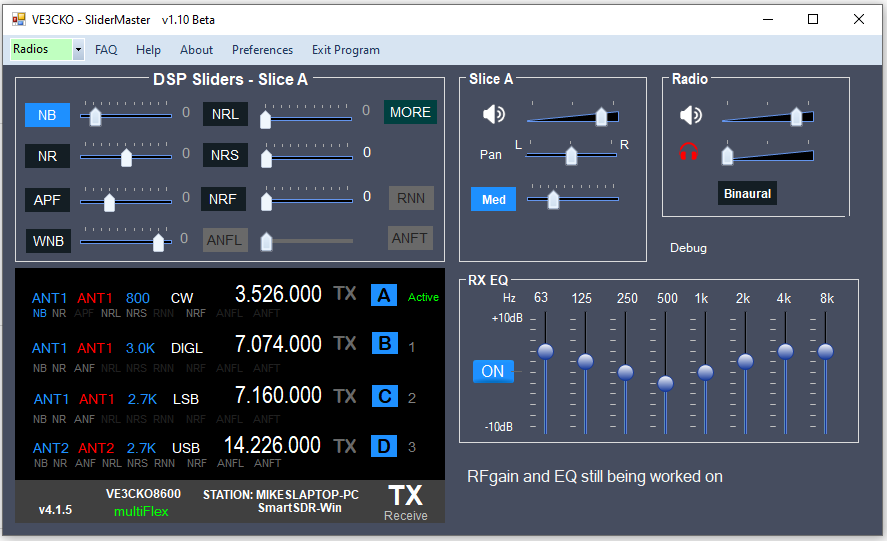
Update on SliderMaster:
Here is a sneak peak of what's coming. The MORE button opens the side window to show new Slice, Radio and EQ groups with access to handy audio related features needed when playing with DSP, like volume, agc, eq, etc. This eliminates having to back and forth to the client. I wasted a lot of time on the EQ sliders, they look prettier but when using the mouse scroll to adjust the level the data is not passed, so must click the mouse to drag the slider. Still working on that. I will likely revert to the same type of sliders used for everything else.
DSP that are not availabe in certain modes are greyed out.
As per the "0" beside each slider, I'm thinking of removing that so that's why they are all zero, when the mouse is hovered over the slider the value is displayed in a bubble similar to what FlexRadio when you do the same.
 1
1 -
I tried to make an etransfer last Friday but my bank (in Rep of Ireland) would not allow it. Is there a PayPal address to use instead?
Erik EI4KF
0 -
0
-
Tnx Mike, done. If you are sending beta versions out please see my note with the PayPal donation.
73 de Erik.
0 -
Ready for testing.
73 de LY5DX
Orders@rallyandracing.biz0 -
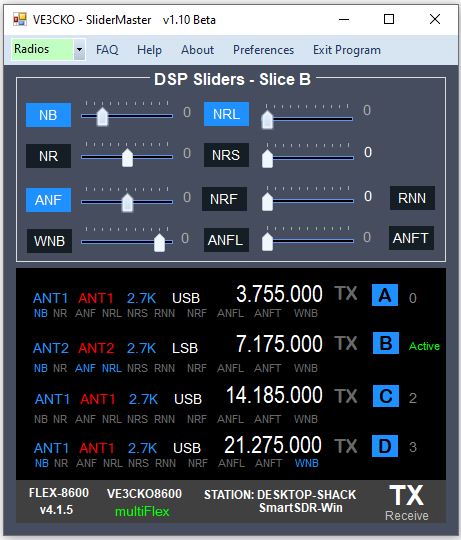
New Beta v1.10 will be available for download by beta testers shortly. Need feedback for general release
Change Log:
*********************** V1.10 *********************** pending release stay tuned
- Added dark theme, and ability to select other themes when they are created.
- Updated sliders with slider values shown in tooltip bubble, just like Flex.
- Fixed when a slice selected only the DSP features for the current mode are available as should be.
- Added screen position persistence, startup screen position at location of where it was when "Exit Program".
- Fixed several things upon startup including showing Active slice from the client and appropriate DSP information for that slice.
 0
0 -
v1.10 Beta is now available for testers.
0 -
Hi,
Never got a mail following my message in this thread. So what do we need to do to test the program ?
Thanks
0 -
Hi Mike, how can I become a Tester? I appreciate you guidance.
Thanks,
Eduardo PY2VR
0 -
There were just some beta testers selected but I did add you, F4BPO and you should have received the invite.
For beta testers please frequent the website for updates and view the Change Log before you report any issues, as they may have been already resolved.
For others wanting SliderMaster it will be full release shortly and available free to download, with a donation voluntary. but if you want to use it now, drop me line.
Saying that, a new Beta v1.12 is available for download by beta testers.
*********************** V1.12 Beta *********************** released !!!!!
- Fixed NRL, ANFL and ANFT available for 6000 series radios.
- Fixed app width for 6000 series radios.
- Fixed HELP link, "How to allow a program through a firewall on your computer".
- Fixed FAQ: SmartSDR v4 – Noise Mitigation Quick Reference - by Tim Ellison
*********************** V1.11 Beta ***********************
- Added FAQ: SmartSDR v4 – Noise Mitigation Quick Reference - by Tim Ellison
- Added FAQ: Filter-by-Filter SNR Guidelines - by Michael Walker
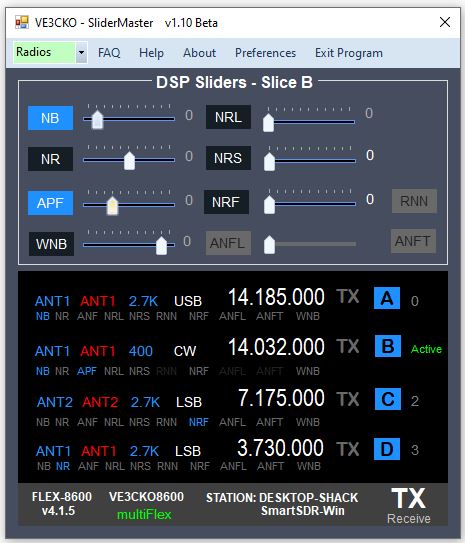
*********************** V1.10 Beta ***********************
- Added dark theme, and ability to select other themes in Preferences.
- Updated sliders with slider values shown in tooltip bubble, just like Flex.
- Fixed when slice selected only the DSP features for the current mode are available as should be.
- Added screen position persistence, startup screen position at location of where it was when "Exit Program".
- Fixed several thing upon startup including showing Active slice and appropriate DSP information for that slice.
 0
0











Leave a Comment
Categories
- All Categories
- 386 Community Topics
- 2.2K New Ideas
- 656 The Flea Market
- 8.4K Software
- 155 SmartSDR+
- 6.5K SmartSDR for Windows
- 185 SmartSDR for Maestro and M models
- 438 SmartSDR for Mac
- 275 SmartSDR for iOS
- 264 SmartSDR CAT
- 202 DAX
- 385 SmartSDR API
- 9.4K Radios and Accessories
- 52 Aurora
- 294 FLEX-8000 Signature Series
- 7.2K FLEX-6000 Signature Series
- 969 Maestro
- 58 FlexControl
- 866 FLEX Series (Legacy) Radios
- 941 Genius Products
- 470 Power Genius XL Amplifier
- 345 Tuner Genius XL
- 126 Antenna Genius
- 306 Shack Infrastructure
- 215 Networking
- 466 Remote Operation (SmartLink)
- 142 Contesting
- 808 Peripherals & Station Integration
- 143 Amateur Radio Interests
- 1K Third-Party Software