SmartSDR v4.1.5 | SmartSDR v4.1.5 Release Notes
SmartSDR v3.10.15 | SmartSDR v3.10.15 Release Notes
The latest 4O3A Genius Product Software:
The latest 4O3A Genius Product Software and Firmware
If you are needing assistance with FlexRadio products, please refer to the product documentation or check the Help Center for known solutions. Need technical support from FlexRadio? It's as simple as creating a HelpDesk ticket.
How do i restore lost PH/CW panels? SSDR 4.1.5 Lex 8400

how can i get them back?
Mike N4LSP
Best Answers
-
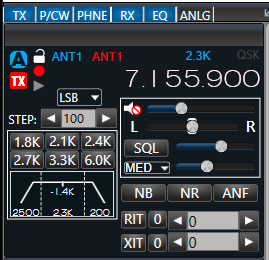
Hi Mike, click the heading at the top of the control panel to turn on and off the individual panels.
 0
0 -
Thats my issue.That panel is not visible0


Answers
-
I have no idea where it went.There is nothing to click to bring it back.0
-
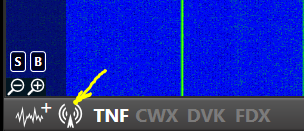
HI Mike, OK, I understand now. Click the little icon in the lower left-hand corner of SmartSDR:
 1
1 -
It sort of helps to click on all the buttons and see what they do. Sometimes some of the esoteric features are Elusive. There's a lot of little click buttons all around the slice flags and panadaptors that need clicking to see what evil they unleash. Once one gets to where they know, "hey I know I've seen the radio do that before, now where is that control again?" and you head out looking for it until you find it. You'll be OK after a while. Thats just basic functions the menu items are even more crafty stooof. Don't make the radio anymore difficult than you absolutely need it. A lot of guys and I fell into the profile for everything trap too… Then something blows up a profile and it becomes like writing software. I myself have ONE profile, and the defaults if I need one.
I was just thinking… Making a cheat sheet. 1. I know I can adjust how the panadaptor looks, where are all the buttons and controls for that? Or I want to listen to my transmitted audio to adjust my transmit tone, how do I make my audio more treble or bassier. how about how do i adjust my cw note in the bandpass. Things you might forget how to do. Instead I spent about 5 years or so learning and relearning things. HAHAHAHA just know it can do most anything except flip pancakes… But the older I get I mess them up too. DD0


Leave a Comment
Categories
- All Categories
- 388 Community Topics
- 2.2K New Ideas
- 658 The Flea Market
- 8.4K Software
- 156 SmartSDR+
- 6.5K SmartSDR for Windows
- 186 SmartSDR for Maestro and M models
- 439 SmartSDR for Mac
- 275 SmartSDR for iOS
- 265 SmartSDR CAT
- 204 DAX
- 386 SmartSDR API
- 9.4K Radios and Accessories
- 53 Aurora
- 297 FLEX-8000 Signature Series
- 7.2K FLEX-6000 Signature Series
- 970 Maestro
- 58 FlexControl
- 866 FLEX Series (Legacy) Radios
- 944 Genius Products
- 471 Power Genius XL Amplifier
- 347 Tuner Genius XL
- 126 Antenna Genius
- 306 Shack Infrastructure
- 215 Networking
- 468 Remote Operation (SmartLink)
- 142 Contesting
- 811 Peripherals & Station Integration
- 144 Amateur Radio Interests
- 1.1K Third-Party Software