SmartSDR v4.2.20 | SmartSDR v4.2.20 Release Notes
SmartSDR v3.10.15 | SmartSDR v3.10.15 Release Notes
The latest 4O3A Genius Product Software:
The latest 4O3A Genius Product Software and Firmware
If you are needing assistance with FlexRadio products, please refer to the product documentation or check the Help Center for known solutions. Need technical support from FlexRadio? It's as simple as creating a HelpDesk ticket.
Diversity RX Antenna Issue

Hi
Am doing some testing with the diversity function (DIV) on my 6600M in Smart Control Mode and found an odd scenario.
Slice A - TX Antenna = ANT1
Slice D - Diversity Slice only used for Receive
No other slices are open.
If Slice A RX Antenna is on RX A or RX B then I go to change Slice D RX Antenna to XVTA or XVTA B it also changes Slice A RX too?
E.g. Slice A RX Antenna = ANT1, change to RX A, change Slice D RX Antenna to XVTA A, Slice A also changes to XVTA A.
If Slice A RX Antenna is on ANT1 or ANT2, I can change Slice D to any antenna, no issue there.
I'm aware the 6600 only has 2 SCU's but it seems there is some restriction here when trying to use RX A or B and XVTA A or B in Diversity?
Any help what I' missing would be great
Running 3.7.4
Thanks
Rich
Answers
-
Hi,
I have a similar question. I have Flex-6600M (v4.1.5) and a remote Flex-6600 (v4.0.1), the behavior is the same on both radios.
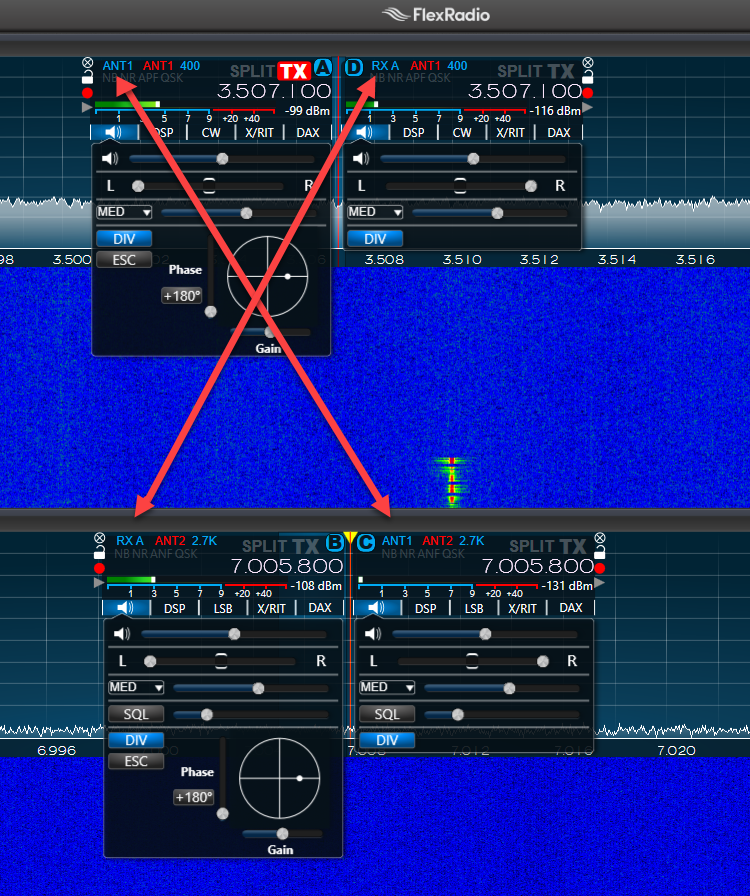
I have two antennas for TX/RX, connected to ANT1 and ANT2 respectively, and two antennas for RX only, connected to RX A and RX B. I thought I could use diversity reception on two bands simultaneously, e.g. ANT1 + RX A on 80m, and ANT2 + RX B on 40m. Apparently not. When diversity is activated on the first slice, the antenna selected for diversity reception follows the main RX antenna from the second slice and vice versa. When diversity is activated on the second slice, it’s diversity antenna follows the main RX antenna from the first slice. Thus, the diversity reception can only be used when there is only one active slice. Is this the way it is supposed to be?
73, Toivo, ES2RR
 0
0 -
Toivo—I am not certain but I think you are trying to monitor four antennas on a radio that will monitor two at a time.
0 -
Neil - yes, my bad. I had misunderstood the SCU concept a bit. It takes two SCU's to do diversity and that's exactly what the 6600 has. I got the explanation also from Tim, W4TME via helpdesk. The radio behaves exactly as it's supposed to.
73, Toivo, ES2RR
0


Leave a Comment
Categories
- All Categories
- 401 Community Topics
- 2.2K New Ideas
- 689 The Flea Market
- 8.6K Software
- 196 SmartSDR+
- 6.6K SmartSDR for Windows
- 200 SmartSDR for Maestro and M models
- 460 SmartSDR for Mac
- 279 SmartSDR for iOS
- 268 SmartSDR CAT
- 220 DAX
- 395 SmartSDR API
- 9.6K Radios and Accessories
- 109 Aurora
- 348 FLEX-8000 Signature Series
- 7.2K FLEX-6000 Signature Series
- 999 Maestro
- 58 FlexControl
- 872 FLEX Series (Legacy) Radios
- 975 Genius Products
- 482 Power Genius XL Amplifier
- 358 Tuner Genius XL
- 135 Antenna Genius
- 322 Shack Infrastructure
- 227 Networking
- 483 Remote Operation (SmartLink)
- 145 Contesting
- 847 Peripherals & Station Integration
- 147 Amateur Radio Interests
- 1.1K Third-Party Software