Welcome to the FlexRadio Community! Please review the new Community Rules and other important new Community information on the Message Board.
The latest SmartSDR Software:
SmartSDR v4.2.18 | SmartSDR v4.2.18 Release Notes
SmartSDR v3.10.15 | SmartSDR v3.10.15 Release Notes
The latest 4O3A Genius Product Software:
The latest 4O3A Genius Product Software and Firmware
SmartSDR v4.2.18 | SmartSDR v4.2.18 Release Notes
SmartSDR v3.10.15 | SmartSDR v3.10.15 Release Notes
The latest 4O3A Genius Product Software:
The latest 4O3A Genius Product Software and Firmware
How to Receive Technical Support::
If you are needing assistance with FlexRadio products, please refer to the product documentation or check the Help Center for known solutions. Need technical support from FlexRadio? It's as simple as creating a HelpDesk ticket.
If you are needing assistance with FlexRadio products, please refer to the product documentation or check the Help Center for known solutions. Need technical support from FlexRadio? It's as simple as creating a HelpDesk ticket.
Can someone help with MRP40

Bru
Member ✭✭
I am another MRP40 user, a registered one who paid for the program and was using it with my Icom 7300. But on moving up to a Flex 6400 am having difficulties getting it to work completely. I do believe I am almost 90% of the way there and it IS decoding CW perfectly, and it is also sending to the radio, because I can clearly see the signals coming into the TX Stream in my DAX. I created a new COM port COM5, using smart SDRCat and assigned it to MRP40. The only problem I am having it it will not put the radio into transmit with PTT. So sound in is working and decoding, sound out is working and I can see it in the TX stream. Both levels are clearly working and adjustable with the DAX level controls and I have a connected com port, just no PTT to ask the radio to transmit. Can anyone help me with this because I believe I am close. Previous comments said it would not decode properly with a Flex, but that part is working perfectly. Thanks All:-)
0
Answers
-
Hi Bruce,
I think you want to do CW and not transmit the CW audio tone in SSB over DAX.
To do this, your configuration needs to be slightly different.
First, a Winkeyer must be created in SmartCat.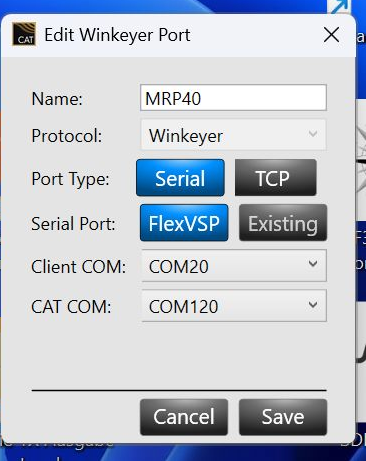
Then set WinKey as the send option in MRP.
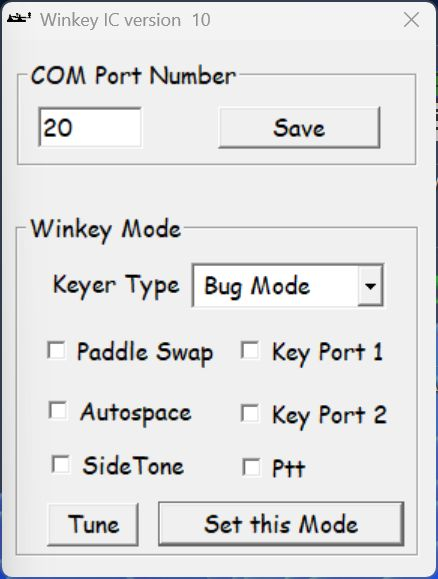
and switch to bug mode!
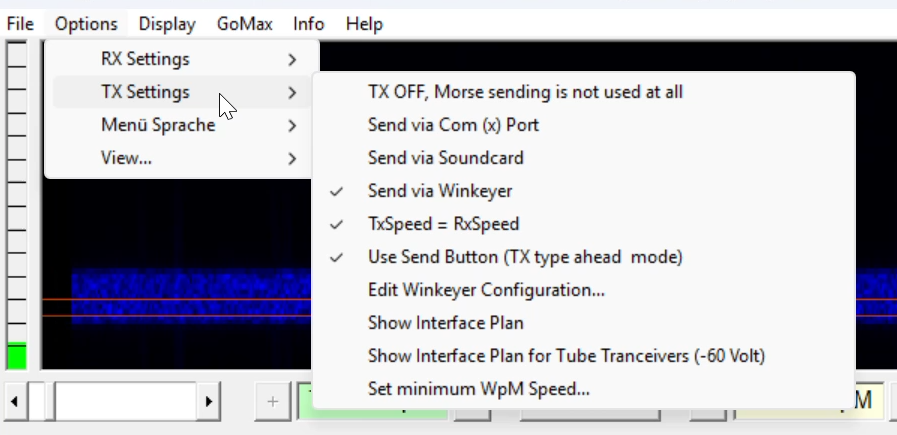
vy73 55 Klaus2 -
Klaus.....thank you so much for helping me with this.Got it working perfectly this morning. I believe this will help a lot of people with Flex Radios, that have this program and cannot get it working.
73
Bruce KO4UHL2


Leave a Comment
Categories
- All Categories
- 393 Community Topics
- 2.2K New Ideas
- 668 The Flea Market
- 8.5K Software
- 174 SmartSDR+
- 6.5K SmartSDR for Windows
- 191 SmartSDR for Maestro and M models
- 450 SmartSDR for Mac
- 276 SmartSDR for iOS
- 266 SmartSDR CAT
- 215 DAX
- 389 SmartSDR API
- 9.5K Radios and Accessories
- 70 Aurora
- 317 FLEX-8000 Signature Series
- 7.2K FLEX-6000 Signature Series
- 981 Maestro
- 58 FlexControl
- 869 FLEX Series (Legacy) Radios
- 952 Genius Products
- 474 Power Genius XL Amplifier
- 349 Tuner Genius XL
- 129 Antenna Genius
- 311 Shack Infrastructure
- 217 Networking
- 474 Remote Operation (SmartLink)
- 143 Contesting
- 833 Peripherals & Station Integration
- 146 Amateur Radio Interests
- 1.1K Third-Party Software