SmartSDR v4.1.5 | SmartSDR v4.1.5 Release Notes
SmartSDR v3.10.15 | SmartSDR v3.10.15 Release Notes
The latest 4O3A Genius Product Software:
The latest 4O3A Genius Product Software and Firmware
If you are needing assistance with FlexRadio products, please refer to the product documentation or check the Help Center for known solutions. Need technical support from FlexRadio? It's as simple as creating a HelpDesk ticket.
Do I need to upgrade to get NRF on a new 8400 all but the first 3 are grayed out

Answers
-
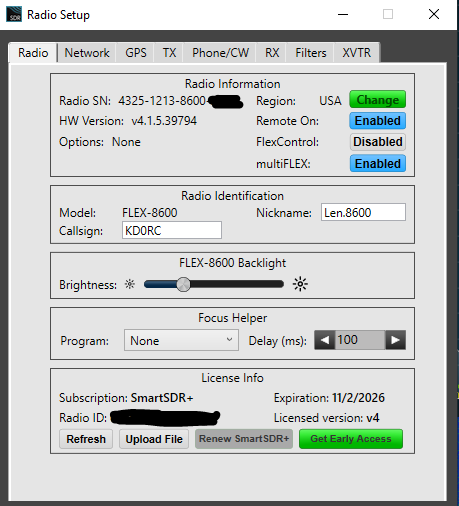
Hi Andy, The radio ships with the basic version of the latest software. To get the additional functionality, you need to purchase SmartSDR+. Go to Settings, Radio Setup, Radio tab. At the bottom you will see two green buttons, one to get SmartSDR+ and one to get SmartSDR+ Early Access. The Early Access option is $100 more, but gets you immediate access when a new version is released instead of waiting for 30 days. Be sure to only pick one option. Since 4.1.15 was released more than 30 days ago, it would be available now with either license option.
The SmartSDR+ license gets you free functionality upgrades for a year. Bug fix releases are free. If you don't renew the SmartSDR+ license after a year, you still keep anything that you already purchased.
From the Flex website:
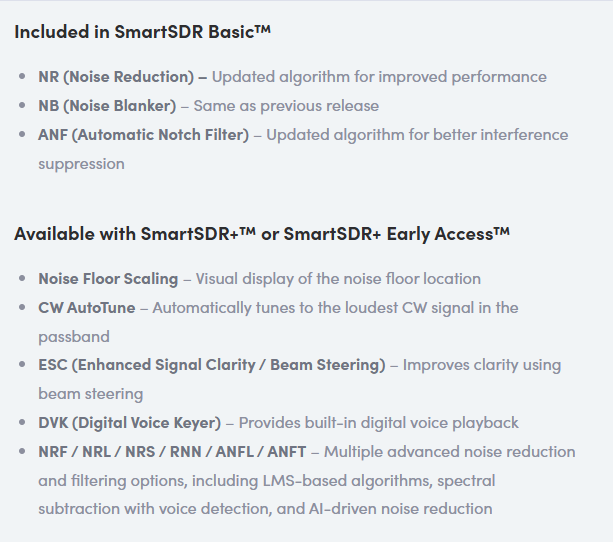
All of this is available on the 8400 except for ESC - that one requires an 8600 with its dual SCUs.
0 -
Are you sure about the price difference? I thought the promotional pricing ended. And that Plus is $199 and Early Access is $299.
James
WD5GWY
0 -
Sorry, I corrected it to show $100 more.
1



Leave a Comment
Categories
- All Categories
- 388 Community Topics
- 2.2K New Ideas
- 658 The Flea Market
- 8.4K Software
- 156 SmartSDR+
- 6.5K SmartSDR for Windows
- 186 SmartSDR for Maestro and M models
- 439 SmartSDR for Mac
- 275 SmartSDR for iOS
- 265 SmartSDR CAT
- 204 DAX
- 386 SmartSDR API
- 9.4K Radios and Accessories
- 53 Aurora
- 297 FLEX-8000 Signature Series
- 7.2K FLEX-6000 Signature Series
- 970 Maestro
- 58 FlexControl
- 866 FLEX Series (Legacy) Radios
- 944 Genius Products
- 471 Power Genius XL Amplifier
- 347 Tuner Genius XL
- 126 Antenna Genius
- 306 Shack Infrastructure
- 215 Networking
- 468 Remote Operation (SmartLink)
- 142 Contesting
- 811 Peripherals & Station Integration
- 144 Amateur Radio Interests
- 1.1K Third-Party Software