SmartSDR v4.1.5 | SmartSDR v4.1.5 Release Notes
SmartSDR v3.10.15 | SmartSDR v3.10.15 Release Notes
The latest 4O3A Genius Product Software:
The latest 4O3A Genius Product Software and Firmware
If you are needing assistance with FlexRadio products, please refer to the product documentation or check the Help Center for known solutions. Need technical support from FlexRadio? It's as simple as creating a HelpDesk ticket.
SmartSDR V4 and DVK ISSUES

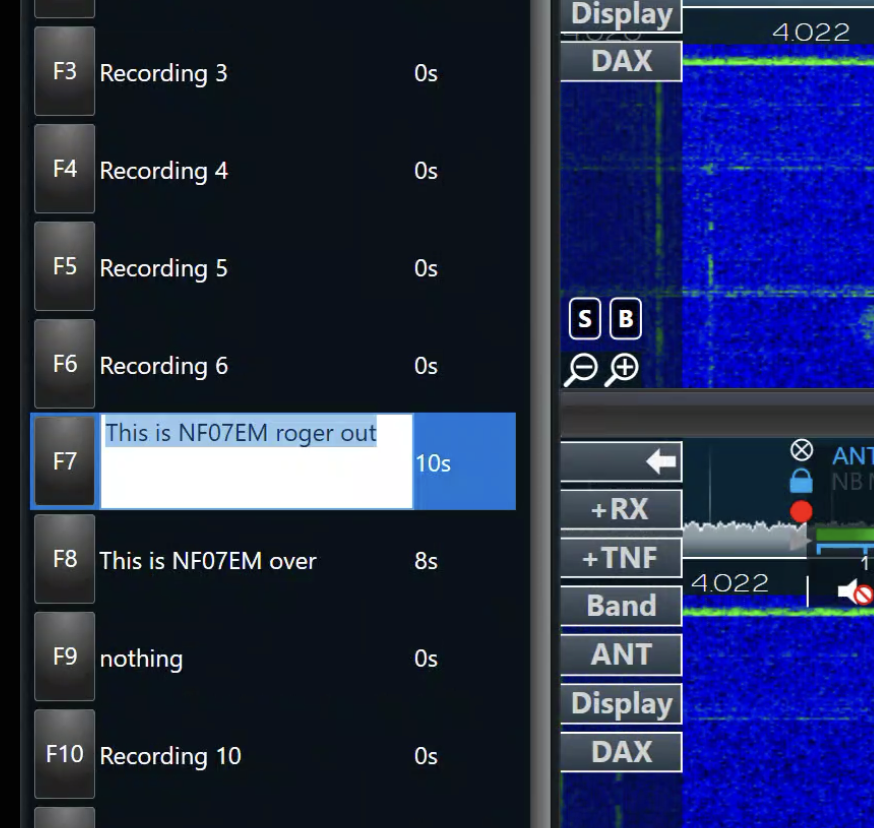
Two questions. First, I can’t get my function buttons on the keyboard (F1, F2, etc) to work with DVK. I have shortcuts enabled. I can transmit my message by clicking on the indicated F button just to the left of the associated message. But pushing the F1 button for message 1 on the keyboard does nothing. I have confirmed that the function buttons on the keyboard are not locked.
Second, I would like to rename each of the 12 messages to some other name, like CALLSIGN. Any suggestions as to how I can do this renaming or is it not possible at this time?
Answers
-
- If you have a laptop you probably need to press the FN to activate the real Function keys. F Keys works perfectly..
- Just click where it says recording #, and you can rename it.
 0
0 -
NF07EM?
0 -
Sorry but no. I’m not using a laptop. I know my keyboard function keys like F1 are working since they work in other programs, just not with DVK. Also, when I click on the recording # area, it won’t let me type in different verbiage. Thanks for your suggestions.
0 -
@Gary Robertson - KY5R If possible, try another client. For me, F1 to F12 work perfectly. I do hate hearing myself each time I press them, but I just wanted to let you know that they work fine for me.
@Geoff AB6BT Yes those are government call signs.
0 -
Thanks Geoff. I went back into DVK and did what you suggested. Amazing, everything is working now. Maybe you’re Santa and brought me an early Christmas present. I truly appreciate the help!!!!
1 -
Gary…Glad to help when I can but it wasn't me!
flexed…I learn something every day, thanks!
0 -
Unfortunately, I still can’t get the shortcut function keys (F1-F12, etc) to work with my DVK on the latest SmartSDR+ version 4 software on my Flex6500. I’ve been able to record my callsign in Recording 1 and a CQ in Recording 2 and transmit each of them by using my mouse to click on the F1 or F2 icons just to the left of each Recording box. However, with shortcuts enabled, nothing happens (no transmit) if I press the appropriate F key on top of the keyboard. I’ve tried simultaneously pressing the function+esc keys to lock/unlock the function keys but it makes no difference. Interesting, the function keys seem to work just fine with other window 11 applications.
Is this a bug in SmartSDR V4? Do I need to reset my Flex6500 or do a cold reboot? Any suggestions would be appreciated. I might note that renaming Recording 1 or any of the other Recording labels is ultimately doable, but it is a pain.
0 -
I do not see one step or setting that I know I had to do when I first tried the DVK. Have you Highlighted or Turned on VOX. I now I could not send out my recorded "CQ" but selected or turned on VOX and everything started to work as I thought it would. Just thought that I read all above and did not see that mentioned. Good luck.
Richard - N4RWG
0 -
Do you have any other software running that uses F1 keys, FRStack, N1MM etc if so they may have already taken control of the F keys you are trying to use with the DVK, this would stop the DVK from functioning.
0 -
My logging program uses F keys. I’ll try DVK with logging application off.
0





Leave a Comment
Categories
- All Categories
- 388 Community Topics
- 2.2K New Ideas
- 658 The Flea Market
- 8.4K Software
- 156 SmartSDR+
- 6.5K SmartSDR for Windows
- 186 SmartSDR for Maestro and M models
- 439 SmartSDR for Mac
- 275 SmartSDR for iOS
- 265 SmartSDR CAT
- 204 DAX
- 386 SmartSDR API
- 9.4K Radios and Accessories
- 53 Aurora
- 297 FLEX-8000 Signature Series
- 7.2K FLEX-6000 Signature Series
- 970 Maestro
- 58 FlexControl
- 866 FLEX Series (Legacy) Radios
- 944 Genius Products
- 471 Power Genius XL Amplifier
- 347 Tuner Genius XL
- 126 Antenna Genius
- 306 Shack Infrastructure
- 215 Networking
- 468 Remote Operation (SmartLink)
- 142 Contesting
- 811 Peripherals & Station Integration
- 144 Amateur Radio Interests
- 1.1K Third-Party Software