SmartSDR v4.1.5 | SmartSDR v4.1.5 Release Notes
SmartSDR v3.10.15 | SmartSDR v3.10.15 Release Notes
The latest 4O3A Genius Product Software:
The latest 4O3A Genius Product Software and Firmware
If you are needing assistance with FlexRadio products, please refer to the product documentation or check the Help Center for known solutions. Need technical support from FlexRadio? It's as simple as creating a HelpDesk ticket.
Recommendation for a future update ... Indication for ANF, NRL, ANFL, and ANFT

On the 6400, to activate the new ANF, NRL, ANFL, and ANFT, you need to do this via the DSP button.
However, once you turn any of these on and click on the DSP button, you do NOT know what feature you activated. IMHO, it would be useful if we had a "flag" to remind us that we have one or more of these features activated.
Today, NB, NR, and ANF turn blue in the RX window, but nothing when the newer features are activated
Suggestions:
- Keep the DSP button "blue" when one or more are activated
- On then 6400, there is empty space below the filter BW graph (might be used on the 8xxx)
Comments
-
… or do like for WNB and display it on the top of the screen :-)
1 -
The buttons in the DSP will go from grey to blue when activated ( on or off).
0 -
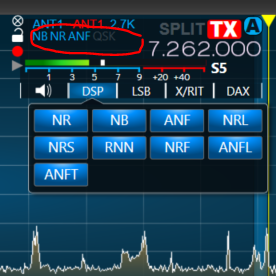
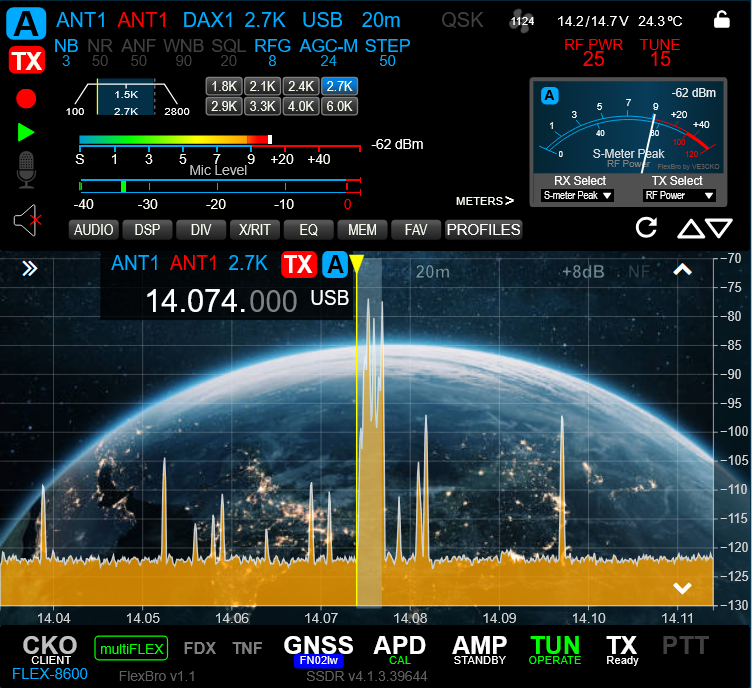
Bruno has a good point. Only so much room in the gui as it sits. In the screenshot I've enabled all DSP features and the gui only shows NB, NR and ANF. My guess is they are already working on reworking the whole slice flag across the platforms. Not a huge deal just tedious relocating items and to keep with a desirable look and feel. In a development project I'm working on I have done this countless times. See 2nd screenshot of my current display. As you can see I have not yet completed upgrading to all v4 features.
As per the keeping the DSP blue button on when any DSP feature is enabled I think it would just add confusion, as the purpose of that row of buttons is to open/close the feature window for said feature.
 2
2 -
@Mike VE3CKO that 2nd screenshot looks awesome.
2 -
I could live with the interface looking like the second photo.
James
WD5GWY
So Mike, when are you going to release your new application?
0 -
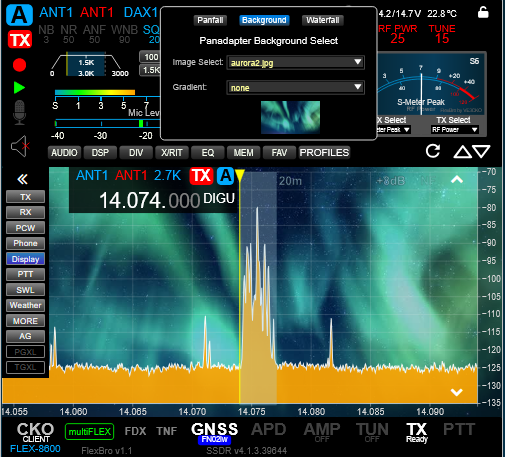
@Mike VE3CKO How did you create that background on the slice? Second Print screen….
0 -
Don't want to hijack the thread. Been working on this on/off for some time now. I'll try and get a demo video together start up a new thead. What you see is not specific to any platform, it's available on my LAN with any device with a browser. Saying that the browser on my Samsung TV can't handle the javascript. The background is selectable from either gradient swatches or a list of images placed a directory. The background is simply layered css.
 3
3 -
How to purchase this new GUI client?
0 -
@Mike VE3CKO I see, so it’s your own GUI using their API. I thought it was something to do with the radio itself. Thanks.
0




Leave a Comment
Categories
- All Categories
- 387 Community Topics
- 2.2K New Ideas
- 658 The Flea Market
- 8.4K Software
- 155 SmartSDR+
- 6.5K SmartSDR for Windows
- 186 SmartSDR for Maestro and M models
- 438 SmartSDR for Mac
- 275 SmartSDR for iOS
- 265 SmartSDR CAT
- 203 DAX
- 385 SmartSDR API
- 9.4K Radios and Accessories
- 52 Aurora
- 297 FLEX-8000 Signature Series
- 7.2K FLEX-6000 Signature Series
- 969 Maestro
- 58 FlexControl
- 866 FLEX Series (Legacy) Radios
- 944 Genius Products
- 471 Power Genius XL Amplifier
- 347 Tuner Genius XL
- 126 Antenna Genius
- 306 Shack Infrastructure
- 215 Networking
- 468 Remote Operation (SmartLink)
- 142 Contesting
- 811 Peripherals & Station Integration
- 144 Amateur Radio Interests
- 1.1K Third-Party Software