SmartSDR v4.2.20 | SmartSDR v4.2.20 Release Notes
SmartSDR v3.10.15 | SmartSDR v3.10.15 Release Notes
The latest 4O3A Genius Product Software:
The latest 4O3A Genius Product Software and Firmware
If you are needing assistance with FlexRadio products, please refer to the product documentation or check the Help Center for known solutions. Need technical support from FlexRadio? It's as simple as creating a HelpDesk ticket.
How to enable noise floor scaling

Probably cockpit error on my part, but I am not seeing a way to enable this feature. Just updated to 4.1.3 on my 6700. Was expecting to see a menu item in the "Display" tab on the panadapter. Appreciate a hint on this. The new noise filter options are working fine. Thanks!
73, Tom
K1FR
Best Answer
-
Hi Tom
This is only available for 8000 series and Aurora radios so guessing that's why nothing appears for the 6700.
 0
0


Answers
-
Thanks, Rich! I missed that totally. 73, Tom
0 -
BUT, if you did have that feature it couod be enabled and adjusted in the DISPLAY tab on left side of the SSDR screen.
Personally I just grab the right side of the waterfall screen with a left mouse click and drag the noise floor to where I like it. I like to leave it up a bit in the waterfall display to allow for 3 levels of spots to display. :))
YMMV. Happy Holidays de K1UO Larry
0 -
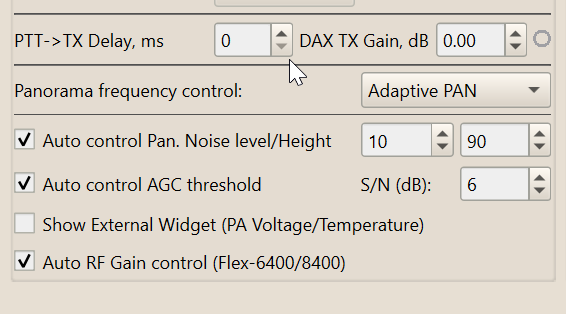
If you have SDC, you can have this on any Flex radio. Also, the implementation and effectiveness is superior to that in SSDR.
 0
0 -
Hi Eric, did you find AGC threshold is a good value? It is about 40+ on AGC-T that I find a bit high. I am using AGC threshold around 23-27, that is about 30 on AGC-T.
Sergey
0 -
Hello Sergey
It will depend on your receive environment.
I went through the Flex tutorial to find the optimum RF Gain for each band. This is important because if you have this wrong, an incorrect AGC-T will ensue. Then I checked manually for the optimum AGC-T and came to a setting of 6 dB in SDC that set AGC-T to around 50 for every band. I checked manually if adjusting AGC-T from the SDC calculated value was better or worse but actually is was spot on in my case.
So now I don't have to consider AGC-T at all. I change bands, SDC recalculates and I get the optimum receiver performance in all cases.
The more noise you have, the likelihood is that AGC-T will be calculated at a lower value because you only want gain on signals and not on noise (which you know). A common error, not saying this is your case, is to set RF Gain too high. AGC-T reduces to compensate but in this scenario I feel that receiver performance is compromised. I'm no expert, many will have opposite opinions, just that this is what I find in my environment.
0 -
Thank you Eric, I just updated to Ver 19.03 and missed "Auto RF Gain Control" option.
Generally at my location i tested AGC-T for a long time and optimal is about 30 for most of the bands and it will correspond with SDC AGC threshold around 23. But I need to play with that more for sure.
73! Sergey
0




Leave a Comment
Categories
- All Categories
- 401 Community Topics
- 2.2K New Ideas
- 689 The Flea Market
- 8.6K Software
- 197 SmartSDR+
- 6.6K SmartSDR for Windows
- 200 SmartSDR for Maestro and M models
- 460 SmartSDR for Mac
- 279 SmartSDR for iOS
- 268 SmartSDR CAT
- 220 DAX
- 395 SmartSDR API
- 9.6K Radios and Accessories
- 109 Aurora
- 348 FLEX-8000 Signature Series
- 7.2K FLEX-6000 Signature Series
- 999 Maestro
- 58 FlexControl
- 872 FLEX Series (Legacy) Radios
- 975 Genius Products
- 482 Power Genius XL Amplifier
- 358 Tuner Genius XL
- 135 Antenna Genius
- 322 Shack Infrastructure
- 227 Networking
- 483 Remote Operation (SmartLink)
- 145 Contesting
- 847 Peripherals & Station Integration
- 147 Amateur Radio Interests
- 1.1K Third-Party Software