SmartSDR v4.1.5 | SmartSDR v4.1.5 Release Notes
SmartSDR v3.10.15 | SmartSDR v3.10.15 Release Notes
The latest 4O3A Genius Product Software:
The latest 4O3A Genius Product Software and Firmware
If you are needing assistance with FlexRadio products, please refer to the product documentation or check the Help Center for known solutions. Need technical support from FlexRadio? It's as simple as creating a HelpDesk ticket.
FT8 and FT4 Simultaneously

I hace 2 panadapters on 15 Meters. And 2 instances of WSJT-X. One is FT4 and the other is FT8.
When I make a transmission on FT8 the transmission is stopped halfway through at the end of the FT4 cycle.
How do I fix that?
Answers
-
the radio cannot transmit on two frequencies at the same time.
73 Dave wo2x0 -
I uinderstand that. I'll rephrase my question.
I am monitoring 2 instances of WSJT-X on 15 meters, one configured for FT8, slice A, and the other for FT4 slice B. Each one has its own panadaptor.
Slice A is set as TX. When I transmit using FT8 on slice A, the transmission is stopped about halfway through at the end of the FT4 cycle. I am not trying to transmit on slice B.
I launchjed the 2 instances of WSJT-X using Slice Master. I did notice that SM changed the radio ports in WSJT-X. I have 2 TCP CAT ports designated for the 2 instances, Slice A is 5002, and slice B is 5003. When I use SM to launch WSJT-X it changes the ports to 7381 and 7382 respectively.
Any clues?
0 -
I see that SM does change the ports as mentioned in my previous message. So, I don't suppose that is of any concern.
I'm still trying to track down the FT8/FT4 problem.
I'd really appreciate any assistance.
Thanks!
0 -
have you tried to just create two TCP ports in SSDR CAT? 5002 for slice A and 5003 for slice B. Then create separate shortcuts for slice A and B following this video.
https://youtu.be/muYUYfaU02c?si=xkeScEQgwdKC3YwTThis will test to see where problem is located.
I do not use SliceMaster.73 Dave wo2x
0 -
Dave…That's worth a try. I remember looking at that a while ago and I belive I gave it a shot. Frankly I don't remember the outcome.
Some folks were raving about how using SliceMaster was the way to start multiple instances of WSJT-X so I thought I'd givre it a try.
I'm off to work this AM but hopefully I'll have time this evening to check it out.
0 -
Well, I did set up icons for 2 slices per the video, both on 15 meters in their own panadapters. One on FT8 and one on FT4. With both instances of WSJT-X open, Transmitting on the FT8 slice terminates after 6 seconds, the end of an FT4 cycle.
So…the behavior is the same.
Any Ideas?
0 -
I'm going to try 2 slices in 1 panadapter to see if anything works differently.
We'll see.
0 -
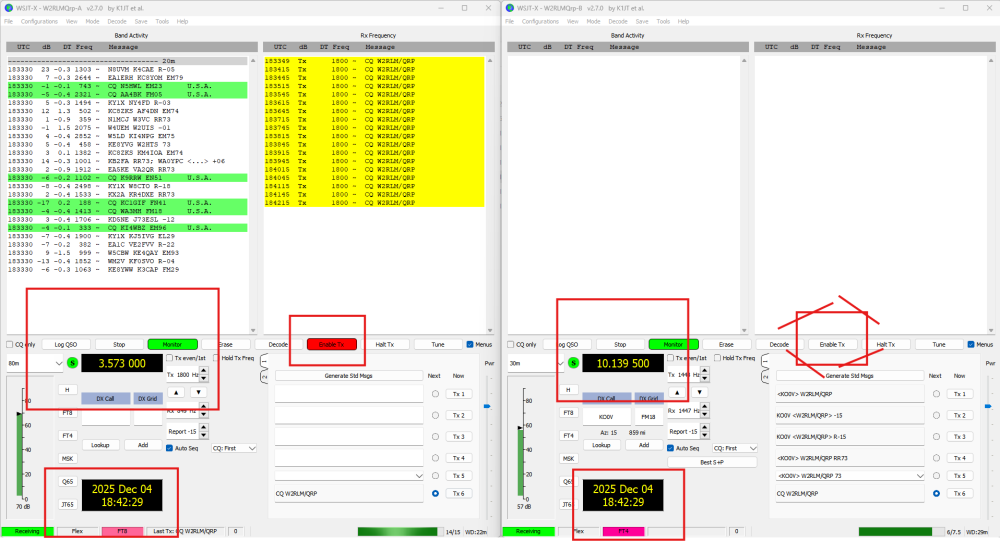
@Geoff AB6BT It appears that both instances of WSJT-X are attempting to transmit at the same 15-second interval, which needs to be adjusted. For example, configure WSJT-X A to transmit at 00 while WSJT-X B receives at 00, then have B transmit while A receives. Ensure the highlighted settings are changed so they are not identical on both instances.
Make sure Full Duplex is enabled. Also, if you’re using two antennas, check that the bands aren’t interfering with each other. Depending on the antenna locations, BandBypass might not provide adequate protection.

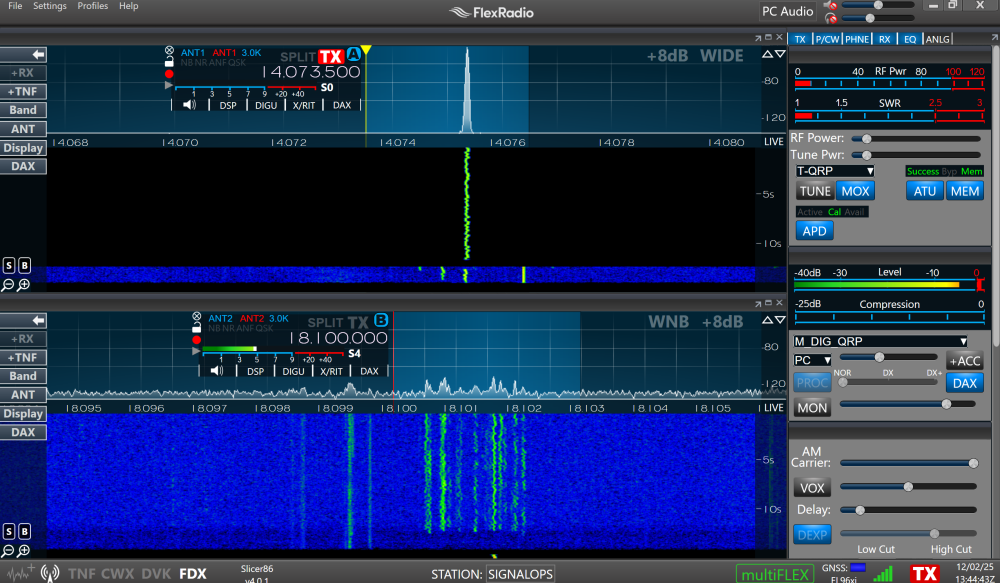
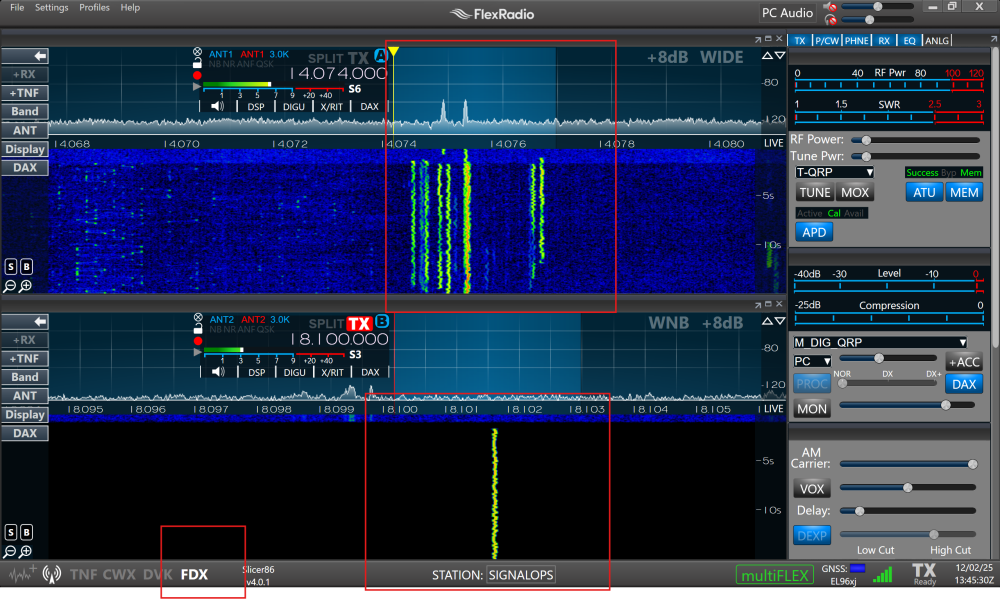
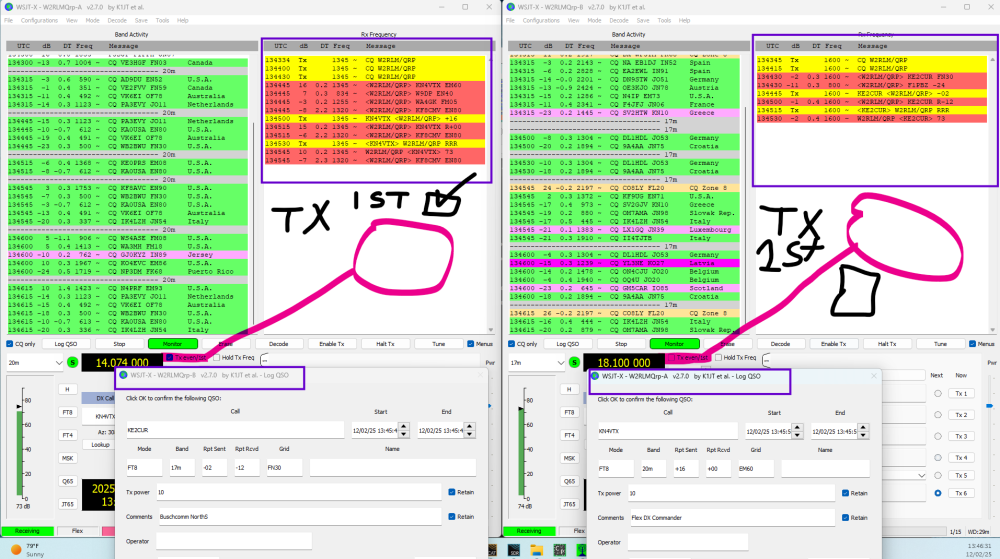
Look at this, I even received a QSO on 20m and 17m. What a great example—enjoy it!
[ ] Tx even/1st is checked on the left, but unchecked on the second instance. I can receive and transmit on both, but only transmit one at time.
0 -
BTW, I'm not using slice master for this setup.
0 -
Flexed…Thanks for the ideas. I have tried this with and without Slice Master. the results are the same
I was never trying to transmit on the FT4 frequency and the radio never looks as though it is transmitting on the FT4 frequency.
I do not have full Duplex enabled.
I'm not sure if one is odd and the other even, I'll have to check later. I'm not sure why this would make a difference in my example.
What seems odd to me is that FT8 transmisssion stops at the 6 second mark of the FT4 slice. That is before the transmit cycle begins.
I'll try your suggestions later today.
0 -
@Geoff AB6BT I have run into this before, trust me it's that check box. Anyways try it an let us know. Full duplex will allow to listen while you are transmitting, but I'm not 100% if it is on the same BAND will be the same. With 2 Antennas while my 20Meters is transmitting I'm listening on my 17Meters, so depending of what are its your goal you might need Full Duplex.
0 -
Wednesday update…
The same condition exists as before after making the following changes:
I selected 1st for FT8 and 2nd for FT4. FT8 slice is TX and FDX enabled.
FT8 transmission is stopped (no RF output) at the 6 second mark.
One thing I hadn't noticed is that while the RF output stops, the WSJT-X progress bar continues to move to the right in TX mode. Does that make sense?
0 -
Are you on the same Bands? If not, could you try out different bands? For example, let’s try 20m FT8 Instance 1 and 30m FT4. If you can send a video, that would be great! I can duplicate it at my station.
0 -
The issue you are having is for two cycles of FT8 there are 4 cycles of FT4. (FT8 at :00 and :30 while FT4 at :00, :15, :45
So if FT8 were to start transmitting and FT4 started receiving, half way through the FT8 transmit cycle FT4 will want to start transmitting.
If your goal is to have FT4 and FT8 both calling CQ, it will not work. You can however have two slices open to have one listening to FT4 and the other FT8.
0 -
OK, I guess I'm not explaing what I'm seeing.
I was never attempting to transmit FT4. I was transmitting only on the FT8 frequency and listening on the FT4 frequency.
That is why I don't understand why the FT8 transmission is truncated halfway through when the FT4 slice is receiving only.
0 -
@Geoff AB6BT Which radio do you have and how many antennas?
0 -
8600. I was using a C4 for the two 15M frequencies. I have others but they were not in play.
0 -
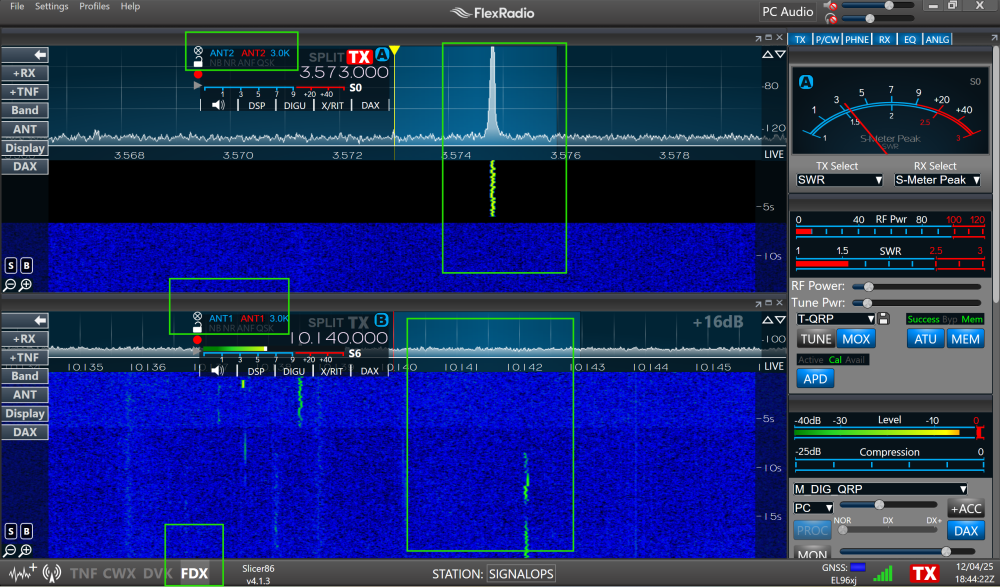
Check this out FT8 transmitting and FT4 listening keep in mind that while FT8 is TXing FT4 will stop listening. If you want FT4 to listen the full time then you need two antenna, and full duplex on.
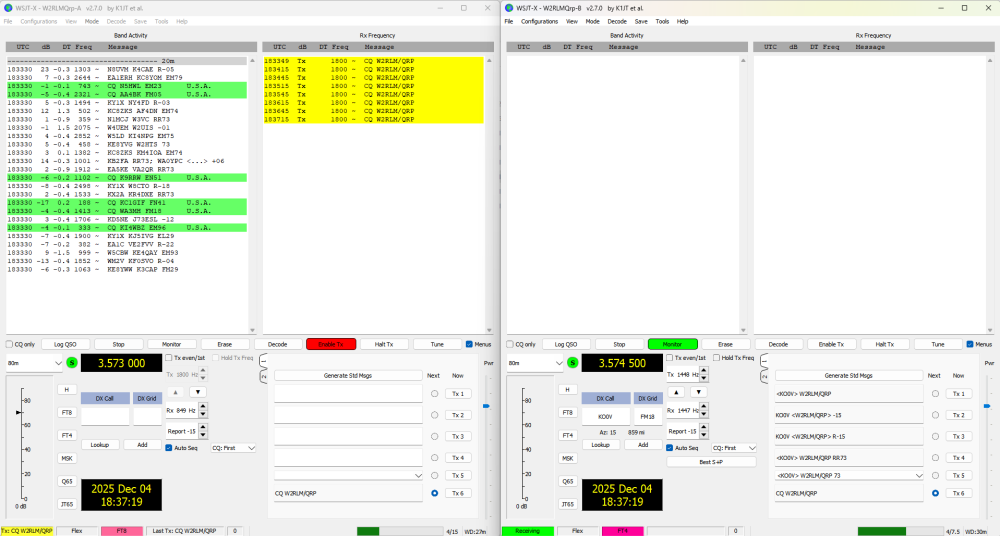
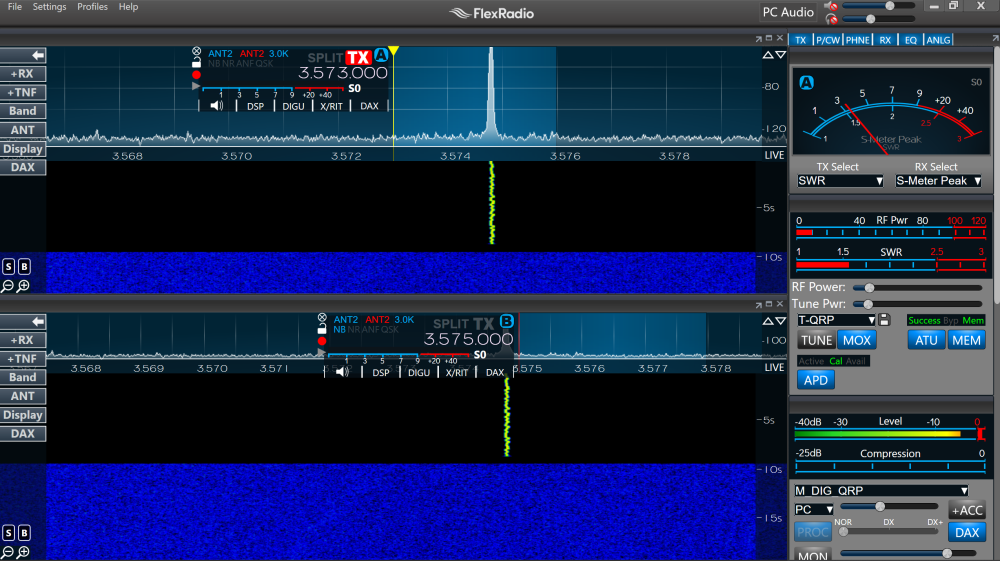
Here is the view with two antennas an full duplex Slice 2 will never be stopped from receiving but you need Full Duplex on and another antenna at least that's my way of doing it. Hope this make sense
 0
0 -
I appreciate you taking time to reply with your setup.
I still do not have an answer to my question regarding what is causing the FT8 transmission to stop.
0 -
More data…
I have slice A on 20M SSB, 14.215 USB. I open the WSJT-X instance configured for FT4 without opening a new slice. There is no slice B.
The CAT TCP port set for the slice B, 5003, shows "Not Present".
At the end of the FT4 cycle, the radio changes frequency from 14.215 to 21.140.
But this only happens when The FT8 instance of WSTT-X is open and configured on slice A at 21.074. Also, The FT8 instance changes frequency to 21.140!
If I manually switch back to 20M the same thing occurrs.
Confusing HUH!
What the heck is going on?
0 -
I'm bumping this with the hope that someone besides me has experienced the same problem.
I'd open a support ticket but I'm sure they are pretty busy…
Thanks in advance.
0 -
Update.
I believe I've found the cause of truncated FT8 transmissions.
I found that if I exit ACLog the FT8 transmission runs to completion.
I have emailed Scott. Hopefully he will have a solution.
0 -
Scott replied that he doesn't have a solution…😕
0



Leave a Comment
Categories
- All Categories
- 388 Community Topics
- 2.2K New Ideas
- 658 The Flea Market
- 8.4K Software
- 156 SmartSDR+
- 6.5K SmartSDR for Windows
- 186 SmartSDR for Maestro and M models
- 439 SmartSDR for Mac
- 275 SmartSDR for iOS
- 265 SmartSDR CAT
- 204 DAX
- 386 SmartSDR API
- 9.4K Radios and Accessories
- 53 Aurora
- 297 FLEX-8000 Signature Series
- 7.2K FLEX-6000 Signature Series
- 970 Maestro
- 58 FlexControl
- 866 FLEX Series (Legacy) Radios
- 944 Genius Products
- 471 Power Genius XL Amplifier
- 347 Tuner Genius XL
- 126 Antenna Genius
- 306 Shack Infrastructure
- 215 Networking
- 468 Remote Operation (SmartLink)
- 142 Contesting
- 811 Peripherals & Station Integration
- 144 Amateur Radio Interests
- 1.1K Third-Party Software