SmartSDR v4.1.5 | SmartSDR v4.1.5 Release Notes
SmartSDR v3.10.15 | SmartSDR v3.10.15 Release Notes
The latest 4O3A Genius Product Software:
The latest 4O3A Genius Product Software and Firmware
If you are needing assistance with FlexRadio products, please refer to the product documentation or check the Help Center for known solutions. Need technical support from FlexRadio? It's as simple as creating a HelpDesk ticket.
Receiving this error repeatably


Comments
-
This exception is preventing me from using SmartSDR 4.0.1. SmartSDR crashes directly after this exception is displayed
0 -
Hi Doug, try a factory reset after exporting your profiles. I'm pretty sure that will fix it. If it doesn't, then submit a help desk ticket.
0 -
You might try a factory reset of the radio…
AL, K0VM
0 -
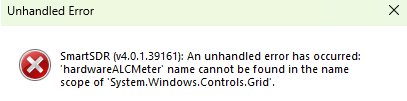
This suggests the error is software.
1 -
But if it's because of a corrupted data base leading to a software error, that is good info for the programmers to know. A factory reset clears the database. And it would get you back in business.
AL, K0VM
0 -
Al is correct. I had one today concerning CAT but I had been playing with ports so a radio reset cleared out the EXCEPTION.
Lar, K1UO
0 -
It is a software bug (SMART-11479) related to the Hardware ALC function. The factory reset would turn that off, which is why that bandaid likely has helped some.
If you are intending to use the Hardware ALC function, you may need to back down to v3.8 which didn't have this version or wait until a fix is available.
0 -
I have a similar problem with a similar error message except it is a function of frequency and method of entry. I am attaching my notes and maybe someone can suggest solutions. I'll open a ticket in a day or two if I cannot sort this one. The radio is useable but with these error depending on frequency.
0 -
Hi Lionel, if you haven't already, export your profiles and do a factory reset. If that doesn't help, submit a help desk ticket.
0 -
Thanks Len. I've done that a couple of times and no improvement. I just now had the 6400 crash but no comm loss error. Odd. At the time of the crash the data rate on the 6400 showed excellent with <10ms latency.
I'll do the factory reset again, maybe third time is a charm.
Curiouser and curiouser….I think I am having fun today, true.
And if all else fails, and I am afraid it will, then off to the ticket we go.
Thanks Len
73 Lionel N5LB
0






Leave a Comment
Categories
- All Categories
- 388 Community Topics
- 2.2K New Ideas
- 658 The Flea Market
- 8.4K Software
- 156 SmartSDR+
- 6.5K SmartSDR for Windows
- 186 SmartSDR for Maestro and M models
- 439 SmartSDR for Mac
- 275 SmartSDR for iOS
- 265 SmartSDR CAT
- 204 DAX
- 386 SmartSDR API
- 9.4K Radios and Accessories
- 53 Aurora
- 297 FLEX-8000 Signature Series
- 7.2K FLEX-6000 Signature Series
- 970 Maestro
- 58 FlexControl
- 866 FLEX Series (Legacy) Radios
- 944 Genius Products
- 471 Power Genius XL Amplifier
- 347 Tuner Genius XL
- 126 Antenna Genius
- 306 Shack Infrastructure
- 215 Networking
- 468 Remote Operation (SmartLink)
- 142 Contesting
- 811 Peripherals & Station Integration
- 144 Amateur Radio Interests
- 1.1K Third-Party Software