SmartSDR v4.2.20 | SmartSDR v4.2.20 Release Notes
SmartSDR v3.10.15 | SmartSDR v3.10.15 Release Notes
The latest 4O3A Genius Product Software:
The latest 4O3A Genius Product Software and Firmware
If you are needing assistance with FlexRadio products, please refer to the product documentation or check the Help Center for known solutions. Need technical support from FlexRadio? It's as simple as creating a HelpDesk ticket.
RTTY no Monitor

This is with an 8600 and Windows PC, SSDR 3.10.10.
I'm using MMTY and I've lost monitor audio. As often, it was working yesterday. I am transmitting a singal but the monitor function is not working.
Yes, the MON button is Blue…
I restarted DAX, the radio, and the PC.
Any suggestions?
Answers
-
Anyone out there have a clue???
0 -
Are you definitely transmitting? You can see the signal on the panadapter in SmartSDR?
Sometimes with MMTTY the TX channel resets so then it doesn't actually transmit.
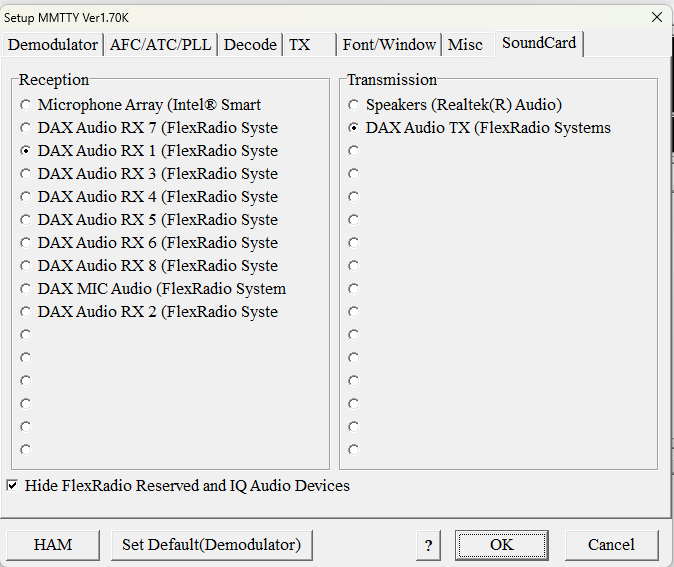
Make sure you have DAX Audio TX set for transmission in MMTTY.
 0
0 -
Rich…Thanks for that but, yes, I am transmitting, I have no trouble completing contacts.
So, still at a loss.
0 -
Save your profiles and do a reset - turn off the Flex and then when turning on, hold the power button in for a few seconds until the power button goes white then release. This has been recommended for alsorts of issues. Just make sure you document any settings as it wipes them.
Second to that, open a call with Flex support.
0 -
Hi Rich, before doing the factory reset, export your profiles. After the reset, re-import them and your radio will have the settings (memories, profiles, etc) restored.
0 -
Good idea. I have found that a full reset has resolved other problems in the past.
I was thinking that it was something I had not configured correctly.
I'll try it this afternoon.
0 -
Here's what I found…after the export, reset, and import, I still did not have any audio monitor in RTTY mode.
I deleted the RTTY Microphone profile I was using and manually set it up again for RTTY. That worked. I saved a new profile.
So…I'm not entirely clear of the cause as all configurations in the radio panel looked identical.
All good now…
0



Leave a Comment
Categories
- All Categories
- 401 Community Topics
- 2.2K New Ideas
- 689 The Flea Market
- 8.6K Software
- 196 SmartSDR+
- 6.6K SmartSDR for Windows
- 200 SmartSDR for Maestro and M models
- 460 SmartSDR for Mac
- 279 SmartSDR for iOS
- 268 SmartSDR CAT
- 220 DAX
- 395 SmartSDR API
- 9.6K Radios and Accessories
- 109 Aurora
- 348 FLEX-8000 Signature Series
- 7.2K FLEX-6000 Signature Series
- 999 Maestro
- 58 FlexControl
- 872 FLEX Series (Legacy) Radios
- 975 Genius Products
- 482 Power Genius XL Amplifier
- 358 Tuner Genius XL
- 135 Antenna Genius
- 322 Shack Infrastructure
- 227 Networking
- 483 Remote Operation (SmartLink)
- 145 Contesting
- 847 Peripherals & Station Integration
- 147 Amateur Radio Interests
- 1.1K Third-Party Software