SmartSDR v4.2.20 | SmartSDR v4.2.20 Release Notes
SmartSDR v3.10.15 | SmartSDR v3.10.15 Release Notes
The latest 4O3A Genius Product Software:
The latest 4O3A Genius Product Software and Firmware
If you are needing assistance with FlexRadio products, please refer to the product documentation or check the Help Center for known solutions. Need technical support from FlexRadio? It's as simple as creating a HelpDesk ticket.
SmartSDR for iOS Mic level to high after SmartSDR 3.9.18 update.

After installing SmartSDR 3.9.18 on my Flex 6600 the Mic level on my IPAD, with the latest level updates, the mic level does not go low enough to allow using any compression. I now have the level set to 1 to not overdrive the radio.
Also noticed my Power setting was changed to 100watts which was previously set to 40 watts.
Comments
-
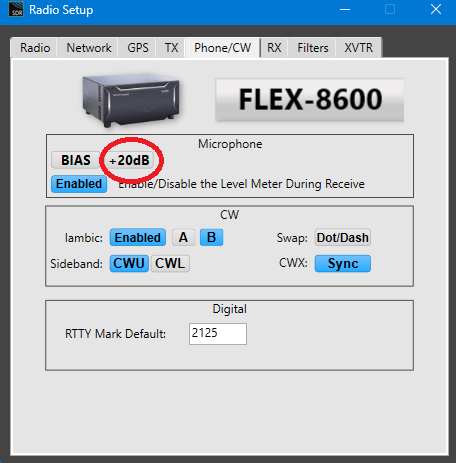
Did mic boost become enabled ??
AL, K0VM
0 -
0
-
I discovered that the controls, required to re-adjust the IPAD Mic, are only visible if the app is in “iPad Audio” mode. I normally operate with the "iPad audio", OFF. this enables audio going to the Radio speaker output. In that mode the IPAD microphone controls are no longer available.
When I use the IPAD locally, there is no access to the IPAD Mic level controls. This might be an area of improvement for SmartSDR IOS. Now that I figured this out I can switch to “Ipad Audio” ON, make the adjustments, and switch back to “Ipad Audio” OFF, to Operate.
0


Leave a Comment
Categories
- All Categories
- 401 Community Topics
- 2.2K New Ideas
- 691 The Flea Market
- 8.6K Software
- 197 SmartSDR+
- 6.6K SmartSDR for Windows
- 200 SmartSDR for Maestro and M models
- 462 SmartSDR for Mac
- 280 SmartSDR for iOS
- 268 SmartSDR CAT
- 220 DAX
- 395 SmartSDR API
- 9.6K Radios and Accessories
- 113 Aurora
- 352 FLEX-8000 Signature Series
- 7.2K FLEX-6000 Signature Series
- 999 Maestro
- 58 FlexControl
- 872 FLEX Series (Legacy) Radios
- 978 Genius Products
- 484 Power Genius XL Amplifier
- 358 Tuner Genius XL
- 136 Antenna Genius
- 323 Shack Infrastructure
- 228 Networking
- 485 Remote Operation (SmartLink)
- 147 Contesting
- 847 Peripherals & Station Integration
- 148 Amateur Radio Interests
- 1.1K Third-Party Software