Welcome to the FlexRadio Community! Please review the new Community Rules and other important new Community information on the Message Board.
The latest SmartSDR Software:
SmartSDR v4.1.5 | SmartSDR v4.1.5 Release Notes
SmartSDR v3.10.15 | SmartSDR v3.10.15 Release Notes
The latest 4O3A Genius Product Software:
The latest 4O3A Genius Product Software and Firmware
SmartSDR v4.1.5 | SmartSDR v4.1.5 Release Notes
SmartSDR v3.10.15 | SmartSDR v3.10.15 Release Notes
The latest 4O3A Genius Product Software:
The latest 4O3A Genius Product Software and Firmware
How to Receive Technical Support::
If you are needing assistance with FlexRadio products, please refer to the product documentation or check the Help Center for known solutions. Need technical support from FlexRadio? It's as simple as creating a HelpDesk ticket.
If you are needing assistance with FlexRadio products, please refer to the product documentation or check the Help Center for known solutions. Need technical support from FlexRadio? It's as simple as creating a HelpDesk ticket.
TX Spectrum/Waterfall

Conny
Member ✭✭
When you enable "Show TX in Waterfall" what are you actually seeing?
When I transmit CW @ 33W into a dummy load I see this. It does not disappears at lower or higher power, its just peaks at 33W.
Is this what is transmitted out thru the antenna connector, i.e, including the PA, or is this what the DSP "think" it would be?
Have this issues on 14MHz and higher frequencies.
I also constantly (since I got the radio) getting reports that my SSB modulation sounds distorted, like "un-linear" and wide.
Anyone "see" something similar?
Is it normal?
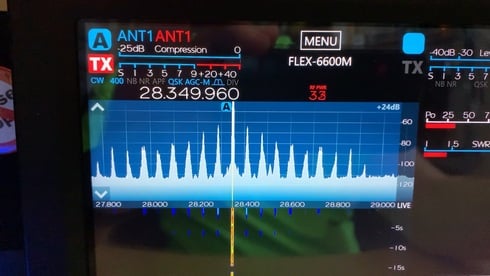
When I transmit CW @ 33W into a dummy load I see this. It does not disappears at lower or higher power, its just peaks at 33W.
Is this what is transmitted out thru the antenna connector, i.e, including the PA, or is this what the DSP "think" it would be?
Have this issues on 14MHz and higher frequencies.
I also constantly (since I got the radio) getting reports that my SSB modulation sounds distorted, like "un-linear" and wide.
Anyone "see" something similar?
Is it normal?
0
Comments
-
Hi Conny -
I would adjust the RX Gain. I get something similar when at 24 DB. If you change the RX gain level, you will see it change dramatically.
I would also suggest you take a look at Ken, NM9P's videos on how to adjust the audio. They made a big difference for me and how I adjusted the radio and how I sound.
https://community.flexradio.com/flexradio/topics/nm9p-videos-on-adjusting-the-flex-6000-series-transmit-audio
Best of luck with the radio. Once you dial it in, the Flex's are awesome.
73 de Tom, N9GUN
0 -
Can I have a different gain setting when I transmit so I actually can see something that represent my transmission when I use the default RX RF gain?0
-
Hi Conny -
That I am not sure on....Maybe others know more. I would also recommend that you review and follow the process on setting the RX Gain preamps per band. The defaults might not be correct for your situation. In other words, more gain might not be better! It turns out I have different settings on each band after following the Flex process.
See below.
https://helpdesk.flexradio.com/hc/en-us/articles/204923669-How-to-determine-the-amount-of-RF-Preamp-...
Tom
0 -
If you are transmitting and if you are running a digital mode. It would seem that you could be over drive via the DAX. The image is a sampling of the transmitted signal on the spectrum. After all the RX is a spectrum analyzer. One of the nice things about the Flex 6000/SmartSDR.0
-
That is normal, you don't have a problem. It is best not to use the panadapter to determine if your TX is clean or muddy.
The reason is, when you transmit several things are mixed into the signal we see on the panadapter. Such as internal noise, and some of the signal that is transmitted is getting back into the radio and this makes the signal on the panadapter look poor, how ever it is important to know what you see is not all going out over the air. This is by design.0 -
Now as for the SSB sounding distorted?
It should be understood that each slider on the EQ works like a gain control. This gain is added to the mic gain under the covers. And the added gain is not shown on in the mic meter.
There are some freq that effect this a lot. The 2K. 4K 8K. They will cause the audio to sound distorted if they are set much above +3. Setting them above +3 is usually to high.
For best sound, set the EQ sliders below 0 or at 0. Also adding to much low end will cause distortion as well.
On the Flex EQ, we want to take away, not add. So if you want more mids and highs, lower the 63 and so on to let the high freq come out more, that is better then adding to the highs.0 -
This was a CW (constant wave) transmission. i.e. just a carrier at the frequency and power setting.0
-
After upgrade and Master Reset, I lost TX in Panafall. What do I enable "TX in Panafall " ?0
-
After upgrade and Master Reset, I lost TX in Panafall.
Where do I enable "TX in Panafall " ?0 -
Under set up,,TX tab, at the bottom of that panel is show TX in Waterfall0


Leave a Comment
Categories
- All Categories
- 389 Community Topics
- 2.2K New Ideas
- 658 The Flea Market
- 8.4K Software
- 157 SmartSDR+
- 6.5K SmartSDR for Windows
- 186 SmartSDR for Maestro and M models
- 439 SmartSDR for Mac
- 275 SmartSDR for iOS
- 265 SmartSDR CAT
- 204 DAX
- 386 SmartSDR API
- 9.4K Radios and Accessories
- 53 Aurora
- 297 FLEX-8000 Signature Series
- 7.2K FLEX-6000 Signature Series
- 971 Maestro
- 58 FlexControl
- 867 FLEX Series (Legacy) Radios
- 945 Genius Products
- 472 Power Genius XL Amplifier
- 347 Tuner Genius XL
- 126 Antenna Genius
- 307 Shack Infrastructure
- 215 Networking
- 468 Remote Operation (SmartLink)
- 142 Contesting
- 811 Peripherals & Station Integration
- 144 Amateur Radio Interests
- 1.1K Third-Party Software