Welcome to the FlexRadio Community! Please review the new Community Rules and other important new Community information on the Message Board.
The latest SmartSDR Software:
SmartSDR v4.2.20 | SmartSDR v4.2.20 Release Notes
SmartSDR v3.10.15 | SmartSDR v3.10.15 Release Notes
The latest 4O3A Genius Product Software:
The latest 4O3A Genius Product Software and Firmware
SmartSDR v4.2.20 | SmartSDR v4.2.20 Release Notes
SmartSDR v3.10.15 | SmartSDR v3.10.15 Release Notes
The latest 4O3A Genius Product Software:
The latest 4O3A Genius Product Software and Firmware
How to Receive Technical Support::
If you are needing assistance with FlexRadio products, please refer to the product documentation or check the Help Center for known solutions. Need technical support from FlexRadio? It's as simple as creating a HelpDesk ticket.
If you are needing assistance with FlexRadio products, please refer to the product documentation or check the Help Center for known solutions. Need technical support from FlexRadio? It's as simple as creating a HelpDesk ticket.
DAX ERROR HAS OCCURRED SmartSDR v2.4.9

Mike - ZL1MRC
Member
Installed the version v2.4.9 on two independent computers after removing all FLEX software include FlexVSP and DAX drivers. In both cases I now get the "An error has occurred while trying to open a DAX sound device"
I checked the sound settings and made sure that only the default (in build) sound devices are set as default.
I have tracked the fault down to the IQ Streams 1 which is giving an error of 'Driver Error'
Checking the Sounds Control Panels shows that DAX IQ RX 1 and DAX IQ RX 3 are missing.
Can any one please assist or should I revert back to the previous version of SmartSDR?
73
Mike ZL1MRC


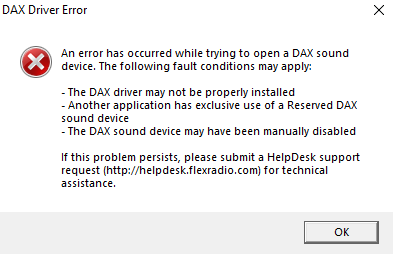
I checked the sound settings and made sure that only the default (in build) sound devices are set as default.
I have tracked the fault down to the IQ Streams 1 which is giving an error of 'Driver Error'
Checking the Sounds Control Panels shows that DAX IQ RX 1 and DAX IQ RX 3 are missing.
Can any one please assist or should I revert back to the previous version of SmartSDR?
73
Mike ZL1MRC
1
Comments
-
Mike -
I have been getting the exact same error on 2.3.9 and 2.4.9. My experience is that reverting back doesn't help. I've gone as far as uninstalling ALL the sound devices on my PC, removing ALL of SmartSDR, etc., but nothing has helped so far. Mine is also on the IQ driver, which I don't currently use so it's not a big deal for me. It first occurred on 2.3.9 when I first tried to enable an IQ channel (by mistake, I meant to click a regular EX channel). The problem (at least on mt installation) appears to be related to trying to use the IQ devices.
I'd love to see a fix.
73 - David, AG4F0 -
Same issue, removed 2.3.9 and installed 2.4.9 In the past perseverance has helped with multiple uninstalls and reinstall. So far nothing has helped.
0 -
After the install I checked and saw that three of the installed DAX devices were using "mangled" device names. after renaming those correctly when I first started DAX, It opened without any errors, and functions. possibly still something leftover from an earlier win 10 update, the same 3 mangled devices have occurred with recent SmartSDR installs. The name mangling was that DAX IQ RX devices, were incorrectly named DX RX devices, inserting the missing "IQ" fixed them.
For real-time discussions
User created documentation.
Volunteer!!73, Jay - NO5J
0 -
Hello all, I have resolved the problem. Was a problem with mangled device names. Renamed them and then following Tims instructions to remove / reinstall - See https://helpdesk.flexradio.com/hc/en-us/articles/204017069-How-to-Manually-Re-Install-DAX-Drivers.
Big thank you to Jay NO5J for your advise.
73
Mike2 -
How did you rename the DAX devices? Thought I did that in the beginning of the year, when I started having the DAX issue.0
-
Hi, you bring out you sound preference by right clicking the speaker icon in the system tray by the clock. Select Sound. You then display the AUDIO devices, Simply double click and change the name. I have several that were incorrect, including one that was labeled DAX RESERVED MIC AUDIO, however the description under was labeled FlexRadio Systems DAX IQ. This one need up being DAX RESERVED IQ RX 1.

73 Mike.0 -
Gents: This was super helpful. I run SSDR on two computers; one had the DAX error that I couldn't resolve. I occasionally run IQ on the second one where no errors occurr, so it was more of an annoyance.
Three of 4 DAX IQ channels on the first computer needed to be renamed and did the trick. I did learn that capitalization of the word "RESERVED" matters when renaming . 0
. 0 -
Last Win update, I had to do a total WIN system recovery, then re-install all my programs. At this point, the DAX,CAT,and SDR started to work OK. I had previously done complete un-install and re-install as described in detail by Tim in Flex posts for SDR and DAX. But some residual registry entries must have remained. They didn't work.0
-
Only fixed by un-installing SDR 2.4.9 about five times.....each time the DAX had problems (DAX errors). Only resolved by removing and re-installing each DAX item individually using the un-install re-install for each item that showed an error. Also had to remove duplicate hidden (ghosted) audio items ....like double DAX Rx 1 in the Audio section of Device manager. And rebooting each time until there were no further DAX errors on startup. Tedious!!! Must be a sticky registry. I followed the SDR un-install exactly - being very careful to remove all hidden ports and audio devices in the device manager. But on restart, would still get DAX errors. So then I started removing only the DAX item showing an error using the Programs/Flex/64 bit drivers/ (folder for each item such as IQ or RX) then running the uninstall.bat then install.bat as a administrator. Then check the device manager for any duplicate items in the View/Hidden menu at the top. Then restart the computer. I finally got all working 15 minutes after the end of the CQWW test. Now I can run "dueling cq" with two slices in N1MM+ SO2R mode. I couldn't find anywhere that described exactly how to set up N1MM config - ie what ports set up in CAT used dtr/rts on or off or whatever. I have a CAT port for each slice (with auto switch off) and set for radio 1 and 2. And a PTT port for each slice - also with auto TX swtich OFF, and DTR off, RTS to PTT and radio 1 or 2 set. Also a OTSTR port set up in "Both". In the N1MM config I have 4 com ports: As described above, 2 ports - one for each slice(radio 1 and 2), and 2 more "PTT" ports with the check mark in digi/cw and rts set to ptt. And the OTSTR port - for a total of 5 ports in the SDR CAT window. Complicated, but it works.
0 -
This worked for me on one PC (so far). Thx.0



Leave a Comment
Categories
- All Categories
- 398 Community Topics
- 2.2K New Ideas
- 678 The Flea Market
- 8.6K Software
- 191 SmartSDR+
- 6.6K SmartSDR for Windows
- 197 SmartSDR for Maestro and M models
- 456 SmartSDR for Mac
- 278 SmartSDR for iOS
- 268 SmartSDR CAT
- 218 DAX
- 392 SmartSDR API
- 9.6K Radios and Accessories
- 95 Aurora
- 335 FLEX-8000 Signature Series
- 7.2K FLEX-6000 Signature Series
- 988 Maestro
- 58 FlexControl
- 872 FLEX Series (Legacy) Radios
- 963 Genius Products
- 478 Power Genius XL Amplifier
- 353 Tuner Genius XL
- 132 Antenna Genius
- 317 Shack Infrastructure
- 222 Networking
- 480 Remote Operation (SmartLink)
- 143 Contesting
- 845 Peripherals & Station Integration
- 147 Amateur Radio Interests
- 1.1K Third-Party Software