Welcome to the FlexRadio Community! Please review the new Community Rules and other important new Community information on the Message Board.
The latest SmartSDR Software:
SmartSDR v4.2.20 | SmartSDR v4.2.20 Release Notes
SmartSDR v3.10.15 | SmartSDR v3.10.15 Release Notes
The latest 4O3A Genius Product Software:
The latest 4O3A Genius Product Software and Firmware
SmartSDR v4.2.20 | SmartSDR v4.2.20 Release Notes
SmartSDR v3.10.15 | SmartSDR v3.10.15 Release Notes
The latest 4O3A Genius Product Software:
The latest 4O3A Genius Product Software and Firmware
How to Receive Technical Support::
If you are needing assistance with FlexRadio products, please refer to the product documentation or check the Help Center for known solutions. Need technical support from FlexRadio? It's as simple as creating a HelpDesk ticket.
If you are needing assistance with FlexRadio products, please refer to the product documentation or check the Help Center for known solutions. Need technical support from FlexRadio? It's as simple as creating a HelpDesk ticket.
API status message with incorrect frequency

Doug - K3TZR
Member
When starting SmartSDR, If I monitor the status messages sent by the radio to SmartSDR the initial status message has the wrong frequency. I'll describe the conditions, it's easily repeatable.
Open SmartSDR, select 40 meters, create a slice at 7,250,000 (lLSB) and a slice at 7,300,000 (LSB). Close SmartSDR. Open SmartSDR again while monitoring the status messages, you will see the following (I've filtered the list to only show messages containing "RF_frequency":
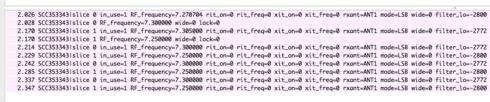
As you can see the first status message containing "RF_frequency" says that Slice 0 has a frequency of 7,270,704 (incorrect!) and is immediately followed by another status message with the frequency at 7,300,000 (correct).
Similarly, the first Slice 1 message has the frequency at 7,305,000 (incorrect!) followed by another status message with the frequency at 7,250,000 (correct).
Although the result is that the correct frequencies are displayed it seems strange that this sequence of events should occur. I believe that it requires multiple (2?) slices to see this occur. I haven't tested many other scenarios.
Flex-6500, SmarSDR 2.2.8, Windows 10.0.17134
Open SmartSDR, select 40 meters, create a slice at 7,250,000 (lLSB) and a slice at 7,300,000 (LSB). Close SmartSDR. Open SmartSDR again while monitoring the status messages, you will see the following (I've filtered the list to only show messages containing "RF_frequency":
As you can see the first status message containing "RF_frequency" says that Slice 0 has a frequency of 7,270,704 (incorrect!) and is immediately followed by another status message with the frequency at 7,300,000 (correct).
Similarly, the first Slice 1 message has the frequency at 7,305,000 (incorrect!) followed by another status message with the frequency at 7,250,000 (correct).
Although the result is that the correct frequencies are displayed it seems strange that this sequence of events should occur. I believe that it requires multiple (2?) slices to see this occur. I haven't tested many other scenarios.
Flex-6500, SmarSDR 2.2.8, Windows 10.0.17134
0
Comments
-
Good find Doug. We'll look into it. Thanks for reporting this. For tracking, this is #6424.0
-
Thanks Eric.
I only found it when I introduced an error into my client code that ignored everything but the initial frequency received. Once corrected my client works fine and ignores the wrong values (as does SmartSDR).0

Leave a Comment
Categories
- All Categories
- 398 Community Topics
- 2.2K New Ideas
- 678 The Flea Market
- 8.6K Software
- 192 SmartSDR+
- 6.6K SmartSDR for Windows
- 197 SmartSDR for Maestro and M models
- 456 SmartSDR for Mac
- 278 SmartSDR for iOS
- 268 SmartSDR CAT
- 218 DAX
- 392 SmartSDR API
- 9.6K Radios and Accessories
- 96 Aurora
- 335 FLEX-8000 Signature Series
- 7.2K FLEX-6000 Signature Series
- 988 Maestro
- 58 FlexControl
- 872 FLEX Series (Legacy) Radios
- 963 Genius Products
- 478 Power Genius XL Amplifier
- 353 Tuner Genius XL
- 132 Antenna Genius
- 317 Shack Infrastructure
- 222 Networking
- 480 Remote Operation (SmartLink)
- 143 Contesting
- 845 Peripherals & Station Integration
- 147 Amateur Radio Interests
- 1.1K Third-Party Software