Welcome to the FlexRadio Community! Please review the new Community Rules and other important new Community information on the Message Board.
Need the latest SmartSDR or 4O3A Genius Product Software?
SmartSDR v4.1.5 | SmartSDR v4.1.5 Release Notes
SmartSDR v3.10.15 | SmartSDR v3.10.15 Release Notes
The latest 4O3A Genius Product Software and Firmware
SmartSDR v4.1.5 | SmartSDR v4.1.5 Release Notes
SmartSDR v3.10.15 | SmartSDR v3.10.15 Release Notes
The latest 4O3A Genius Product Software and Firmware
If you are having a problem, please refer to the product documentation or check the Help Center for known solutions.
Need technical support from FlexRadio? It's as simple as Creating a HelpDesk ticket.
Need technical support from FlexRadio? It's as simple as Creating a HelpDesk ticket.
DAX Reserved Audio RX1 same name as DAX IQ

ai6re
Member ✭✭
DAX Reserved Audio RX1 same name Used for Audio DAX IQ 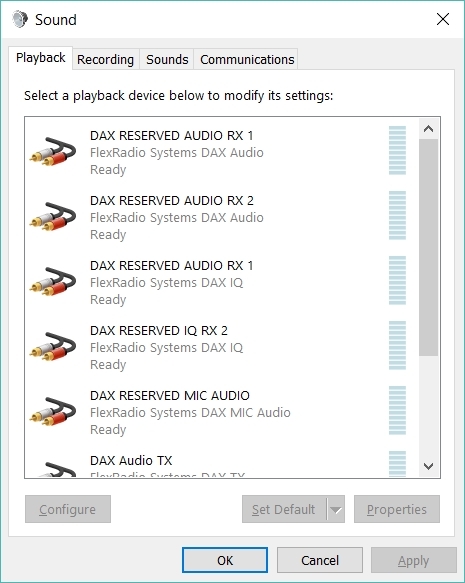 After Windows 10 update and FlexSDR 1.9.9 install I get now audio input to FLDIGI on DAX Audio RX1. Checking Windows Playback Audio, as shown in this photo, The first item is: DAX Reserved Audio RX1 for Flexradio System DAX Audio. The third item is also: DAX Reserved Audio RX1 for Flexradio System DAX IQ. The names are the same for two different devices and I am unable to use RX1 Audio. If I switch to RX2 audio it works fine.
After Windows 10 update and FlexSDR 1.9.9 install I get now audio input to FLDIGI on DAX Audio RX1. Checking Windows Playback Audio, as shown in this photo, The first item is: DAX Reserved Audio RX1 for Flexradio System DAX Audio. The third item is also: DAX Reserved Audio RX1 for Flexradio System DAX IQ. The names are the same for two different devices and I am unable to use RX1 Audio. If I switch to RX2 audio it works fine. 0
Comments
-
That is one of the things that can happen when Windows does an update.. Quik thing to try first... Uninstall SSDR from the PC and make sure to answer correctly to uninstall the DAX drivers.. Reboot the PC and then reinstall SSDR (which will reinstall the DAX drivers..
If that does not work try https://helpdesk.flexradio.com/hc/en-us/articles/204017069-How-to-Manually-Re-Install-DAX-Drivers?_g...
AL, K0VM
1 -
Al, Thanks for the suggestion. That solved the problem and everything is back in order. It took a couple of restarts of Windows 10 to get everything running correctly after the re-installation of SmartSDR 1.9.9. I have tested both RX1 Audio and DAX IQ 1 and both are working perfectly. 73, Don0

Leave a Comment
Categories
- All Categories
- 386 Community Topics
- 2.2K New Ideas
- 655 The Flea Market
- 8.4K Software
- 155 SmartSDR+
- 6.5K SmartSDR for Windows
- 185 SmartSDR for Maestro and M models
- 438 SmartSDR for Mac
- 274 SmartSDR for iOS
- 264 SmartSDR CAT
- 202 DAX
- 385 SmartSDR API
- 9.4K Radios and Accessories
- 52 Aurora
- 293 FLEX-8000 Signature Series
- 7.2K FLEX-6000 Signature Series
- 969 Maestro
- 58 FlexControl
- 866 FLEX Series (Legacy) Radios
- 940 Genius Products
- 470 Power Genius XL Amplifier
- 344 Tuner Genius XL
- 126 Antenna Genius
- 306 Shack Infrastructure
- 215 Networking
- 466 Remote Operation (SmartLink)
- 142 Contesting
- 808 Peripherals & Station Integration
- 143 Amateur Radio Interests
- 1K Third-Party Software