SmartSDR v4.1.5 | SmartSDR v4.1.5 Release Notes
SmartSDR v3.10.15 | SmartSDR v3.10.15 Release Notes
The latest 4O3A Genius Product Software and Firmware
Need technical support from FlexRadio? It's as simple as Creating a HelpDesk ticket.
Profile Import/Export Dialog Does Not Resize (1.7.30.78)

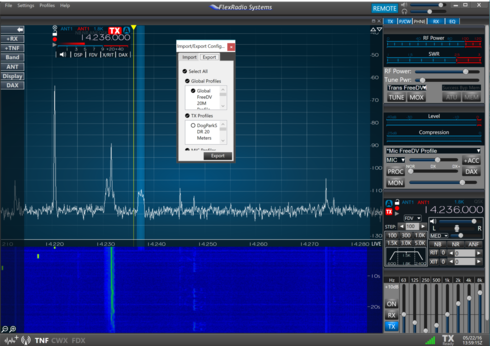
Attempting to export specific profiles out to the desktop for safe keeping, I found that the dialog type is not resizable. It is fixed in size. This makes selecting specific Global and Transmit profiles difficult and specific Microphone profiles impossible.
See the below screenshot:
Comments
-
Working with Tim, this issue is resolved. Here is the text of the support ticket:
- Tim EllisonToday at 14:28
Jay,
Your SSDR.settings file is not corrupted.
The Import/Export screen has a fixed set of dimensions that are dynamically determined and rendered based on screen resolution and the monitor DPI scaling. If it is displaying incorrectly and there are no issues with the SSDR.settings file, then it will have to do with how .NET is enumerating your display environment.
Since you are running in a virtual environment, I can only suspect that the SmartSDR window size is somehow contributing to this behavior. You can try making the SmartSDR window larger and if the import/export dialog box changes size, then this is the issue. Let me know if that action makes any difference.
Tim Ellison, W4TME
Customer Experience ManagerFlexRadio Systems™
4616 W Howard Ln Suite 1-150
Austin, TX 78728
Phone: 512-535-4713 - Jay Burgherr (N0FB)Today at 17:23
The information provided was the secret sauce. I was running Parallels in "Coherence Mode" which makes the Windows applications appear as if they are running in the Mac Environment natively. To Windows, this mode behaves as if the monitor resolution is "0x0", thus the causing issue based on how the dialog is currently programmed. The work around is to:
1.) Take Parallels out of Coherence Mode
2.) Make the Windows Environment Full Screen
3.) Open SmartSDR
4.) Import or export the file as needed within SmartSDR (dialog is now resizable)
5.) Exit Windows from Full Screen Mode
6.) Put Parallels back into Coherence Mode (if the user wishes)Thanks Tim for the information and assistance!
1 - Tim EllisonToday at 14:28
Leave a Comment
Categories
- All Categories
- 386 Community Topics
- 2.2K New Ideas
- 657 The Flea Market
- 8.4K Software
- 155 SmartSDR+
- 6.5K SmartSDR for Windows
- 185 SmartSDR for Maestro and M models
- 438 SmartSDR for Mac
- 275 SmartSDR for iOS
- 264 SmartSDR CAT
- 202 DAX
- 385 SmartSDR API
- 9.4K Radios and Accessories
- 52 Aurora
- 295 FLEX-8000 Signature Series
- 7.2K FLEX-6000 Signature Series
- 969 Maestro
- 58 FlexControl
- 866 FLEX Series (Legacy) Radios
- 944 Genius Products
- 471 Power Genius XL Amplifier
- 347 Tuner Genius XL
- 126 Antenna Genius
- 306 Shack Infrastructure
- 215 Networking
- 467 Remote Operation (SmartLink)
- 142 Contesting
- 809 Peripherals & Station Integration
- 144 Amateur Radio Interests
- 1.1K Third-Party Software