Welcome to the FlexRadio Community! Please review the new Community Rules and other important new Community information on the Message Board.
Need the latest SmartSDR or 4O3A Genius Product Software?
SmartSDR v4.1.5 | SmartSDR v4.1.5 Release Notes
SmartSDR v3.10.15 | SmartSDR v3.10.15 Release Notes
The latest 4O3A Genius Product Software and Firmware
SmartSDR v4.1.5 | SmartSDR v4.1.5 Release Notes
SmartSDR v3.10.15 | SmartSDR v3.10.15 Release Notes
The latest 4O3A Genius Product Software and Firmware
If you are having a problem, please refer to the product documentation or check the Help Center for known solutions.
Need technical support from FlexRadio? It's as simple as Creating a HelpDesk ticket.
Need technical support from FlexRadio? It's as simple as Creating a HelpDesk ticket.
Frequency Display "trimmed"
Alan C
Member ✭✭
Flex 6300, Win 8.1, Ver 1.38
The top ten percent of my flag frequency display is cut off. Didn't notice this in ver 1.3. Perhaps some setting?
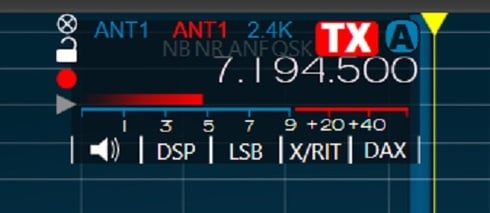
The top ten percent of my flag frequency display is cut off. Didn't notice this in ver 1.3. Perhaps some setting?
1
Comments
-
Yes I also see an overlap.0
-
Nice catch.
0 -
I see it on a win 8.1 machine but not on a win 7 machine. Of course these machines
also have different video cards. Interesting.
Ned, K1NJ
0 -
Go to resolution screen see if you have it at 125%1
-
Dale you sent him to the right place... it looks it is set high; causing the overlap.
You are the winner of the day!
0 -
Dale, Yes I have it on 125% (medium). I put back to 100% (small). This cured the problem! However, I don't recalled changing that resolution when moving from ver 1.3 to tver 1.38. I'm thinking it was OK using 125% on ver 1.3. Thank you for your input.
0 -
I have added this report to our bug tracker to see if there is something we can do to make the GUI DPI agnostic.1
-
Hi Tim,
This looks like a less serious version of the problem i have reported.
M0 -
I Windows 8.1 only, There are two controls for changing the size of objects in the monitor. I have old eyes and 1920x1080 is a bit on the small side, I was also seeing the Frequency readout clipped then i found the other windows 8.1 control. It can enlarge without clipping at 100,125, and 150% It may not behave the same with all display card and monitors but it works for my stuff. To get to this control you ... Right the desktop and choose "Screen Resolution" near the bottom of the menu.
then click the highlighted line below.
I used to see this ...
when you uncheck the highlighted checkbox it changes the window to this...
Position 1=@100%
Position 2=@125%
Position 3=@150%
I don't know why not "choosing one scaling level for all my displays" makes a difference. but it does the Frequency Flag doesn't clip.
It definately gets chopped at 125% if I use the other control panel form, It's only a slight difference but it is different.
This way it acts like it increases the size of both the font and the box the font is in in proportion. Everything gets bigger, all the controls in SmartSDR grow, it makes it easier for me to single click the slider gutters to the left/right of the slider buttons to decrement/increment by 1. still cant see the gutter but its easier to hit it because it's bigger too.
Hope it works like this for others, and hope it helps.0 -
It is the windows DPI scaling interaction that is causing this. We don't have a fix for this just yet. but changing the DPI scaling may help as Jay points out below.0
-
Any update on this yet? I have the same issue?
0





Leave a Comment
Categories
- All Categories
- 381 Community Topics
- 2.1K New Ideas
- 636 The Flea Market
- 8.3K Software
- 143 SmartSDR+
- 6.4K SmartSDR for Windows
- 188 SmartSDR for Maestro and M models
- 430 SmartSDR for Mac
- 272 SmartSDR for iOS
- 261 SmartSDR CAT
- 199 DAX
- 383 SmartSDR API
- 9.4K Radios and Accessories
- 45 Aurora
- 274 FLEX-8000 Signature Series
- 7.2K FLEX-6000 Signature Series
- 957 Maestro
- 57 FlexControl
- 866 FLEX Series (Legacy) Radios
- 931 Genius Products
- 465 Power Genius XL Amplifier
- 340 Tuner Genius XL
- 126 Antenna Genius
- 302 Shack Infrastructure
- 213 Networking
- 463 Remote Operation (SmartLink)
- 144 Contesting
- 794 Peripherals & Station Integration
- 141 Amateur Radio Interests
- 1K Third-Party Software