Welcome to the FlexRadio Community! Please review the new Community Rules and other important updates on the Message Board.
The latest SmartSDR Software:
SmartSDR v4.3.19 | SmartSDR v4.3.19 Release Notes
SmartSDR v3.10.15 | SmartSDR v3.10.15 Release Notes
The latest 4O3A Genius Product Software: The latest 4O3A Genius Product Software and Firmware
How to Receive Technical Support: If you are needing assistance with FlexRadio products, please refer to the product documentation or check the Help Center for known solutions.
Need technical support from FlexRadio? It's as simple as creating a HelpDesk ticket.
IQSkimmer

IQSkimmer is a new app similar CWSkimmer that runs on Windows, MacOS, and Linux.
IQSkimmers purpose is to skim a band for CW signals and decode them. Pretty much just like CWSkimmer did for years on Windows. However, IQSkimmer does not need any bridge to work. It connects directly to the I/Q stream from your FlexRadio.
This is a very early release. So far I've only tested it on MacOS with SmartSDRMac and AetherSDR. In both apps you need to enable DAX IQ on a channel. Then in IQSkimmer provide the IP (or discover) of your FlexRadio and select the IQ channel and press start.
Here is IQSkimmer running with AetherSDR:

Here is IQSkimmer running with SmartSDR Mac:

Operation:
- Ensure DAX IQ is on in your radio client. Select the desired IQ channel.
- Position your pan adapter to show the area of the band you are interested in. IQSkimmer follows that positioning.
- Run IQSkimmer, supply or discover radio IP, select IQ channel, press start
It should began scanning right away.
Additional controls:
There are sliders at the top that control the detect dB, floor, and range.
Your slice frequency and mode are shown top right.
A small dot appears where a signal is decoding. Single click on that dot to highlight the decoder and this will show the decoded CW in the large window area below. Double click on the dot to move your slice to this freqency.
An additional feature IQSkimmer offers is the ability to save the decodes into small text files. Press "Save text" to toggle this one. On a Mac the text files are saved to Documents/IQSkimmer. They contain the date, time, frequency in the file name.
More testing and enhancements will be done to ensure it runs well on Windows and Linux.
Releases of the code can be found here:
Be aware this has not been tested yet on Windows or Linux. Initial tests will be done this upcoming weekend.
Issues can be created on github here:
I am open to ideas for improvements. Either message me or use the discussions at:
Comments
-
Hi Mark, it loaded nicely on my Win 10 laptop. I am using it with a Flex 8600 and SmartSDR. So far, it is working great!
I'll give it a shot with RimuSDR later today, but that should work just like SmartSDR for Windows.
Your waterfall rendering is excellent! I can very clearly see the dots and dashes. It is easy to see who is naughty and nice WRT key clicks…
One suggestion for the Windows version. The text at the bottom of the screen is too low contrast to read:
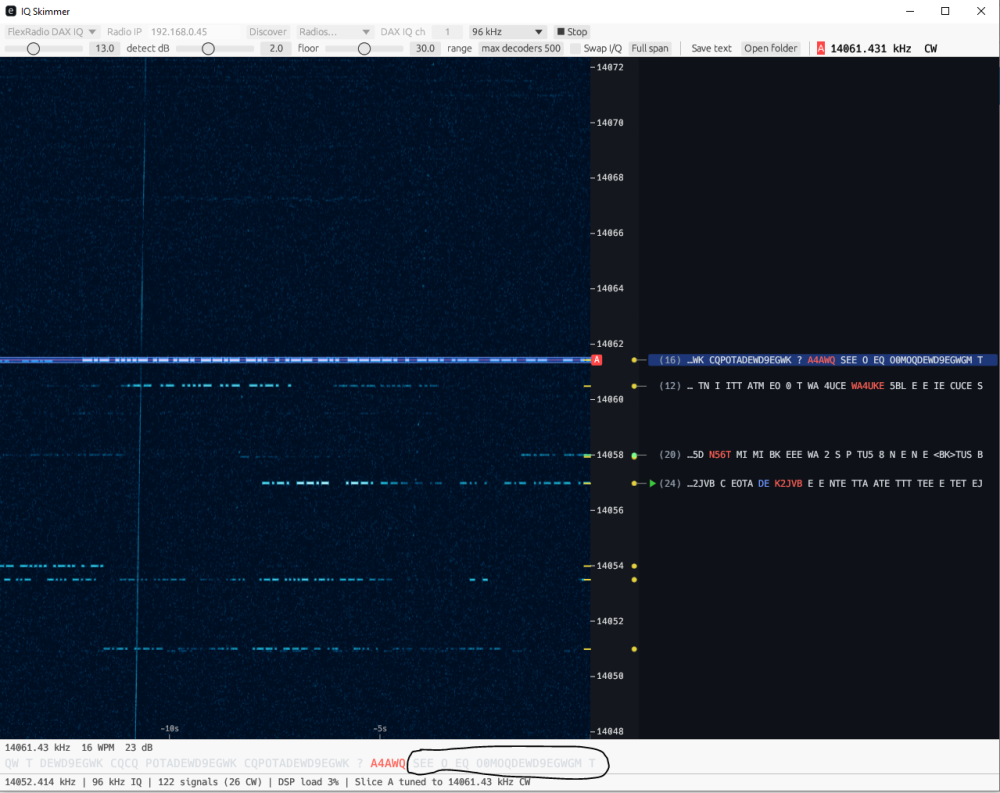
Very nicely done!
0 -
Thanks Len, I will put in an issue to update that.
0 -
Wow Wow !!!! I am late to the party . I have been wishing for an app like this for my Mac mini and Flex 8400 . I love the skimmer features in SDC Control and they work well across platforms , but not as helpful on non contest bands , like WARC bands . I also use Alex's CW Skimmer on Windows but that's getting a little old . Congratulations , let me know if you need anything tested . I use an 8400 with AetherSDR, SmartSDR for Mac OS, and SSDR for Windows .
Andy K3UK
0



Leave a Comment
Categories
- All Categories
- 419 Community Topics
- 2.2K New Ideas
- 719 The Flea Market
- 8.7K Software
- 229 SmartSDR+
- 6.6K SmartSDR for Windows
- 213 SmartSDR for Maestro and M models
- 474 SmartSDR for Mac
- 282 SmartSDR for iOS
- 270 SmartSDR CAT
- 225 DAX
- 397 SmartSDR API
- 9.7K Radios and Accessories
- 143 Aurora
- 390 FLEX-8000 Signature Series
- 7.3K FLEX-6000 Signature Series
- 1K Maestro
- 58 FlexControl
- 876 FLEX Series (Legacy) Radios
- 1K Genius Products
- 496 Power Genius XL Amplifier
- 366 Tuner Genius XL
- 139 Antenna Genius
- 335 Shack Infrastructure
- 237 Networking
- 500 Remote Operation (SmartLink)
- 150 Contesting
- 868 Peripherals & Station Integration
- 149 Amateur Radio Interests
- 1.2K Third-Party Software