Welcome to the FlexRadio Community! Please review the new Community Rules and other important updates on the Message Board.
The latest SmartSDR Software:
SmartSDR v4.3.19 | SmartSDR v4.3.19 Release Notes
SmartSDR v3.10.15 | SmartSDR v3.10.15 Release Notes
The latest 4O3A Genius Product Software: The latest 4O3A Genius Product Software and Firmware
How to Receive Technical Support: If you are needing assistance with FlexRadio products, please refer to the product documentation or check the Help Center for known solutions.
Need technical support from FlexRadio? It's as simple as creating a HelpDesk ticket.
What happened to the GNSS after upgrade to 4.3

I upgraded to 4.3 on my 8400M. After upgrading the GNSS is not listed in the menu. Where did it go?
Answers
-
Rick,
Still there… Scroll down on menu.. look for GPS…
AL, K0VM
0 -
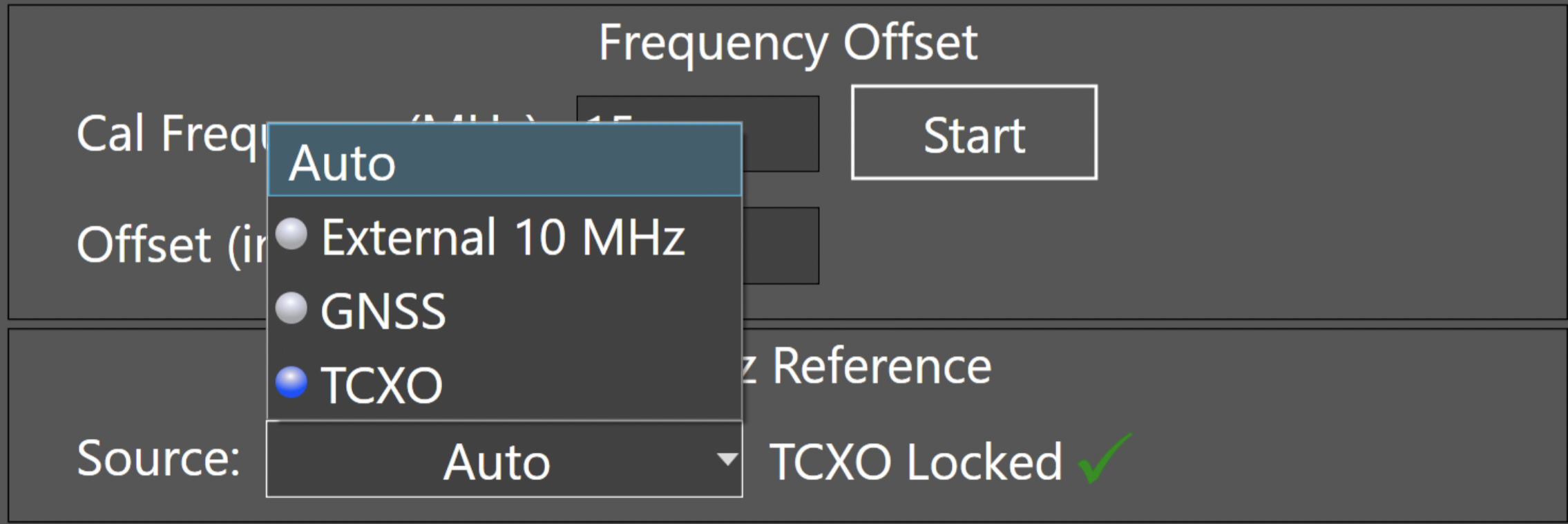
Radio Menu does not list GNSS. Auto, External 10 Mhz reference, GPSDO,( which I do not have installed) and TCXO are listed. GPSDO will not lock up it stays in free run. Under GPS tab It says it 'sees 19-20 satellites with zero tracked and the status is Free Run. So again, where did GNSS go?
0 -
Rick,
Can you share a pic of the screen when you're expecting to see GNSS? I have a FLEX-8600M on my desk that I can compare. This is what the Menu > Radio > 10 MHz Reference list looks like for me while running v4.3.16.
 0
-
Eric, I listed what shows on my radio. No GNSS. I notice that you do not have GPSDO listed.
Len, GNSS does not show under the GPS tab on the 8400M. It does not show as installed.
0 -
Rick,
Good enough. I assume the menu I showed is the same one you're looking at. If not, please correct me so I don't go too far down the wrong path. I'll see what I can figure out.
0 -
Eric, I restarted the radio for the third time and now it shows the GNSS as installed. Currently, as I type this response, it shows 14 satellites visible but zero tracked. I guess restarting the third time is the charm. It still says is warming up. Thanks for responding this late at night. I'll let you know if it fails to lock up.
0 -
I searched and found no code changes between v4.2.20 and v4.3.16 in the radio firmware or the client that would explain a change in the GPSDO vs GNSS detection or reporting.
Have you tried doing a full power cycle of the radio to see if this is a one-off issue immediately following the update? (the old turn-it-off-and-on-again thing) Make sure to drop power to the radio to ensure everything is completely reset (as opposed to just pushing the button to shut down and then pushing the button again to boot back up).
0 -
How many satellites does the GNSS need to see or track before it will lock up? I have my 8400M on for 3 hours and still no lock up after 'seeing' 14 satellites. I had it set to auto and then also to GNSS.
0 -
If I am not mistaken, the Number of sats that are visible is predicted from constellation orbital data and your location. It needs to lock and track 3 or 4 stats to provide accurate time, frequency and location data. It can derive orbital data for the constellation if it can see one sat even before it tracks any sats. Once it has tracked stats it will retain the constellation data and location even when the power is off and can predict the visiblity then power returns.
AL, K0VM
0 -
I also lost the GNSS after the 4.3.16 update but a couple Radio reboots after the upgrade brought it back
YMMV K1UO Larry
Win11
8400
0 -
after reboot all good
0





Leave a Comment
Categories
- All Categories
- 419 Community Topics
- 2.2K New Ideas
- 719 The Flea Market
- 8.7K Software
- 229 SmartSDR+
- 6.6K SmartSDR for Windows
- 213 SmartSDR for Maestro and M models
- 474 SmartSDR for Mac
- 282 SmartSDR for iOS
- 270 SmartSDR CAT
- 225 DAX
- 397 SmartSDR API
- 9.7K Radios and Accessories
- 143 Aurora
- 390 FLEX-8000 Signature Series
- 7.3K FLEX-6000 Signature Series
- 1K Maestro
- 58 FlexControl
- 876 FLEX Series (Legacy) Radios
- 1K Genius Products
- 496 Power Genius XL Amplifier
- 366 Tuner Genius XL
- 139 Antenna Genius
- 335 Shack Infrastructure
- 237 Networking
- 500 Remote Operation (SmartLink)
- 150 Contesting
- 868 Peripherals & Station Integration
- 149 Amateur Radio Interests
- 1.2K Third-Party Software