Welcome to the FlexRadio Community! Please review the new Community Rules and other important updates on the Message Board.
The latest SmartSDR Software:
SmartSDR v4.3.16 | SmartSDR v4.3.16 Release Notes
SmartSDR v3.10.15 | SmartSDR v3.10.15 Release Notes
The latest 4O3A Genius Product Software: The latest 4O3A Genius Product Software and Firmware
How to Receive Technical Support: If you are needing assistance with FlexRadio products, please refer to the product documentation or check the Help Center for known solutions.
Need technical support from FlexRadio? It's as simple as creating a HelpDesk ticket.
Trying Slice Logger

I am trying to set up Slice Logger and experience a problem with connecting my 8600.
Radio chooser does not show any radios. Entry via IP address does work, but Telemetry does not show any parameters for the radio.
Ultimately I would like to replace HRD with Slice Logger as logging software and interface it with JTDX and JT Alert.
Possibly someone can provide a detailed setup instructions for it as it could be of interest to other OMs keen to use Slice Logger.
Tom
Answers
-
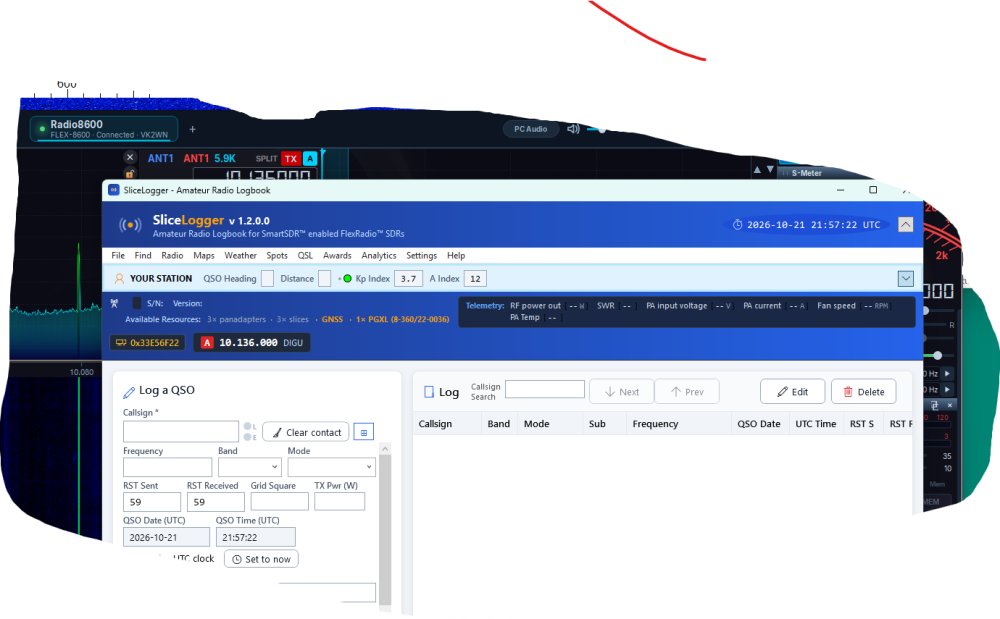
Thanks for your reply OM Mick. Good to see detailed help files in Slice Logger. I am able to connect radio by entering IP address, radio chooser does not show any radios. Radio frequency and mode are displayed but no telemetry data. Any suggestions how to make it working?
Tom
0


Leave a Comment
Categories
- All Categories
- 417 Community Topics
- 2.2K New Ideas
- 716 The Flea Market
- 8.7K Software
- 225 SmartSDR+
- 6.6K SmartSDR for Windows
- 212 SmartSDR for Maestro and M models
- 472 SmartSDR for Mac
- 282 SmartSDR for iOS
- 270 SmartSDR CAT
- 225 DAX
- 397 SmartSDR API
- 9.7K Radios and Accessories
- 140 Aurora
- 387 FLEX-8000 Signature Series
- 7.3K FLEX-6000 Signature Series
- 1K Maestro
- 58 FlexControl
- 876 FLEX Series (Legacy) Radios
- 1K Genius Products
- 495 Power Genius XL Amplifier
- 366 Tuner Genius XL
- 139 Antenna Genius
- 333 Shack Infrastructure
- 237 Networking
- 500 Remote Operation (SmartLink)
- 150 Contesting
- 867 Peripherals & Station Integration
- 148 Amateur Radio Interests
- 1.2K Third-Party Software