Welcome to the FlexRadio Community! Please review the new Community Rules and other important updates on the Message Board.
The latest SmartSDR Software:
SmartSDR v4.3.19 | SmartSDR v4.3.19 Release Notes
SmartSDR v3.10.15 | SmartSDR v3.10.15 Release Notes
The latest 4O3A Genius Product Software: The latest 4O3A Genius Product Software and Firmware
How to Receive Technical Support: If you are needing assistance with FlexRadio products, please refer to the product documentation or check the Help Center for known solutions.
Need technical support from FlexRadio? It's as simple as creating a HelpDesk ticket.
Bell modem can't connect

A friend has lent me his 6400 to test out. To see if Flex is for me.
I live in Ontario and have Bell fiber internet with a Home Hub 4000 modem. I can successfully connect while on the LAN but not remotely.
We have read the documentation and put the radio into manual port following plus created the two rules for TCP and UDP.
It is proving quite frustrating. Has anyone else encountered this and can offer advice.
As ridiculous as this sounds, I find that I can't do remote with a Flex.
Comments
-
One likely culprit is Carrier Grade NAT (CGNAT). Check with Bell Fiber to see if you have CGNAT. If so, there are other solutions (VPN) that will get you around the issue.
If you do not have CGNAT, then there is probably an easier fix. In this case, submit a help desk ticket - Flex Support will most likely be able to help.
0 -
 Mike-VA3MW Administrator, FlexRadio Employee, Community Manager, Super Elmer, Moderator adminOptions
Generally, Bell Fibe is not CGNAT, but you will have to check to make sure.
What does this tell you?
If it is not CGNAT, then you want to log into the home hub and I highly highly recommend you use the automatic settings for uPNP in the Hub (it used to be turned on as I was a customer and it was when I last used it but I dumped it for Rogers). Make sure the radio is in Automatic mode (follow all the steps in Chapter 9 of the SmartSDR manual).
Did you do the PTT registration to register the radio?
Mike
0 -
Thanks for the feedback.
I have been able to get it working. Radio is in Guelph and I remoted in from the Bruce Peninsula.
However, I traveled to Amsterdam and Tokyo (work for an airline) and was unable to connect from either hotels wifi. Do hotels have a firewall? Is there a workaround that I could try?
I have this loner 6400 for the month so I can experience the Flex system. Having remote is very important to me given the amount of travel I do. I need to resolve this foreign hotel issue before I commit.
Many thanks
Craig
VA3YBW0 -
Mike-VA3MW Administrator, FlexRadio Employee, Community Manager, Super Elmer, Moderator adminOptions
You should not have an issue connecting from a hotel. I never have at all, but I have had to call the Hotel IT support line at times.
0 -
Thanks mike
I was talking to another pilot ham and he has the same issue. His workaround is to hotspot his laptop to his phone to bypass the hotel wifi.0 -
Mike-VA3MW Administrator, FlexRadio Employee, Community Manager, Super Elmer, Moderator adminOptions
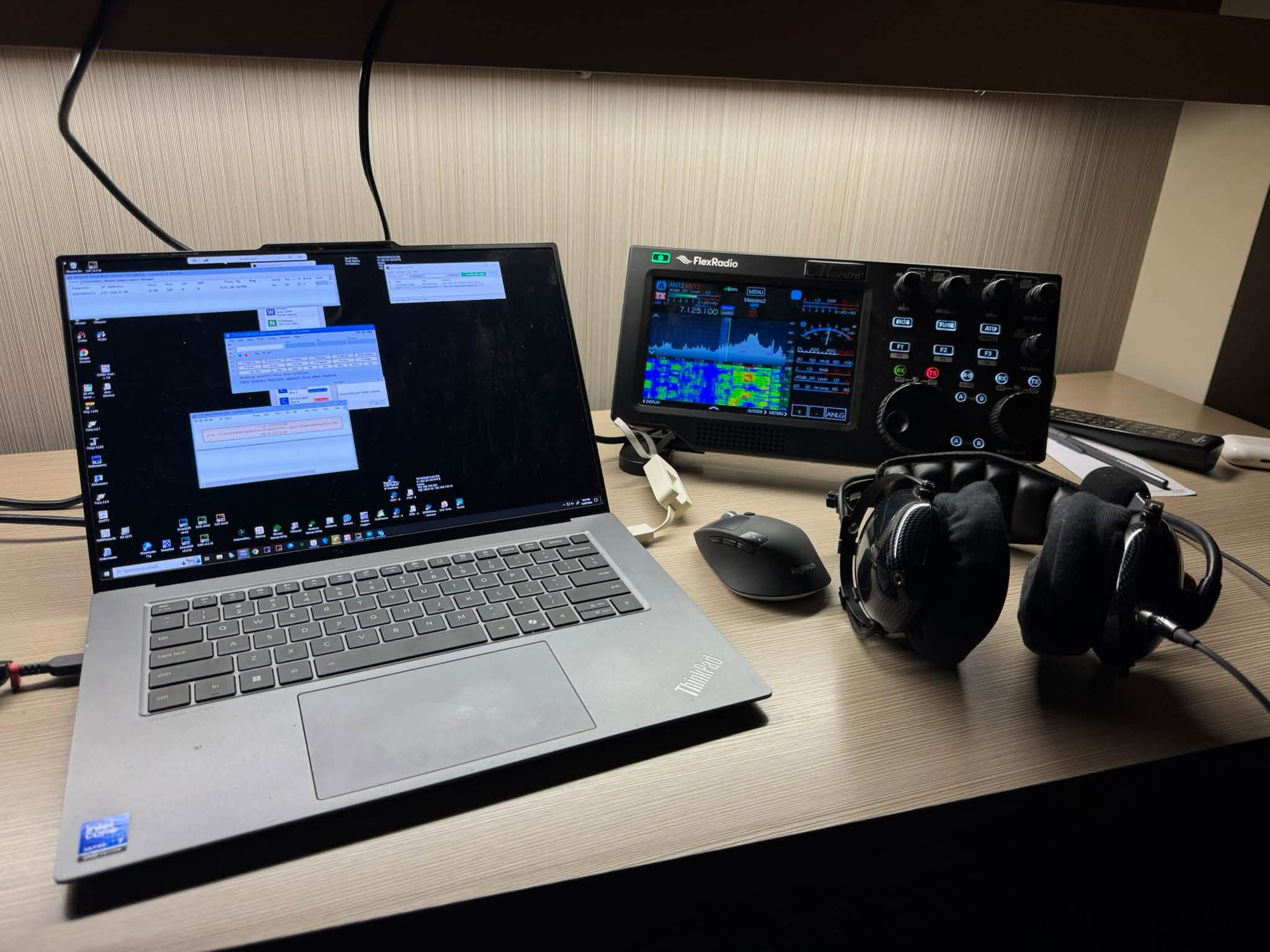
I was just in Montreal and I worked CQWW on Friday night using the hotel WiFi with my Laptop and my Maestro flawlessly.
The setup is dead simple.
- Connect the Maestro to the LAN connector on your laptop. If you don't have one, get a USB - LAN adapter. The are very inexpensive. Don't boot the Maestro yet
- Start up your laptop and connect to the hotel WiFi (I was in a Marriot and had 2M down and 5M up — go figure)
- In Windows turn on ICS (Internet Connection Sharing). There are LOTS of videos and documentation on how to do this on line
- Boot the Maestro do not connect to the Hotel WiFi and let the LAN stuff do its magic
- Log into your radio with SmartLink
The Maestro will now connect to the Internet through the Laptop.
I've been doing this way for years.
Mike va3mw
 0


Leave a Comment
Categories
- All Categories
- 419 Community Topics
- 2.2K New Ideas
- 719 The Flea Market
- 8.7K Software
- 229 SmartSDR+
- 6.6K SmartSDR for Windows
- 213 SmartSDR for Maestro and M models
- 474 SmartSDR for Mac
- 282 SmartSDR for iOS
- 270 SmartSDR CAT
- 225 DAX
- 397 SmartSDR API
- 9.7K Radios and Accessories
- 143 Aurora
- 390 FLEX-8000 Signature Series
- 7.3K FLEX-6000 Signature Series
- 1K Maestro
- 58 FlexControl
- 876 FLEX Series (Legacy) Radios
- 1K Genius Products
- 496 Power Genius XL Amplifier
- 366 Tuner Genius XL
- 139 Antenna Genius
- 335 Shack Infrastructure
- 237 Networking
- 500 Remote Operation (SmartLink)
- 150 Contesting
- 868 Peripherals & Station Integration
- 149 Amateur Radio Interests
- 1.2K Third-Party Software