Welcome to the FlexRadio Community! Please review the new Community Rules and other important updates on the Message Board.
The latest SmartSDR Software:
SmartSDR v4.3.19 | SmartSDR v4.3.19 Release Notes
SmartSDR v3.10.15 | SmartSDR v3.10.15 Release Notes
The latest 4O3A Genius Product Software: The latest 4O3A Genius Product Software and Firmware
How to Receive Technical Support: If you are needing assistance with FlexRadio products, please refer to the product documentation or check the Help Center for known solutions.
Need technical support from FlexRadio? It's as simple as creating a HelpDesk ticket.
New HelpDesk Article re: Setting Up MMTTY for FLEX-6000/8000 Radios
Comments
-
If I'm working a contest, frequency synchronization is certainly important—everything is synced up (SDR, Log, MMTTY), and the PTT works normally.
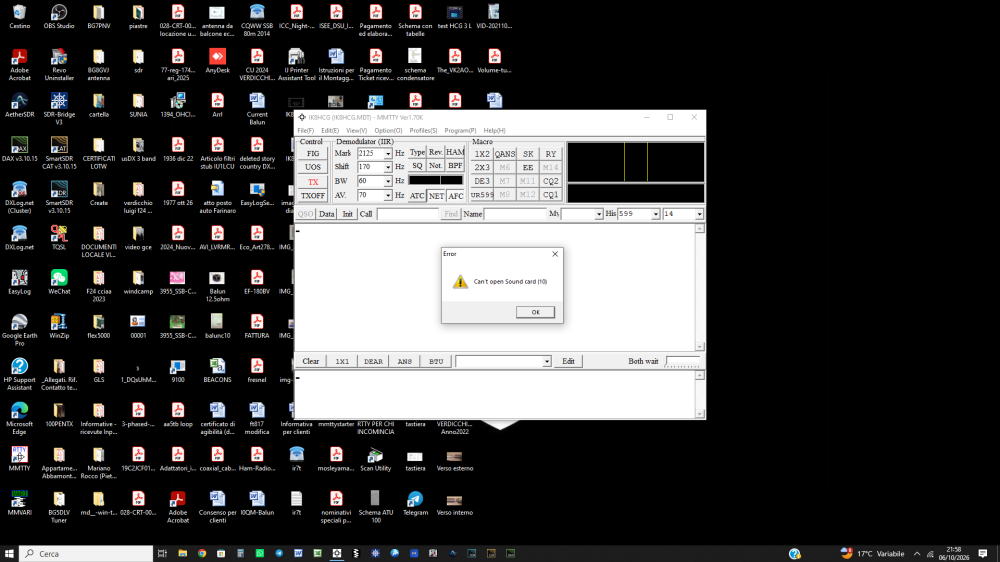
That’s the whole problem—that error every time MMTTY launches; there is no other reason.
0 -
I have a different way of thinking. What needs syncing CAT wise in my shack is the radio and the logbook, whatever logbook of choice you have - I use Swisslog because it is Flex API compatible so I always get coloured DX Spots to the panorama to differentiate between worked, confirmed, needed . Work a station and log it. MMTTY can log of course but it is never going to be the main log. So I need only log between the radio and the logbook. MMTTY can 'float about' on any frequency decoding and transmitting. This is why I prefer dedicated contest loggers like SDC, which happens to also have a superior RTTY and PSK decoder, and of course the 'old guard' still use the inferior N1MM+ (in which MMTTY can be defined as the RTTY modem so N1MM is doing the logging and controlling PTT and MMTTY is solely TX/RX RTTY).
Anyway, each one to their own preference of course.
0 -
That’s exactly where the problem lies: with everything closed SSDR and its APIs, the station log, and the skimmer as soon as I launch MMTTY, it reports an error stating it cannot detect a sound card, with the card number varying each time.
I’m going to get a laptop and set everything up fresh on it. I also removed the version 4 builds and switched to SSDR version 3.10; I have to be honest, the adjustable NR works remarkably well.
 0
-
In case it helps - how to set up MMTTY standalone and basic with FlexRadio.
0 -
Thanks, Erik. Downloaded and saved to a folder. I need to figure out where the conflict lies; as you can see, the moment I open MMTTY without any other applications running, it flags that error which shouldn't happen. We'll find a solution somehow; the ultimate test would be installing SSDR and MMTTY on a new PC.
0 -
"Hi, I had a similar problem a while ago but I don't remember with which version. In the end, the solution was as simple as it was frustrating: I uninstalled MMTTY and reinstalled it from scratch... I had spent hours blaming FlexRadio when the problem was actually MMTTY... maybe the .INI file got corrupted or who knows what. Anyway, in the end, everything started working with the new installation. It might not be your case, but give it a try anyway: you never know !
73 - Stefano IK2HKT
0 -
Ciao Stefano sono Lou, forse ti ricordi come IG9R.
Come hai risolto? Ti usciva anche a te l errore su MMTTY senza ulteriori applicani di ssdr aperte? Al momento ho eliminato la 4.2.20 (Basic) sono ritornato alla 4.1.5
Io al momento ho desistito
0 -
SOLVED SOLVED SOLVED
The issue was in Windows10 the Privacy settings under "Microphone," which was blocking MMTTY.
• Open Windows10 Settings
• Go to Privacy, then click on "Microphone" in the left-hand column. in my Was off
• Ensure that "Allow apps to access your microphone" is enabled (Status: On).
• Scroll down to "Allow desktop apps to access your microphone" and make sure this option is also enabled.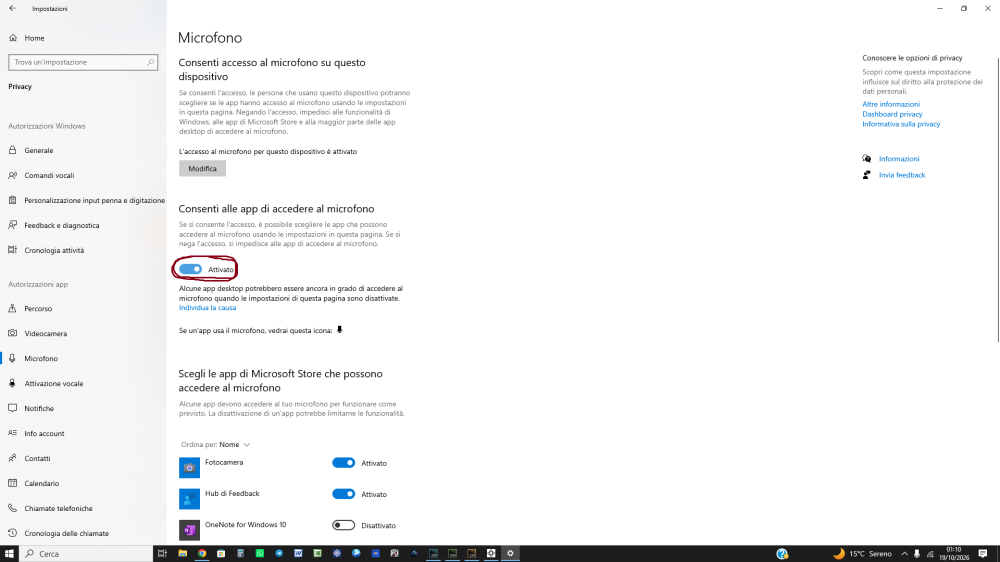
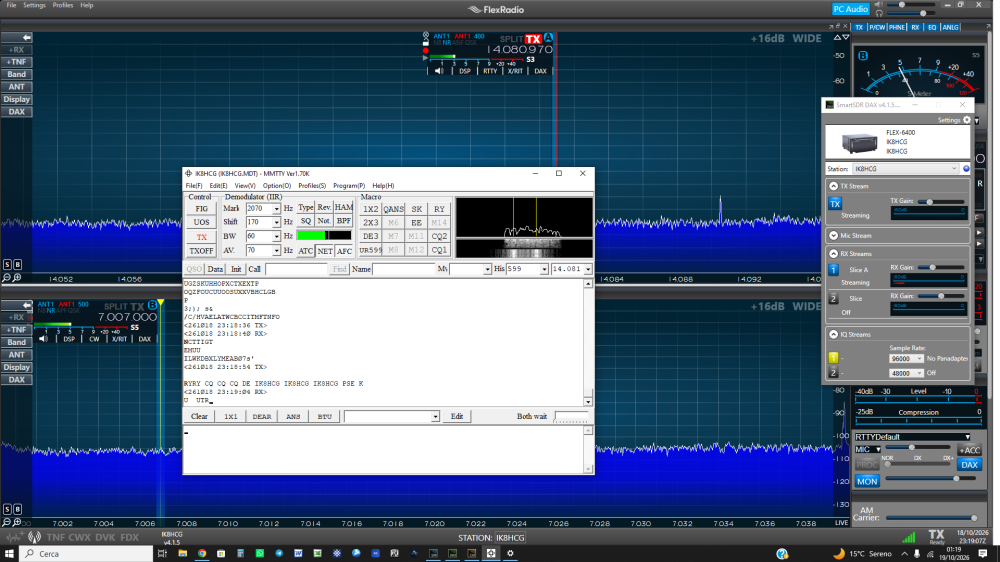
nearly two nights to figure out where the problem might be
1



Leave a Comment
Categories
- All Categories
- 419 Community Topics
- 2.2K New Ideas
- 719 The Flea Market
- 8.7K Software
- 229 SmartSDR+
- 6.6K SmartSDR for Windows
- 213 SmartSDR for Maestro and M models
- 474 SmartSDR for Mac
- 282 SmartSDR for iOS
- 270 SmartSDR CAT
- 225 DAX
- 397 SmartSDR API
- 9.7K Radios and Accessories
- 143 Aurora
- 390 FLEX-8000 Signature Series
- 7.3K FLEX-6000 Signature Series
- 1K Maestro
- 58 FlexControl
- 876 FLEX Series (Legacy) Radios
- 1K Genius Products
- 496 Power Genius XL Amplifier
- 366 Tuner Genius XL
- 139 Antenna Genius
- 335 Shack Infrastructure
- 237 Networking
- 500 Remote Operation (SmartLink)
- 150 Contesting
- 868 Peripherals & Station Integration
- 149 Amateur Radio Interests
- 1.2K Third-Party Software